When Anthropic launched Claude Code, it redefined the developer workflow by moving AI beyond simple editor autocomplete and shifting it into an autonomous command line agent. However, with massive agentic power comes massive token consumption. Because this tool reads your files, executes terminal commands, and processes feedback loop iterations entirely on its own, small operational missteps can rapidly exhaust your limits.
If you notice your usage costs spiking or find yourself waiting on long, repetitive loops, you are likely falling into common behavioral traps. This guide breaks down the top claude code mistakes that leak tokens and stall productivity, helping you keep your development pipeline lean and efficient.
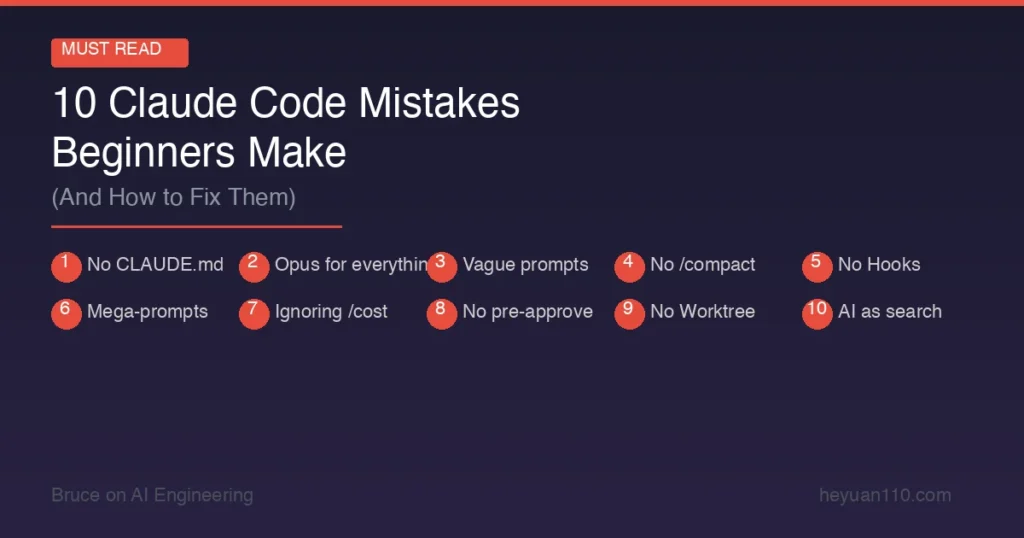
1. Neglecting to Clear Context Between Unrelated Tasks
The single most expensive error engineers make is treating a single terminal session like an ongoing casual chat thread. Claude Code works by passing the entire conversation history, every file read, and all terminal outputs back to the transformer model on every single turn.
If you spend an hour debugging an authentication routing issue and immediately transition into writing a new database migration within the same session, Claude reads and processes that entire authentication history on every single new keystroke. This habit often triggers frustrating claude code errors where the agent confuses variable names or attempts to apply logic from the previous task to your new files.
The Fix: Run the
/clearcommand the moment a distinct task is finished. If your next prompt can logically exist in a fresh terminal window, wipe the session clean first. Your system level configuration files remain completely unaffected, but your active memory reset protects you from severe token drain.
2. Letting Claude Get Trapped in the Ralph Wiggum Loop
When Claude Code encounters a complex build error or a failing test suite, its autonomous nature prompts it to try fixing the issue immediately. If its first modification fails, it reads the new error and tries a second modification. Without human intervention, this can trigger a repetitive trial-and-error cycle often referred to by developers as the Ralph Wiggum Loop.
The agent can blindly modify secondary files or apply surface level syntax patches to suppress symptoms rather than solving the foundational problem, burning through thousands of input tokens per second. An efficient engineering workflow should actively break recursive automation loops before context degradation occurs.
3. Creating a Bloated or Outdated CLAUDE.md File
A primary feature of this ecosystem is the CLAUDE.md file, a local markdown architecture document that the agent reads automatically at the beginning of a session. It is an incredibly powerful way to establish structural rules, but stuffing it with comprehensive team onboarding data, essay-long style guides, or outdated documentation creates a permanent token tax. Learning essential claude code tips can help you avoid this baseline waste completely.
Because this file is processed continuously, an over-engineered 4,000-token CLAUDE.md file drains your daily allocation on simple instructions before you even write a single line of functional code.
| CLAUDE.md Asset Strategy | Antipattern (High Token Spend) | Best Practice (Optimized) |
| Instruction Scope | Pasting full framework style guides | Keeping instructions under 100 lines |
| Multi-Project Handling | One monolithic file at the repository root | Utilizing modular subdirectory files |
| Rule Application | Adding rules based on speculative errors | Only adding a note after a repeated mistake |
4. Pasting Raw Multi-Line Logs Instead of Referencing Local Paths
When an application crashes, it is highly tempting to copy 200 lines of terminal stack trace and paste it directly into the prompt. Doing this permanently embeds that massive block of text into your active message context for the rest of the session. Furthermore, verbose tool logs, such as raw package installation scripts or verbose Docker build streams, fill context windows with useless ANSI escape codes and progress bar assets that the model struggles to parse cleanly.
The Fix: Put massive logs or data configurations into a dedicated local file within your workspace. Instead of pasting the content, instruct the agent by pointing directly to the asset:
"Examine the error log file located at logs/build-failure.log."This lets the platform read the file selectively using internal tooling rather than forcing it into the persistent prompt thread.
5. Blindly Trusting Auto-Compaction Mid-Session
Claude Code features an internal safety system called auto-compaction that triggers automatically when the conversation history occupies roughly 83% of the context window. During this phase, the tool summarizes the active thread to clear up memory space. However, this auto-compaction process is inherently lossy.
If you are in the middle of a complex multi-file refactor, the compression step can discard the exact historical design patterns or variable mapping decisions you established twenty minutes prior. The agent will then start guessing, causing massive software bugs and unnecessary terminal errors.
-
Proactive monitoring: Keep a close eye on your active memory usage by regularly calling the
/statusor/costmetrics. -
The 40% rule: When you estimate that your active session complexity has reached roughly 40% to 50% capacity, proactively pause execution.
-
Manual handoff: Write a quick, concise markdown handoff file summarizing your current progress, run
/clear, and feed that summary document right back into a brand new chat.
6. Skipping the Plan Phase on Wide Architectural Changes
Asking an autonomous agent to perform a broad sweeping task, such as “migrate our backend api to use TypeScript throughout,” without establishing boundaries is an incredibly fast way to break your build. The tool will begin changing files across multiple directories simultaneously, frequently hitting syntax conflicts and generating cascading test failures.
Instead of: "Migrate this entire directory to TypeScript right now."
Try this:    "Switch to Plan Mode. List every file you intend to modify and outline your approach before executing."
By enforcing a planning phase, you can catch structural misunderstandings before any code is modified. You can use the built-in system shortcut Shift+Tab twice to drop straight into Plan Mode, review the layout, and use a single Shift+Tab click to authorize execution once the plan looks completely sound.
7. Using Premium Reasoning Models for Simple Routine Work
Deploying a high-tier reasoning model like Claude Opus for basic, mechanical development tasks is a massive waste of API allocation. Routine operations like writing basic regex strings, creating structural boilerplate code, or generating simple git commit messages do not require deep cognitive processing.
Adhering to smart claude code best practices means matching the intelligence tier directly to the difficulty of the task. Use lightweight models for routine structural creation or file renames, standard models for day-to-day feature builds and test creation, and save premium reasoning models for complex debugging and deep architectural design choices. If model-matching to task complexity feels overwhelming at first, it might help to explore lighter GitHub Copilot alternatives for simpler routine work before scaling up to a full agentic workflow.
8. Failing to Use Command Hooks as Deterministic Guardrails
Relying entirely on text instructions within your project configuration files to prevent destructive actions works roughly 70% of the time. The other 30% of the time, the agent might accidentally try to push code changes straight to your main production branch or execute dangerous directory deletions during an aggressive debugging loop.
When the agent attempts an illegal operation and fails, it spends thousands of tokens trying to interpret the system level denial. You can completely eliminate this issue by implementing deterministic shell hooks. According to official guidelines in the Anthropic Developer Documentation, setting up a strict pre-tool hook blocks dangerous bash strings instantly at the command line level before they ever hit the model, protecting your source code and your budget simultaneously.
9. Forgetting to Isolate Your Active Testing Suites
When you instruct Claude Code to implement a brand new feature and verify its stability, its default instinct is often to run your entire enterprise testing configuration. If your project contains hundreds of integration tests, running the full suite after every single minor file edit will destroy your token allowance within minutes.
Ensure your CLAUDE.md or local development configurations explicitly command the agent to target individual test paths:
"When validating your changes, you must only execute the specific test file associated with the component you modified. Do not execute the global integration test configuration unless explicitly instructed."
Summary of Core Best Practices
Mastering agentic development tools requires shifting your perspective from simple writing assistance to high-level project management. By keeping your active session memory clean, establishing explicit execution boundaries, and utilizing modular directory instructions, you can easily maximize your coding speed while cutting down unnecessary costs. For more advanced developer blueprints, comprehensive systems evaluations, and actionable automation insights, explore our engineering network at Openaihit.
Frequently Asked Questions
Why does my token usage spike so quickly when using Claude Code?
Claude Code functions as an autonomous command line agent, meaning it resends your entire conversation history, project context files, and terminal execution outputs back to the model on every single turn. If you do not clear your session context regularly, your token consumption compounds exponentially with every command you execute.
What is the most effective way to lower my Claude Code costs?
The single most effective strategy is practicing the Document and Clear pattern. Use the /clear command frequently between unrelated engineering tasks, keep your local project instruction files under 100 lines, and explicitly force the agent to plan out multi-file edits before modifying code.
Should I put my entire project documentation inside CLAUDE.md?
No, putting massive amounts of documentation inside your main project instructions file is a critical mistake. You should keep the central file lean and concise. For larger systems or monorepos, place smaller, modular instruction files inside specific project subdirectories so they only load when the agent navigates into those directories.
Can command line hooks help save tokens?
Yes, implementing command line hooks can save significant resources. By setting up pre-tool validation scripts that instantly block destructive commands or filter out verbose node module errors, you prevent the agent from getting trapped in expensive error resolution loops.