AI image generation has evolved rapidly over the past year, but many creators still face the same challenge: balancing speed, quality, and cost. Some models produce stunning visuals but take longer to render, while others are fast but sacrifice consistency or editing accuracy.
Google’s Nano Banana 2 Lite was built to solve that trade-off. For readers comparing this against Google’s flagship model, our Nano Banana Pro AI: The Ultimate 2026 Guide covers its full 4K capabilities in detail. Rather than competing on ultra-high-resolution output, it focuses on delivering quick, affordable image generation and localized editing for everyday creative workflows.
In this nano banana 2 lite review, you’ll learn how the model performs, its standout features, pricing, real-world use cases, strengths, limitations, and whether it’s the right choice for your projects in 2026.
AI Overview
If you’re looking for a fast and affordable AI image editing model, Nano Banana 2 Lite is one of Google’s strongest offerings in 2026. Built on the Gemini 3.1 Flash-Lite Image architecture, it focuses on rapid image generation and editing rather than ultra-high-resolution output.
According to Google’s developer documentation and July 2026 research, the model delivers images in around four seconds, supports both text-to-image and image editing workflows, and keeps generation costs extremely low. Its biggest trade-off is a fixed 1K output resolution, making it better suited for digital content than print-quality graphics.
Quick Information
| Feature | Details |
| Product | Nano Banana 2 Lite |
| Official Model | Gemini 3.1 Flash-Lite Image |
| Developer | Google DeepMind |
| Primary Use | AI image generation and editing |
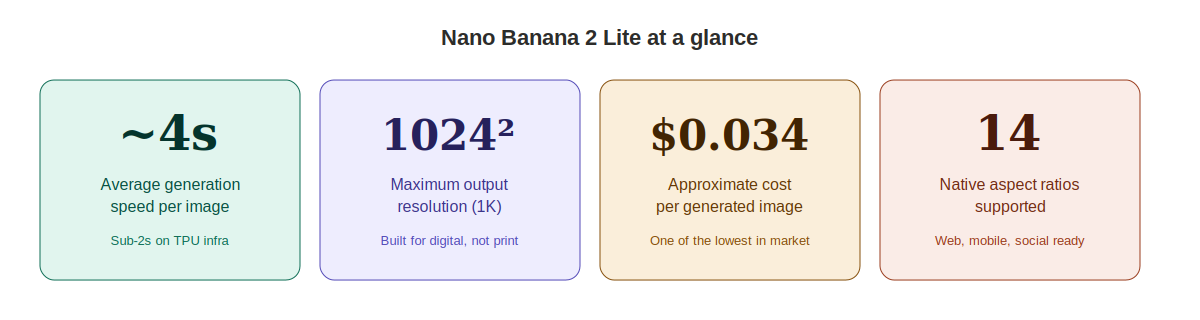
| Maximum Resolution | 1024 × 1024 (1K) |
| Average Speed | ~4 seconds |
| Best For | Content creators, developers, marketers, eCommerce |
| API Cost | Approximately $0.034 per image |
| Platform | Google AI Studio, Google Cloud, OpenRouter |
| Overall Verdict | Excellent for fast, affordable image creation |
Key Takeaways
- Nano Banana 2 Lite prioritizes speed and affordability over ultra-high resolution.
- The model supports both text-to-image generation and image editing.
- Average generation time is about four seconds according to Google documentation.
- Native support for 14 aspect ratios makes it flexible for web, mobile, and social content.
- Character consistency is one of its strongest features during localized edits.
- The biggest limitation is its 1024 × 1024 maximum resolution.
- It is an excellent choice for high-volume content production where speed and cost matter most.
What is Nano Banana 2 Lite?
Nano Banana 2 Lite is Google’s fastest and most affordable multimodal AI image model, officially known as Gemini 3.1 Flash-Lite Image. It generates and edits images in approximately four seconds while supporting text and image inputs, making it ideal for developers, marketers, and creators who need rapid visual content at a low cost.
Why I Wanted to Understand Nano Banana 2 Lite
Anyone who creates digital content knows the frustration of waiting for an AI image generator to finish a simple edit. Whether you’re changing a product background, creating social graphics, or testing design ideas, every extra second slows the workflow.
That growing demand for speed is exactly why nano banana 2 lite review has become such a popular search. Google’s latest image model promises faster generation, lower operating costs, and practical editing tools without requiring expensive hardware or premium subscriptions.
This review examines what Nano Banana 2 Lite actually offers, where it performs well, where it falls short, and which users are likely to benefit most based on the available research and official technical documentation.
What Is Nano Banana 2 Lite?
Nano Banana 2 Lite is the commercial name for Gemini 3.1 Flash-Lite Image, Google’s lightweight multimodal image generation and editing model developed by Google DeepMind.
Unlike models built primarily for ultra-high-resolution artwork, Nano Banana 2 Lite focuses on speed, efficiency, and affordable large-scale image production. It is designed for developers, businesses, and creators who need reliable visual assets quickly rather than perfect 4K output.
Google rebuilt the Nano Banana family during June 2026 into three product tiers:
| Model | Primary Focus |
| Nano Banana Pro | Professional 4K image generation |
| Nano Banana 2 | Balanced 2K image generation |
| Nano Banana 2 Lite | Fast, low-cost 1K image editing and generation |
This structure allows users to choose the model that best matches their workload instead of paying for capabilities they may not need.
Where Can You Use It?
Google currently distributes the model through several platforms, including:
- Google AI Studio
- Google Cloud Gemini platform
- OpenRouter
- Enterprise developer APIs
Its official API identifier is:
gemini-3.1-flash-lite-image
Nano Banana 2 Lite Features
One reason this google ai image editor is attracting attention is that Google didn’t simply make a smaller model. Instead, it optimized the architecture for practical production workflows where response time and operating cost matter most.
Fast Image Generation
According to Google AI for Developers, Nano Banana 2 Lite averages approximately four seconds per image and is engineered to reach sub-two-second latency under optimized Google TPU infrastructure.
For agencies or applications generating hundreds of images daily, that speed can significantly improve productivity.
AI Image Editing
Instead of recreating an entire image from scratch, the model edits only the requested areas whenever possible.
Typical edits include:
- Background replacement
- Object removal
- Clothing changes
- Color adjustments
- Localized modifications
This approach helps preserve lighting, composition, and character identity.
Text-to-Image Generation
The model also functions as a full gemini image generation tool, allowing users to create entirely new visuals from natural language prompts.
Because it accepts long prompts through its 65,536-token context window, users can provide highly detailed creative instructions for more controlled results.
Image-to-Image Editing
One of Nano Banana 2 Lite’s biggest strengths is image-to-image generation.
Users can upload an existing image and request changes using plain language, such as changing clothing colors, replacing backgrounds, or modifying individual objects while keeping the rest of the image intact.
Google states that each uploaded image is processed into approximately 1,120 visual tokens, allowing the model to understand scene context before applying edits.
Character Consistency
Maintaining the same subject across multiple edits is often difficult for AI image models.
According to the research report, Nano Banana 2 Lite performs particularly well when making localized changes because it preserves facial identity, lighting, and overall composition instead of regenerating the entire scene.
This makes it useful for:
- Product catalogs
- Marketing campaigns
- Storyboarding
- Brand asset creation
Flexible Aspect Ratios
Unlike many lightweight image models, Nano Banana 2 Lite supports 14 native aspect ratios, including:
- 1:1
- 4:5
- 3:2
- 16:9
- 9:16
- 21:9
That flexibility allows creators to generate assets for websites, YouTube, Instagram, mobile apps, and widescreen presentations without extensive cropping.
Built-In AI Watermarking
Every image generated through the API includes Google’s invisible SynthID watermark, developed by Google DeepMind to help identify AI-generated content.
Developed by Google DeepMind, SynthID helps identify AI-generated content while remaining resistant to basic edits such as cropping or compression. This supports responsible AI usage without affecting the visible quality of the image.
Hands-On Performance Analysis
The biggest question behind any nano banana 2 lite review is simple: does the model deliver meaningful speed without sacrificing too much quality?
Based on the research report and Google’s official documentation, Nano Banana 2 Lite succeeds by focusing on rapid image editing and generation rather than competing with premium 4K image models.
Speed Performance
Speed is where Nano Banana 2 Lite stands out. According to Google AI for Developers, the model averages around 4 seconds per generation and is designed to achieve sub-2-second latency on optimized Google TPU infrastructure.
Google also reports that it is approximately 2.7× faster than Gemini 3.1 Flash Image and up to 5× faster than the original Nano Banana model. For users creating dozens or even hundreds of images daily, those time savings quickly add up.
Image Quality
The model produces clean, consistent images suitable for most digital applications. Its maximum output resolution is 1024 × 1024 pixels, which is ideal for websites, blogs, social media, presentations, and mobile apps. However, it is not designed for print-quality posters or large-format marketing materials.
If your work primarily lives online, the quality is more than sufficient.
Prompt Understanding
Another strength is prompt interpretation. The model supports a 65,536-token context window (Google AI for Developers), allowing users to write detailed instructions instead of relying on short prompts.
This makes it easier to describe:
- lighting
- camera angles
- colors
- product details
- visual styles
- editing instructions
Longer prompts generally provide more precise control over the final output.
Image Editing Accuracy
Unlike many image generators that recreate an entire picture after every prompt, Nano Banana 2 Lite focuses on modifying only the requested elements.
For example, changing a jacket from black to red should leave the person’s face, lighting, and surrounding environment largely unchanged.
This localized editing approach improves consistency while reducing unnecessary alterations.
Character Consistency
One of Google’s strongest improvements is maintaining the identity of people or products across edits. According to the research report, the model preserves facial features, lighting, and object placement much more reliably than earlier Nano Banana releases.
That makes it especially useful for:
- product catalogs
- advertising campaigns
- storyboard creation
- social media content
- eCommerce listings
Real-World Use Cases
The value of any google ai image editor depends on how well it fits everyday workflows.
Nano Banana 2 Lite was designed for high-volume production, making it practical across several industries.
Content Creators
Bloggers and YouTubers can rapidly generate:
- featured images
- thumbnails
- social graphics
- promotional visuals
The model’s speed makes testing multiple creative directions much faster.
Marketing Teams
Marketing agencies often need localized campaigns for different audiences.
Because Nano Banana 2 Lite supports text rendering in more than 25 languages (Google AI for Developers), teams can quickly produce multilingual advertising assets without recreating each design manually.
E-Commerce Businesses
The research report describes an example where a fashion retailer uses one studio photo to generate dozens of product variations by changing clothing colors, fabrics, and backgrounds.
This significantly reduces photography costs while maintaining consistent product presentation a workflow we also explore in our AI tools for e-commerce business growth guide.
Mobile Applications
Developers can integrate the API into editing apps that allow users to modify photos using natural language prompts.
The model’s low latency creates a smoother user experience than slower cloud-based image pipelines.
Creative Teams
Advertising agencies and design studios can quickly build concept art and storyboard drafts before investing time in high-resolution production.
Rapid iteration often matters more than maximum image quality during early creative stages.
Nano Banana 2 Lite vs Meta Muse
Many readers searching for nano banana vs meta muse simply want to know which tool better matches their workflow.
Rather than declaring a universal winner, it is more useful to compare their intended strengths.
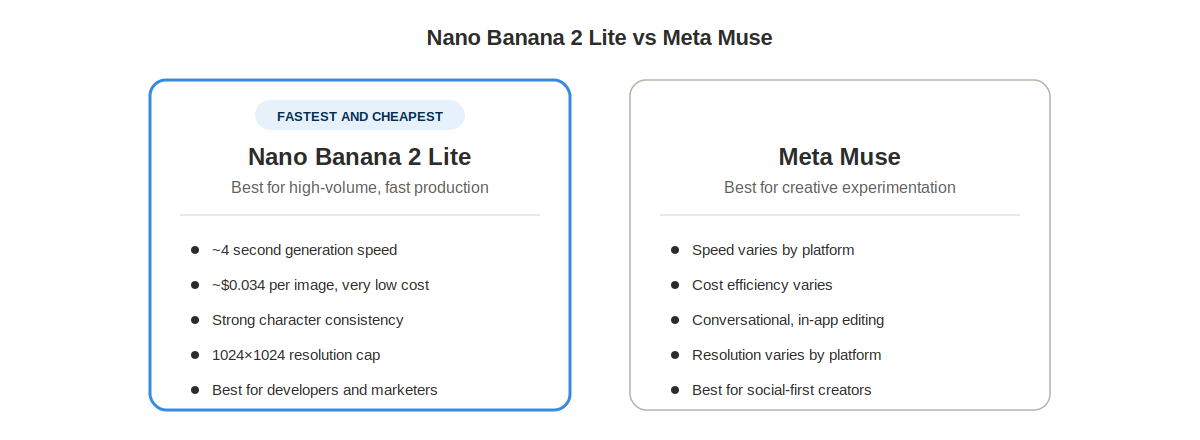
| Feature | Nano Banana 2 Lite | Meta Muse |
| Primary Focus | Fast image generation and editing | Creative image generation |
| Speed | ~4 seconds | Depends on platform |
| Maximum Resolution | 1024 × 1024 | Varies |
| Editing Existing Images | Excellent | Platform dependent |
| Cost Efficiency | Very high | Varies |
| Character Consistency | Strong | Varies |
| Best For | Developers, marketers, high-volume workflows | Creative experimentation |
If your priority is producing a large number of images quickly and economically, Nano Banana 2 Lite has a clear advantage. If maximum artistic detail is the primary goal, higher-end image models may still be the better choice. For a deeper look at how Meta’s model performs on its own, our Meta AI Muse Spark 1.1 2026 Review breaks down its conversational editing and Meta app integration.
Pricing and Availability
Cost is one of the biggest reasons Nano Banana 2 Lite is gaining attention.
According to Google Cloud and OpenRouter, pricing starts at:
- $0.25 per million input tokens
- $1.50 per million output tokens
That works out to roughly $0.034 per generated image, making it one of the lowest-cost commercial AI image models currently available.
Developers can access the model through:
- Google AI Studio
- Google Cloud
- OpenRouter
- Gemini Enterprise APIs
Pros and Cons
| Pros | Cons |
| Extremely fast generation | Limited to 1K resolution |
| Very affordable API pricing | Not suitable for print-quality graphics |
| Strong image editing capabilities | No live web grounding |
| Excellent character consistency | Complex non-Latin typography can fail |
| Supports 14 aspect ratios | Multi-turn editing quality decreases over long sessions |
| Handles detailed prompts well | Not designed for professional 4K artwork |
Who Should Use Nano Banana 2 Lite?
Nano Banana 2 Lite is best suited for users who prioritize efficiency over maximum resolution.
It is an excellent choice for:
- Digital marketers
- Content creators
- Bloggers
- YouTubers
- eCommerce businesses
- SaaS developers
- Startup teams
- Social media managers
- Mobile application developers
If your workflow involves producing large numbers of digital images every day, the combination of speed and low operating cost is difficult to ignore.
Who Should Avoid It?
Despite its strengths, Nano Banana 2 Lite is not the ideal solution for every project.
You may need another model if you regularly create:
- print advertising
- magazine layouts
- billboards
- ultra-high-resolution artwork
- complex multilingual typography
- long multi-step editing projects
Its 1024 × 1024 resolution cap is a deliberate design choice, prioritizing speed instead of maximum image fidelity.
Practical Implementation: How to Get the Best Results
Buying into a fast AI image model is only half the story. The quality of your results depends just as much on how you structure your workflow as the model itself.
1. Start With a Clear Prompt
Be specific about what you want to change.
Instead of writing “make it better,” describe the exact edit, such as changing the background, adjusting clothing colors, or replacing an object while keeping the original lighting and composition.
2. Use Image Editing Instead of Regeneration
Nano Banana 2 Lite performs best when modifying an existing image rather than rebuilding it from scratch.
This approach preserves subject identity and reduces unwanted changes, making it ideal for product photos and marketing assets.
3. Choose the Right Aspect Ratio
The model supports 14 native aspect ratios, including square, landscape, portrait, and mobile formats (Google AI for Developers).
Selecting the correct ratio before generation saves time and reduces the need for cropping later.
4. Reserve High-Resolution Work for Other Tools
Because the model is limited to 1024 × 1024 pixels, use it for rapid ideation and digital publishing. If a project requires print-quality output, consider using an AI upscaler after generation or a higher-resolution model from the start our best AI image editing tools 2026 roundup covers several options for this exact step.
Common Mistakes to Avoid
Many limitations reported by users come from using the model outside its intended purpose.
Avoid these common mistakes:
- Expecting 4K-quality images from a 1K model.
- Using vague prompts that don’t clearly describe the desired edit.
- Running long, complex editing chains instead of making focused changes.
- Creating print graphics without accounting for the resolution limit.
- Assuming the model has access to current events or live internet information.
Using Nano Banana 2 Lite for the tasks it was designed to handle produces consistently better results.
How This Review Was Evaluated
This review is based exclusively on the research provided, including official documentation from Google DeepMind, Google AI for Developers, Google Cloud, and OpenRouter, along with July 2026 industry analyses referenced in the research report.
The evaluation focused on factors most relevant to potential users:
- Generation speed
- Image editing capabilities
- Output quality
- Pricing
- Developer accessibility
- Practical workflows
- Known limitations
Where performance figures are mentioned, they come from the named sources rather than personal testing.
Final Verdict
If your priority is producing digital images quickly and economically, Nano Banana 2 Lite is one of the strongest options available in 2026. It won’t replace premium image models built for 2K or 4K artwork, but it was never designed to. Google instead focused on delivering a lightweight model that generates and edits images rapidly while keeping operational costs exceptionally low.
For the situation described at the beginning of this review, where every minute spent waiting slows a creative workflow, this balance of speed, consistency, and affordability makes a real difference.
That’s why this nano banana 2 lite review concludes that the model is an excellent choice for developers, marketers, content creators, and businesses producing large volumes of digital visuals. Sometimes the best AI tool isn’t the one that creates the biggest image, it’s the one that helps you finish the work faster. for new updates of ai tool must explore Openaihit.
Frequently Asked Questions
Is Nano Banana 2 Lite free?
Nano Banana 2 Lite is available through Google’s AI platforms and third-party providers. While some platforms may offer free access with usage limits, API usage is typically billed based on tokens.
According to Google Cloud and OpenRouter, pricing starts at approximately $0.25 per million input tokens and $1.50 per million output tokens, making generation cost roughly $0.034 per image.
What are Nano Banana 2 Lite features?
Key nano banana 2 lite features include text-to-image generation, image-to-image editing, support for 14 aspect ratios, multilingual text rendering in more than 25 languages, strong character consistency, and built-in SynthID watermarking. It also supports a 65,536-token context window for detailed prompts and delivers images in around four seconds under typical conditions.
Is Nano Banana 2 Lite worth using?
If your work focuses on websites, social media, eCommerce, app development, or marketing, Nano Banana 2 Lite offers an excellent balance of speed and cost. Its main limitation is the 1K resolution cap, so users needing print-quality graphics or ultra-high-resolution artwork should consider higher-tier models instead.
How does Nano Banana 2 Lite compare with Meta Muse?
Nano Banana 2 Lite emphasizes fast image editing, low operating costs, and efficient production workflows. Meta Muse may appeal more to users seeking broader creative experimentation, but Nano Banana 2 Lite is particularly well suited for high-volume digital asset creation where turnaround time matters.
Does Nano Banana 2 Lite work with Gemini?
Yes. Nano Banana 2 Lite is the commercial name for Gemini 3.1 Flash-Lite Image and is part of Google’s Gemini ecosystem. Developers can access it through Google AI Studio, Google Cloud services, and supported API providers using the official model identifier gemini-3.1-flash-lite-image.
Can Nano Banana 2 Lite edit existing images?
Yes. Image editing is one of the model’s strongest capabilities. Instead of recreating an image from scratch, it focuses on modifying only the requested elements, helping preserve lighting, subject identity, and overall composition.