Key Takeaways
-
Autonomous execution without constant hand-holding
-
Handles general work alongside coding tasks
-
Flexible pricing structure using credit system
-
Broader focus compared to developer-centric tools
-
Great fit for complex multi-step workflows
Have you ever wished you could just pass off a whole list of messy tasks to someone else and walk away? That is exactly what everyone is talking about right now with the launch of new autonomous tools. In this manus ai review, we are going to look closely at whether this new system can actually handle your daily workload or if it is just more tech noise.
Let us get right to the point. Yes, it can automate significant portions of your work, but it is not a magic fix for everything. It shines brightest when taking on multi-step projects like market research, file organization, and web data gathering without needing you to guide every single step.
If you spend hours on repetitive digital tasks, using an ai automation agent like this will save you serious time. Over at openaihit.com, we regularly test these tools in real-world scenarios to see which ones actually deliver on their promises.
AI Overview
Manus AI is an autonomous digital worker designed to complete complex, multi-step tasks independently. Unlike traditional chat models that only answer questions, this system opens browsers, writes code, edits files, and processes data to deliver complete projects. In this manus ai review, we explore its core features, pricing models, and how it handles daily workflows to help you decide if it fits your personal productivity needs.
What Is Manus AI and How Does It Work?
Most assistants wait for you to feed them prompts line by line. You ask a question, get an answer, and then figure out what to do next. This platform operates differently. You give it a final goal, and it breaks that goal down into smaller actionable steps. It then executes those steps one by one inside its own cloud environment.
Think of it as hiring a remote assistant who does not need micro-managing. You ask for a competitive analysis report, and it browses the web, gathers data, creates spreadsheets, and formats a final document for you.
When you submit a project, the internal engine establishes a plan of action. It spins up a remote virtual environment equipped with tools like a full web browser, a code runner, and file editing software.
As it works through the tasks, it constantly evaluates its progress. If a web page fails to load or a script throws an error, it attempts to fix the problem on its own rather than stopping to ask for help. This independent trial-and-error process is what makes it a true ai automation agent. It mimics human problem-solving by adapting when things do not go as planned.
Standout Manus AI Features
To understand why people are excited, you have to look at the main manus ai features that set it apart from basic chatbots.
Autonomous Browser Control
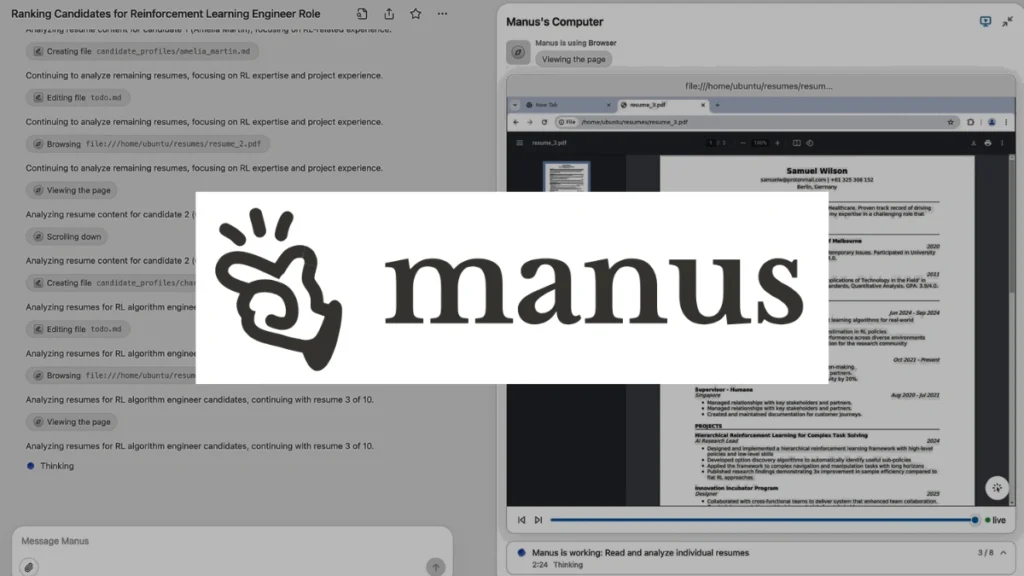
It does not just search the web for text links. It opens a virtual browser, clicks buttons, fills out forms, and navigates complex websites just like a human worker would.
File Handling and Data Processing
You can upload raw files, spreadsheets, or PDFs. The system cleans the data, runs analysis, and creates organized outputs like charts or new files.
Multi-Step Execution
Instead of stopping after one turn, this ai automation agent keeps working through a full checklist until the entire project is completed.
Native Code Generation and Execution
When text parsing or simple browser actions are not enough, it writes custom computer code on the fly. It runs this code in a secure sandbox to transform large datasets or automate repetitive calculations.
Workspace Integration
It allows users to connect various cloud tools and storage services. This means you can have it grab a document from one folder, process the contents, and export the finished result directly to your designated destination.
Here is a quick look at how key manus ai features map to everyday business tasks:
| Feature | Real-World Application | User Benefit |
| Virtual Browser Navigation | Extracting pricing data across multiple store pages | Cuts manual web research time by hours |
| Independent Planning | Converting messy notes into formatted documents | Reduces manual organization efforts |
| Code & File Execution | Generating custom scripts to process CSV datasets | Eliminates repetitive formatting work |
| Sandbox Environment | Testing web scrapers safely in cloud isolation | Prevents errors on local hardware |
| Multi-File Aggregation | Combining multiple PDF invoices into one report | Saves hours of tedious copy-paste effort |
Breaking Down Manus AI Pricing
Understanding the cost structure is crucial before bringing any new tool into your daily operations. The manus ai pricing setup relies on a credit-based subscription model designed to scale with your workload.
| Subscription Tier | Monthly Cost | Included Credits | Target User |
| Free Tier | $0 / month | Limited daily refresh credits | Casual testing and basic tasks |
| Standard Tier | ~$20 / month | ~4,000 monthly credits | Freelancers & light daily users |
| Pro Tier | ~$40 – $200 / month | 8,000 to 40,000+ credits | Heavy power users & business tasks |
Based on available data, simple jobs consume fewer credits, while research projects that require prolonged browser usage burn through credits much faster. When planning your monthly budget, keep in mind that execution time directly impacts credit consumption. If you ask the tool to visit dozens of websites, each page interaction costs processing power.
For small business owners, starting with a basic paid plan is generally the safest approach. You can measure how many credits your typical weekly tasks require before upgrading to higher tiers.
Many users find that assigning high-volume, lower-complexity tasks gives the best return on investment. This strategy keeps credit usage predictable while freeing up valuable human hours.
Head-to-Head: Manus AI vs Devin
Many tech workers ask how this system compares to other autonomous tools on the market. The most common comparison is manus ai vs devin, as both represent a major leap forward in software independence. While Devin focuses almost entirely on software engineering and codebases, this tool takes a much broader approach.
In short, if you need a pure software developer to fix repository bugs, Devin is built for that specialized world. But if you need an ai automation agent that handles general office work, research, and data projects alongside basic coding, this platform is the more versatile option.
Here is how the key differences play out across different operational categories:
| Operational Area | Manus AI | Devin |
| Primary Focus | General administrative & research workflows | Software development & bug fixing |
| Target Audience | Marketers, researchers, & business managers | Software engineers & dev teams |
| Web Browsing | Broad navigation for research & data entry | Targeted navigation for technical documentation |
| Document Processing | Advanced handling of PDFs, CSVs, & text | Focused on code repositories & config files |
| Learning Curve | Low, uses natural conversation prompts | Moderate to high, requires developer knowledge |
When looking at manus ai vs devin, the choice really comes down to your primary daily responsibilities. Non-technical teams will get far more daily utility out of a generalist platform.
Real-World Performance: What Can It Handle?
In our practical tests at openaihit, we wanted to see how the system handles messy, real-world requests rather than clean demo prompts. When asked to audit competitor pricing across five different e-commerce sites, the platform launched a browser, navigated to each site, collected product prices, and organized everything into a clean downloadable table. It handled minor website layout changes without crashing or getting stuck in a loop.
Another test involved processing a massive set of unorganized event sign-ups. We fed the tool hundreds of unformatted email submissions containing mixed text, numbers, and phone formats.
The system analyzed the text, created a standardized data schema, cleaned up invalid entries, and exported a ready-to-use CSV file within minutes. However, it is not completely flawless. Tasks requiring complex visual verification or logging into accounts with strict multi-factor security measures can sometimes stall the process.
Here are the areas where this ai automation agent truly excels in daily operations:
-
Deep Market Research: Scrapes web pages, reads long articles, and summarizes findings into executive briefs.
-
Data Cleaning & Formatting: Takes messy CSV files and reorganizes them based on custom rules.
-
Drafting Complex Reports: Combines research data into formatted documents complete with headers and tables.
-
Basic Web Scraping: Extracts structured information from multiple sites automatically.
-
Automated File Conversions: Converts batches of documents or data types into ready-to-use formats.
Potential Limitations and Challenges
No software review is complete without discussing the downsides. While the platform is impressive, users should maintain realistic expectations. First, performance speed can vary depending on task complexity. Because the agent must plan, execute, check its work, and retry failed steps, complex jobs can take several minutes to finish.
Second, web site anti-bot protections can occasionally block the virtual browser. If a target site uses aggressive verification challenges, the agent may need human intervention to continue.
Third, long execution chains can run up credit costs quickly. If an agent gets caught in a troubleshooting loop on a difficult step, it consumes credits while trying to solve the problem.
Lastly, user oversight remains essential. While it works independently, checking final deliverables for accuracy is still a necessary step in any professional environment.
The Future of Autonomous Work Agents
The rise of independent digital workers marks a major shift in how web platforms operate. We are moving away from simple search boxes toward systems that accomplish tangible goals.
In the near future, these platforms will likely integrate deeper into enterprise software networks. Instead of just gathering data, they will manage end-to-end operational workflows with minimal oversight.
As browser technology improves, agents will navigate complex web applications with greater accuracy and speed. This will significantly lower the barrier for non-technical users to build custom automations.
At openaihit.com, we believe the best approach is learning how to partner with these tools early. Understanding their strengths and weaknesses now prepares you for the next generation of digital work.
Is Manus AI Worth It for Your Workflow?
Deciding to pay for another subscription comes down to calculating how much your personal time is worth.
If your work consists mostly of quick questions or writing short emails, standard chat assistants will do the job just fine. You probably do not need an advanced ai automation agent for those basic tasks.
However, if you spend hours every week managing files, searching the web, or pulling together reports, the time saved easily justifies the subscription cost. It handles tedious legwork so you can focus on high-level decisions.
To get the most value, start by mapping out your weekly routine. Identify repetitive, multi-step tasks that take up significant time but do not require complex human judgment. Assigning those specific projects to an autonomous tool allows you to clear your schedule for strategic thinking and creative work.
Final Verdict
Our manus ai review shows that autonomous technology has reached a genuinely practical milestone. While it won’t entirely replace human oversight, it dramatically speeds up complex digital projects. If you want to streamline your heavy computer tasks, this tool is definitely worth testing out.
Frequently Asked Questions
What is Manus AI used for?
It is used for automating multi-step digital tasks like web research, data processing, and document generation independently.
How much does Manus AI cost?
Plans generally range from a limited free tier up to $200 per month based on usage credits.
Is Manus AI better than Devin?
It depends on your needs; Devin targets deep software coding, while Manus handles general business workflows.
Can Manus AI browse the web automatically?
Yes, it independently navigates websites, extracts data, and fills out forms in a virtual browser.