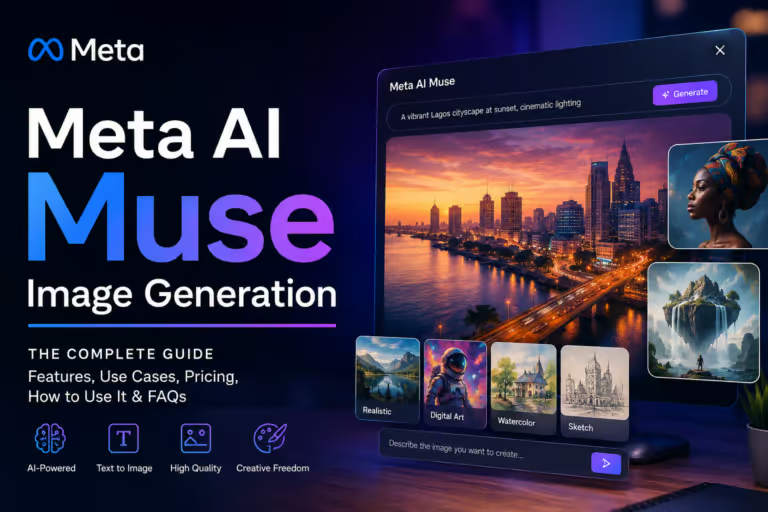
Imagine you’re creating a social media campaign and need eye-catching visuals before the day ends. Instead of opening several design tools, you type a prompt into Meta AI, upload a reference photo, and generate multiple polished images within the same app you’re already using.
That’s exactly the experience Meta Muse Image Generator aims to deliver. Introduced by Meta in July 2026, it’s designed to make AI-powered image creation and editing feel like a natural extension of Instagram, WhatsApp, Facebook, and Messenger rather than a separate creative platform.
But convenience alone doesn’t make an AI image generator the best choice.
With competitors like Nano Banana 2 pushing 4K image quality and Adobe Firefly focusing on commercial-safe creative workflows, choosing the right tool has become more complicated than ever. For a deeper look at how these two rivals stack up on their own, our Nano Banana Pro AI: The Ultimate 2026 Guide breaks down its 4K capabilities in detail.
This review breaks down what Meta Muse Image actually offers, how its editing tools perform, where it excels, where it falls short, and whether it deserves a place among the best AI image generators of 2026. You’ll also see how it compares with Nano Banana 2 and Adobe Firefly so you can decide which platform best fits your workflow.
AI Overview
Meta Muse Image Generator is Meta’s latest AI image model, developed by Meta Superintelligence Labs and released in July 2026. It combines the Muse Spark reasoning engine with the Muse Image rendering model to create and edit images directly inside Meta’s ecosystem.
Its biggest strengths are conversational image editing, seamless integration with Meta apps, and strong in-image text rendering. While Nano Banana 2 offers higher-resolution output and Adobe Firefly remains the preferred choice for commercial design workflows, Meta Muse stands out for creators who value speed and social-first content creation.
Key Takeaways
- Meta Muse Image was officially released in July 2026 by Meta Superintelligence Labs.
- The platform combines Muse Spark for prompt reasoning with Muse Image for visual generation.
- It focuses on fast image creation and editing directly within Meta’s apps instead of requiring separate design software.
- According to the research report, Meta Muse ranked second globally on the Artificial Analysis Image Arena leaderboard, an independent AI benchmarking platform, in July 2026 for text-to-image and multi-image editing performance
- Adobe Firefly remains stronger for commercial production workflows, while Nano Banana 2 leads in native 4K upscaling and advanced multi-character consistency.
- Meta Muse is particularly attractive for marketers, influencers, and creators who regularly publish content across Meta platforms.
What Is Meta Muse Image Generator?
Meta Muse Image Generator is Meta’s AI-powered image creation and editing model developed by Meta Superintelligence Labs. Released in July 2026, it uses the Muse Spark reasoning engine alongside the Muse Image rendering model to generate, edit, and enhance images directly within Instagram, WhatsApp, Facebook, and Messenger, making AI-powered creativity accessible inside Meta’s ecosystem.
What Is Meta Muse Image Generator?
Meta Muse Image Generator is Meta’s flagship generative AI image model, developed by Meta Superintelligence Labs (MSL) to create and edit images using natural language.
Rather than functioning as a standalone design application, it’s built directly into Meta’s ecosystem, allowing users to generate visuals inside apps they already use every day.
The platform was officially introduced on July 8, 2026, marking Meta’s biggest step yet into professional-grade AI image generation.
It replaced the company’s earlier, simpler image-generation approach with a far more capable system designed for realistic artwork, conversational editing, and high-quality visual content.
Unlike many AI image generators that require switching between multiple websites or software, Meta Muse focuses on keeping the entire creative process inside Instagram, WhatsApp, Facebook, and Messenger. For creators who primarily publish on social media, this integrated workflow can save valuable time.
According to the research data, Meta built Muse to support everything from simple text prompts to complex image modifications, making it suitable for marketers, content creators, educators, and everyday users looking for fast visual creation.
Overview
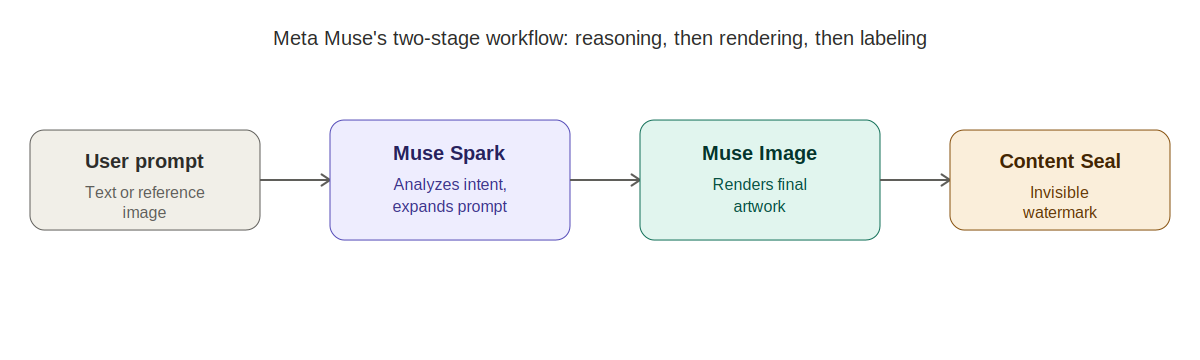
Meta Muse isn’t just one AI model. It’s a visual generation system built around two primary components that work together to understand requests and produce polished images.
The first component is Muse Spark, a reasoning engine with a 1-million-token context window. Instead of immediately creating an image, Muse Spark analyzes your request, understands the intent, expands complex prompts, and prepares detailed instructions before passing them to the image model.
The second component is Muse Image, the rendering engine responsible for generating the final artwork. It converts those structured instructions into finished images while handling composition, lighting, typography, and editing tasks.
This two-stage architecture separates prompt understanding from image generation, helping the platform process conversational requests more effectively than traditional text-to-image models.
How It Works
Using Meta Muse feels surprisingly straightforward, even though a sophisticated workflow operates behind the scenes.
When you enter a prompt such as “Replace the background of this café photo with a modern coworking space while keeping the lighting natural,” the request doesn’t go directly to the image generator.
Instead, Muse Spark first analyzes the language, identifies objects, studies lighting, recognizes the existing image structure, and expands the prompt into detailed visual instructions.
Those refined instructions are then sent to Muse Image, which generates or edits the image based on the processed guidance rather than the raw prompt alone.
Before the completed image is delivered, Meta applies its Content Seal, an invisible watermark designed to remain detectable even after cropping, resizing, compression, or screenshots. This safeguard aims to improve traceability of AI-generated content while supporting responsible use.
Where You Can Access It
One of Meta Muse’s biggest advantages is accessibility.
Rather than asking users to learn a completely new platform, Meta integrates the tool directly into products millions already rely on every day.
You can access Meta Muse through supported experiences within:
- Messenger
This approach creates a smoother workflow for creators who regularly publish content across Meta platforms. A marketer can generate promotional graphics during a WhatsApp conversation, while an Instagram creator can experiment with Story visuals without moving files between multiple applications.
The research also notes that Meta introduced more than 30 native AI Story effects during its July 2026 rollout, further strengthening integration across its social platforms.
Key Features of Meta Muse Image Generator
Meta Muse is designed to simplify the creative process by combining AI reasoning, image generation, and image editing into a single workflow. Instead of relying on complex prompt engineering, users can describe what they want in natural language and refine the results through follow-up instructions.
Here are the features that make Meta Muse stand out in the growing AI image generation market.
Text-to-Image Generation
Meta Muse converts text prompts into detailed, high-quality images using the combined capabilities of Muse Spark and Muse Image. Rather than interpreting prompts literally, the AI analyzes context, style, and intent before generating the final visual.
This approach produces more accurate compositions and reduces the need for repeated prompt adjustments, making it accessible for both beginners and experienced creators.
Conversational Image Editing
One of Meta Muse’s strongest features is its ability to edit existing images using natural language.
Instead of manually selecting editing tools, users can simply describe the changes they want. Common editing tasks include:
- Replacing backgrounds
- Removing unwanted objects
- Changing colors or lighting
- Restoring old photos
- Redesigning rooms
- Modifying hairstyles or clothing
Because edits are applied to specific areas instead of regenerating the entire image, the original composition is preserved more effectively.
Reference Image Support
Meta Muse supports reference images, allowing users to upload an existing photo and generate new variations while maintaining key visual elements.
This is especially useful for:
- Product photography
- Brand consistency
- Marketing campaigns
- Social media content
- Creative mockups
For businesses producing multiple visuals around the same product or campaign, reference images help maintain a consistent style across all assets.
Built-In Creative Presets
To simplify common editing tasks, Meta Muse includes presets for workflows such as sketch-to-image generation, photo restoration, room redesign, and object replacement. These presets reduce the learning curve and allow users to achieve polished results without writing highly technical prompts.
Seamless Meta Integration
Unlike many AI image generators, Meta Muse is integrated directly into Instagram, Facebook, WhatsApp, and Messenger. This enables users to generate, edit, and share visuals without switching between multiple applications, making the creative process faster and more convenient for social-first workflows.
Feature Summary
| Feature | Meta Muse Image |
| Text-to-image generation | Yes |
| Conversational prompting | Yes |
| AI image editing | Yes |
| Smart object replacement | Yes |
| Background editing | Yes |
| Reference image support | Yes |
| Sketch-to-image | Yes |
| Photo restoration | Yes |
| Room redesign presets | Yes |
| Readable typography generation | Strong |
| Native Meta app integration | Yes |
| Invisible Content Seal watermark | Yes |
| Muse Video support | Preview available |
| Best suited for | Social media creation, marketing assets, quick visual editing |
If you’re comparing broader image-generation options beyond these three, our best AI image generator tools in 2026 roundup covers a wider range of platforms worth considering.
Hands-On Performance Review
Specifications only tell part of the story. The real question is how Meta Muse performs when you rely on it for everyday creative work. Rather than judging the platform on a single feature, it’s more useful to evaluate it across the areas that matter most to creators: image quality, prompt understanding, editing accuracy, speed, and creative flexibility.
Image Quality
Meta Muse produces high-quality images designed primarily for digital content rather than large-format print.
Its strongest areas include:
- Realistic lighting
- Natural compositions
- Readable typography
- Consistent object placement
- Social media-ready visuals
According to the research report, Meta Muse ranked second globally on the Artificial Analysis Image Arena leaderboard for text-to-image generation and multi-image editing in July 2026. This ranking reflects strong human preference scores across creative tasks.
While the quality is excellent for web content, Nano Banana 2 still holds an advantage when projects require native 4K upscaling or highly detailed production assets.
Prompt Accuracy
One of Meta Muse’s biggest improvements comes from the Muse Spark reasoning engine. Instead of interpreting prompts word for word, Muse Spark expands conversational requests into structured instructions before the image is generated.
For example, if you ask the AI to replace the background of a selfie with a modern café while preserving facial lighting, the system first analyzes the original image, identifies lighting directions, studies facial geometry, and then prepares detailed rendering instructions.
This process reduces misunderstandings that often occur in single-model AI image generators. Users who prefer writing prompts naturally instead of using complicated prompt formulas will likely appreciate this approach.
Editing Experience
Editing is where Meta Muse separates itself from many competitors. Rather than generating an entirely new image after every prompt, the AI focuses on modifying specific areas while preserving the original composition whenever possible.
The research highlights several editing capabilities, including:
- Smart object replacement
- Background changes
- Photo restoration
- Room redesign
- Hair modifications
- Sketch-to-image conversion
These tools make the muse image editing tool especially useful for creators who frequently revise marketing graphics, product photos, or social media visuals.
Speed
Meta’s biggest advantage isn’t just AI quality, it’s convenience. Because Muse is integrated into Instagram, WhatsApp, Facebook, and Messenger, users don’t need to move between separate design platforms for many everyday creative tasks.
A typical workflow can be completed within a single conversation:
- Generate an image.
- Refine it with follow-up prompts.
- Edit individual elements.
- Share it immediately.
For businesses already working inside Meta’s ecosystem, this streamlined process can significantly reduce production time.
Creative Flexibility
Meta Muse supports a wide variety of creative projects.
According to the research, users can create:
- Social media graphics
- Marketing banners
- Lifestyle product images
- Room redesign concepts
- Restored photographs
- Typography-based graphics
- Creative illustrations
Reference image support also helps maintain visual consistency across multiple projects, making the platform practical for branding and recurring campaigns.
Performance Scorecard
| Category | Evaluation |
| Image Quality | Excellent for digital and social content |
| Prompt Understanding | Excellent |
| Conversational Editing | Excellent |
| Background Replacement | Excellent |
| Typography Rendering | Strong |
| Reference Image Support | Strong |
| Ease of Use | Excellent |
| Social Media Workflow | Excellent |
| Commercial Print Projects | Moderate |
| Native 4K Output | Better handled by Nano Banana 2 |
Meta Muse vs Nano Banana 2 vs Adobe Firefly
Choosing the best AI image generator in 2026 depends less on finding a single winner and more on selecting the right tool for your workflow.
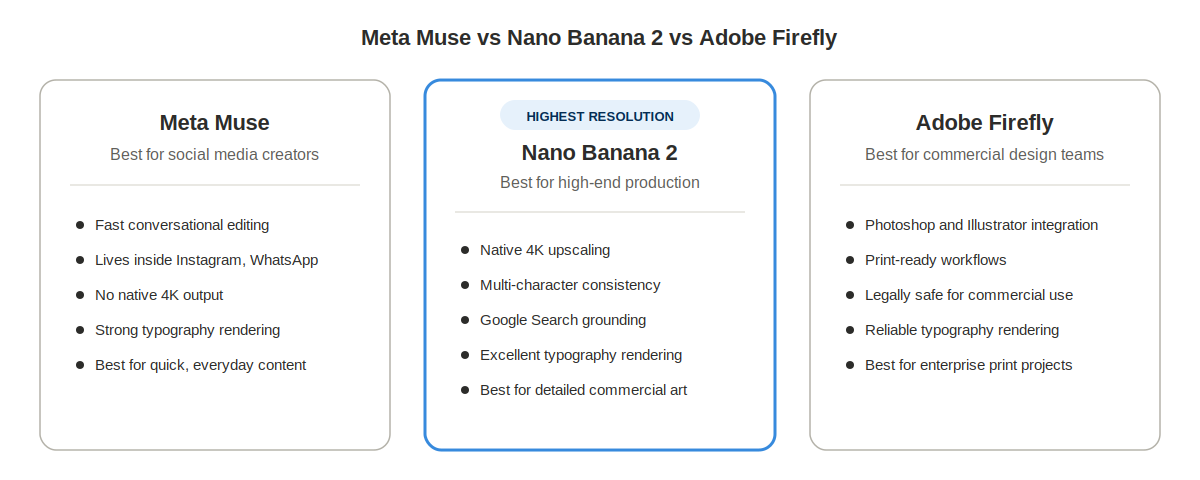
Meta Muse focuses on fast social content creation inside Meta’s apps. Nano Banana 2 emphasizes high-resolution production and advanced consistency, while Adobe Firefly prioritizes commercial design workflows and legal confidence.
Feature Comparison
| Feature | Meta Muse Image | Nano Banana 2 | Adobe Firefly |
| Primary Engine | Muse Image + Muse Spark | Gemini 3.1 Flash Image | Firefly Image v3 |
| Best For | Social media creators | High-end creative production | Commercial design teams |
| Image Editing | Excellent | Excellent | Excellent |
| Native 4K Upscaling | No | Yes | High-resolution print workflows |
| Reference Images | Yes | Yes | Yes |
| Typography Rendering | Strong | Excellent | Reliable |
| Ecosystem | Instagram, WhatsApp, Facebook, Messenger | Standalone Web + Adobe | Photoshop, Illustrator, Firefly |
| Search Grounding | Meta ecosystem | Google Search Grounding | Adobe Stock ecosystem |
For a head-to-head specifically between the two most-discussed image models this year, check our Midjourney vs DALL-E 3: Best AI Image Generator Compared breakdown.
Which One Should You Choose?
Choose Meta Muse Image if you:
- Create content primarily for social media.
- Want fast image editing without leaving Meta apps.
- Prefer conversational prompts over technical prompt writing.
- Need quick marketing assets and promotional graphics.
Choose Nano Banana 2 if you:
- Require native 4K image quality.
- Create storyboards or detailed commercial artwork.
- Need consistent multi-character scenes.
- Depend on real-time Google Search grounding.
Choose Adobe Firefly if you:
- Work professionally in Photoshop or Illustrator.
- Need commercial-focused creative workflows.
- Value Adobe’s established production ecosystem.
- Frequently prepare assets for print or enterprise design projects.
Real-World Use Cases
One of Meta Muse Image’s biggest strengths is that it solves practical creative problems instead of simply generating attractive images. Because it’s integrated into Meta’s ecosystem, users can move from an idea to a finished visual without leaving the apps they already use.
Here are some of the most valuable ways creators and businesses can use it.
Marketing Graphics
Small businesses often need promotional graphics quickly for sales, product launches, and seasonal campaigns.
According to the research report, marketers can use Meta AI inside WhatsApp to generate formatted promotional banners directly within conversations, reducing the need to move between multiple design platforms.
This workflow is especially useful for:
- Flash sales
- Product announcements
- Event promotions
- Limited-time offers
- Brand awareness campaigns
Social Media Content
Meta Muse naturally fits social media creation because it lives inside Instagram, Facebook, Messenger, and WhatsApp.
The July 2026 rollout introduced more than 30 native AI Story effects, allowing creators to transform ordinary photos into more engaging content without relying on third-party editing apps.
For influencers and content creators, this means less time editing and more time publishing.
Blog Featured Images
Content creators frequently need original visuals that match the topic of an article.
Instead of relying on stock photography, Meta Muse can generate custom illustrations, header images, and supporting graphics from simple text prompts.
This helps blogs establish a more distinctive visual identity while reducing dependence on generic stock imagery.
Product Photography
E-commerce businesses constantly need fresh product images for advertisements and social media.
Using reference image support, sellers can upload an existing product photo and request different environments, lighting styles, or seasonal themes while keeping the product itself recognizable.
This approach makes it easier to create multiple marketing variations from a single original image.
Presentation Graphics
Presentations often require custom visuals that are difficult to find in image libraries.
Muse Image can generate:
- Concept illustrations
- Background visuals
- Business graphics
- Educational diagrams
- Marketing presentation assets
These images help presenters communicate ideas more clearly while maintaining visual consistency.
Can Meta Muse Create Infographics?
A common question is whether Meta Muse functions as a meta muse infographic generator.
The answer is both yes and no.
Meta Muse can create many of the visual components needed for an infographic, including icons, illustrations, charts, backgrounds, and typography-friendly graphics.
However, it isn’t a dedicated infographic design platform.
If your project requires advanced layouts, editable charts, or drag-and-drop data visualization, specialized infographic software will still provide a better experience.
A practical workflow is to generate visual assets with Meta Muse and then assemble the final infographic using dedicated design software.
Limitations You Should Know
Meta Muse is impressive, but it isn’t the perfect solution for every workflow.
Its main limitations include:
- No native 4K image generation.
- Limited advanced design controls.
- Best experience is inside Meta’s ecosystem.
- Some prompts may be restricted by AI safety policies.
- Professional print workflows are better suited to Adobe Firefly.
Who Should Use Meta Muse Image Generator?
Meta Muse is an excellent choice for users who prioritize speed, convenience, and social media content creation over advanced production workflows.
| Best For | Why |
| Content creators | Fast visual creation for daily publishing |
| Social media managers | Native integration with Meta platforms |
| Small businesses | Quick promotional graphics |
| Bloggers | Original featured images and illustrations |
| Digital marketers | Rapid campaign asset creation |
| Casual users | Simple conversational image editing |
Who May Prefer Other Tools?
Meta Muse may not be the ideal option if your projects require:
- Native 4K production
- Professional print workflows
- Layer-based editing
- Complex commercial artwork
- Advanced Photoshop integration
In these situations, Nano Banana 2 or Adobe Firefly will generally offer a better fit.
Practical Tips for Better Results
Even powerful AI models produce better results when used strategically.
Follow these practices to improve your workflow with Meta Muse.
1. Write Clear Prompts
Describe the subject, style, lighting, background, and mood instead of using only a few words.
Specific prompts help Muse Spark build more accurate rendering instructions.
2. Use Reference Images
Upload an existing image whenever consistency matters.
This is especially useful for products, branding, and recurring marketing campaigns.
3. Edit Instead of Regenerating
If only one part of an image needs improvement, modify that specific element instead of creating an entirely new image.
This preserves composition and saves time.
4. Understand Platform Strengths
Meta Muse performs best for social-first creative work.
For high-resolution commercial production or enterprise design workflows, choosing the right specialized platform can produce better long-term results.
The next section brings everything together with a final verdict and answers the most common questions people ask about Meta Muse Image Generator.
Practical Application: How to Get the Best Results with Meta Muse Image Generator
Reading about features is useful, but applying them effectively is what determines the quality of your results. Follow this workflow to make the most of Meta Muse, whether you’re creating marketing graphics, social media posts, or product visuals.
Step 1: Start with a Clear Goal
Before writing your prompt, decide exactly what you need.
Ask yourself:
- Is this image for Instagram?
- Is it a blog header?
- Is it a product advertisement?
- Is it a presentation graphic?
Having a clear objective helps Muse Spark interpret your request more accurately before the image reaches the rendering stage.
Step 2: Write Detailed Prompts
Instead of writing:
“Create a coffee shop.”
Write:
“Create a modern coffee shop interior with warm lighting, wooden furniture, large windows, indoor plants, realistic photography style, and a welcoming atmosphere.”
Detailed prompts usually produce more consistent and visually appealing results.
Step 3: Use Reference Images When Possible
If you’re working on branding or product marketing, upload an existing image instead of starting from scratch.
Reference images help maintain:
- Brand consistency
- Product appearance
- Character identity
- Visual style
This is particularly valuable when creating multiple assets for the same campaign.
Step 4: Refine Instead of Restarting
Don’t regenerate the entire image if only one element needs improvement.
Meta Muse is designed for conversational editing, so you can request changes such as:
- Replace the background.
- Improve lighting.
- Change clothing color.
- Remove unwanted objects.
- Add decorative elements.
Editing individual components saves time and usually preserves the strongest parts of the original image.
Step 5: Choose the Right Tool for the Job
Meta Muse isn’t intended to replace every creative application.
Use Meta Muse when you need:
- Fast social media graphics
- Promotional images
- Product mockups
- Creative illustrations
- Everyday image editing
Consider Nano Banana 2 if your project requires native 4K output or highly consistent multi-character scenes.
Adobe Firefly remains the stronger option for enterprise design workflows that depend on Photoshop integration and commercial production tools.
Common Mistakes to Avoid
Many disappointing AI-generated images result from workflow mistakes rather than limitations of the model itself.
Avoid these common errors:
- Writing extremely short prompts with little context.
- Ignoring reference images when consistency matters.
- Regenerating entire images instead of editing specific areas.
- Expecting social-first tools to replace professional print workflows.
- Overlooking privacy settings before using public profile images.
Small adjustments to your workflow can significantly improve the quality and consistency of your results.
Final Verdict
Meta Muse Image Generator is one of the most accessible AI image tools released in 2026. Its greatest strength isn’t just image quality, it’s the seamless creative experience inside Meta’s ecosystem. For creators who publish regularly on Instagram, Facebook, or WhatsApp, it removes much of the friction involved in generating and editing visuals.
While Nano Banana 2 leads in high-resolution image generation and Adobe Firefly remains the preferred option for professional design teams, Meta Muse offers an excellent balance of quality, speed, and ease of use. If your primary goal is creating engaging digital content quickly, it’s one of the best AI image generators available today. for more updates of ai tool visit Openaihit.
Frequently Asked Questions
Is Meta Muse Image Generator free?
Yes. Meta offers basic image generation for free inside its AI apps. Users who need higher usage limits can upgrade through Meta’s subscription plans.
Is Meta Muse Image Generator better than Adobe Firefly?
It depends on your needs. Meta Muse is better for fast social media content and conversational editing, while Adobe Firefly is stronger for professional commercial design and Adobe Creative Cloud workflows.
Can Meta Muse Image Generator replace Nano Banana 2?
Not completely. Meta Muse is ideal for social-first image creation, whereas Nano Banana 2 offers native 4K output, better multi-character consistency, and advanced production capabilities.
Does Meta Muse Image Generator support image editing?
Yes. It can edit existing images through conversational prompts, including background replacement, object editing, photo restoration, and smart in-painting.
Which Meta apps support Meta Muse Image Generator?
Meta Muse is available across Instagram, WhatsApp, Facebook, and Messenger, allowing users to create and edit images without leaving Meta’s ecosystem.
Can Meta Muse create infographic graphics?
Yes, but only the visual elements. It can generate icons, illustrations, and graphics, while dedicated infographic software is still better for layouts and data visualization.
Is Meta Muse Image Generator suitable for commercial projects?
Yes, for many marketing and social media projects. However, businesses needing advanced print workflows and enterprise design tools may find Adobe Firefly a better fit.