The visual demands of digital marketing changed dramatically following the recent search engine algorithm updates. Google quality evaluation systems now actively deprioritize sites that rely heavily on generic, unedited AI generated images. Instead, search engines favor original, high effort visual media that display authentic details, sharp edges, and consistent lighting.
To maintain first page search rankings and keep user engagement high, marketing teams, photographers, and content creators are shifting away from basic text to image generators. In this comprehensive guide curated by Openaihit, you will learn how to choose the best ai image editing tools 2026 has to offer, compare free versus paid software tiers, and discover how to optimize your production workflow to avoid hidden credit costs.
Key Takeaways
-
Utility Over Generation: The industry has shifted from creating completely new images via text prompts to using AI to edit, clean up, and improve existing brand photos.
-
Credit Budgets: Paid platforms often use credit based pricing, where advanced features like 4K upscaling can consume up to 15 times more credits than basic edits.
-
No Special Hardware Needed: Most modern AI editing tools process images in the cloud, allowing you to work from a standard web browser without expensive hardware.
-
Image Realism Matters: Search platforms increasingly reward natural textures and realistic visual quality while reducing the visibility of overly artificial AI generated graphics.
The Real World Shift Fixing Images vs Generating From Scratch
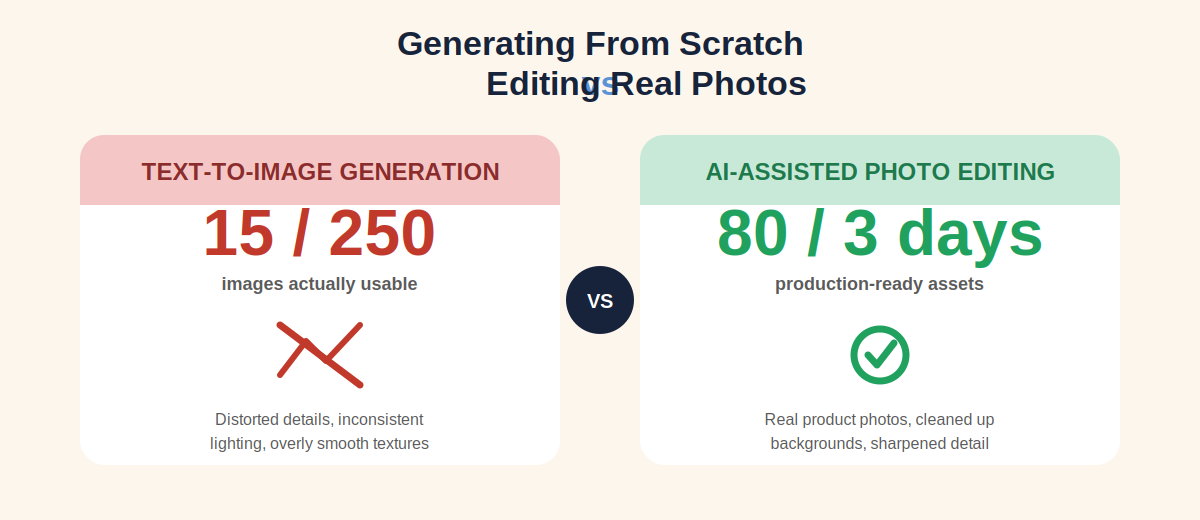
Last month, our digital media team ran into a major obstacle during a promotional campaign. We decided to allocate 70 percent of our visual budget to raw text to image tools, assuming we could easily generate all of our social media graphics and product backdrops from scratch.
The results were a massive wake up call.
Out of 250 completely new images generated by AI, only 15 were actually usable for our brand. For a deeper look at how the top generators actually compare on realism, check our Midjourney vs DALL-E 3 comparison for the best AI image generator in 2026. The remaining images contained familiar AI issues, distorted product details, inconsistent lighting, and overly smooth textures that made our products appear unrealistic. Our team spent more than 40 hours trying to perfect prompts that still could not consistently deliver production ready assets.
Everything changed when we stopped focusing on generating entirely new visuals and instead used the best ai image editing tools 2026 systems as editing assistants. Rather than replacing our photography, we enhanced it.
We used our existing product photos to remove distracting backgrounds, eliminate unwanted objects, and sharpen low resolution images. Within just three days, we produced more than 80 professional quality assets and recovered our campaign timeline.
That experience completely changed how our team evaluates AI editing software. It demonstrated why choosing the right utility utility editing tool is far more valuable than chasing the latest text prompt image generator.
Best Free AI Image Editing Tools 2026
If you are a solo blogger, social media coordinator, or small business owner working with a limited budget, you do not necessarily need an expensive subscription. Several browser based AI editors provide excellent background removal, resizing, and image enhancement features without requiring any local software installation.
Pixlr AI, Best for Quick Social Media Graphics
Pixlr is a lightweight, browser based photo editor built for fast daily image cleanup. Its automatic background removal tool isolates subjects in just a few seconds, making it easy to create polished product photos and social media graphics.
-
Who This Tool Is For: Small business owners, freelancers, bloggers, and content creators who need quick background removal or simple visual improvements.
-
Who Should Avoid It: Commercial photographers who require advanced color grading or professionals working extensively with large RAW image files.
-
Why We Recommend It: Pixlr is easy to access, requires virtually no setup, and refreshes its free usage allowance every 24 hours. That makes it an excellent choice for handling everyday editing tasks without paying for premium software. If you want to explore more no-cost options first, our free AI image generator guide rounds up the best zero-budget tools available right now.
CapCut AI Suite, Best for Auto Resizing Across Multiple Platforms
CapCut online AI workspace makes resizing images for multiple platforms incredibly efficient. Its intelligent cropping system automatically detects the primary subject, helping preserve important visual elements whether you are converting images for TikTok, Instagram, Facebook, or website banners.
-
Who This Tool Is For: Social media managers, marketers, and content creators who regularly publish the same visuals across multiple platforms.
-
Who Should Avoid It: Print designers and corporate branding professionals who require strict color accuracy and pixel perfect layouts for physical media.
-
Why We Recommend It: CapCut significantly reduces the time spent manually creating multiple image versions. Instead of cropping each design individually, creators can generate platform ready images in just a few clicks, saving hours of repetitive work.
Best Paid AI Image Editing Tools 2026
When you are handling high resolution client projects, professional product photography, or large scale commercial campaigns, free AI editors often reach their limits. Premium platforms provide greater accuracy, advanced automation, and workflows designed for professional production environments.
Adobe Creative Cloud (Firefly and Lightroom), The Professional Industry Standard
Adobe continues to be the benchmark for professional AI powered image editing. Its Generative Fill feature allows designers to expand images, remove distractions, or add new elements using simple text prompts. Unlike basic AI editors, Adobe analyzes the existing image to match lighting direction, camera blur, texture, and grain, helping edited areas blend naturally with the original photograph. Its Generative Fill feature allows designers to expand images, remove distractions, or add new elements using simple text prompts. Full technical details are available directly on Adobe’s official Firefly page, which documents all generative editing capabilities.
-
Who This Tool Is For: Professional graphic designers, marketing agencies, creative studios, and photographers already working within the Adobe ecosystem.
-
Who Should Avoid It: Casual users and small business owners who only need simple one click edits and want to avoid a more advanced learning curve.
-
Why We Recommend It: Adobe delivers exceptional editing precision while using a commercially safe AI training approach, making it one of the most reliable solutions for professional client work. For teams deciding between design ecosystems, our comparison of Canva AI vs Adobe Firefly breaks down which platform wins for different use cases.
Magnific AI, Best for High Fidelity 4K Image Upscaling
Magnific AI specializes in improving low resolution images. Rather than simply stretching pixels, it analyzes image context and reconstructs realistic details such as skin texture, wood grain, fabric patterns, and natural surface characteristics to produce significantly sharper results.
-
Who This Tool Is For: Website developers, print advertisers, agencies, and brand managers who regularly convert small web images into high quality marketing assets.
-
Who Should Avoid It: Budget conscious bloggers and creators who primarily publish standard resolution images online.
-
Why We Recommend It: Magnific AI currently provides one of the strongest AI upscaling experiences available, producing realistic results without creating the overly smooth or artificial appearance often associated with traditional image enlargement.
Imagen AI and Aftershoot, Best for High Volume Batch Processing
Professional photographers often return from weddings, events, or commercial shoots with thousands of images that require sorting and basic corrections before delivery. Imagen AI and Aftershoot automate much of this process by identifying blurry photos, detecting closed eyes, and applying baseline exposure adjustments based on your editing preferences.
-
Who This Tool Is For: Wedding photographers, event photographers, commercial studios, and media teams managing large image libraries.
-
Who Should Avoid It: Illustrators and fine art photographers who prefer manually adjusting every individual image.
-
Why We Recommend It: These platforms dramatically reduce the time spent sorting and performing repetitive edits, allowing photographers to deliver finished galleries much faster.
Critical Buying Guide Credit Economies and Hidden Software Costs
Before subscribing to any premium AI editing platform, it is important to understand how modern pricing models work. Most services no longer offer unlimited AI processing on entry level subscriptions. Instead, they allocate a fixed number of monthly credits or tokens that are consumed every time you use AI powered features. Understanding these credit systems can help you avoid unexpected costs while planning your monthly editing budget more effectively.
AI Editing Tool Comparison Matrix
| AI Editing Tool | Ideal Use Case | Starting Price 2026 | Free Tier | Hardware Requirements |
| Pixlr AI | Quick social media graphics | Free or Freemium | Daily Reset Credits | Runs entirely in a web browser |
| CapCut AI | Multi platform image resizing | Free | Full free web access | Runs entirely in a web browser |
| Adobe Firefly | Object additions and border fills | Twenty Two Dollars Per Month | Limited monthly credits | Cloud based processing |
| Magnific AI | High fidelity 4K upscaling | Fourteen Dollars Per Month | No free tier | High end cloud processing |
| Imagen AI | High volume batch automation | Pay per image billing | One Thousand free trial photos | Hybrid local cloud workflow |
How to Avoid Wasting Your Monthly Credits
One of the most common budgeting mistakes marketing teams make is assuming every AI editing task costs the same amount of credits. In reality, credit consumption varies significantly between features.
Simple tasks, such as removing a background object or adjusting an image aspect ratio, may require only a single credit. However, advanced operations like high quality 4K upscaling can consume up to 15 credits for a single image. If your team repeatedly performs high resolution processing throughout the month, it is possible to exhaust an entire credit allocation within just a few days.
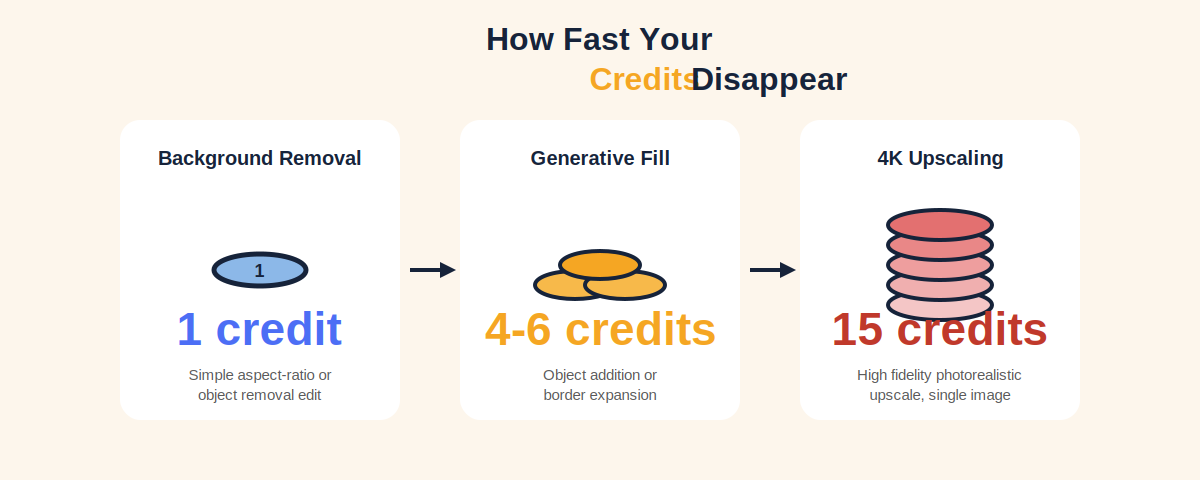
A more efficient workflow is to reserve expensive AI features for final, approved assets while using lower cost editing functions during the review and revision stages. This approach helps maintain predictable software costs without compromising production quality.
Practical Checklist Publishing Visual Content in 2026
Before publishing any AI assisted visual content in 2026, run through this checklist based on how the latest engine updates evaluate creative assets.
-
Does the visual asset display natural textures instead of plastic, overly smooth surfaces?
-
Have you verified that key brand details and product elements remain undistorted?
-
Are the lighting directions and shadow projections consistent across the whole composition?
-
Did you use cloud tools effectively to keep your hardware costs at zero?
-
Have you prioritized editing your authentic brand imagery over generating random graphics from scratch?
Conclusion
The visual standards expected by today’s search platforms continue to evolve, making utility focused AI editing far more valuable than relying solely on raw AI image generation. Our own campaign demonstrated this shift clearly. Spending time trying to generate entirely new visuals resulted in wasted hours, inconsistent quality, and very few usable assets. The real improvement came from enhancing authentic product photography instead of replacing it.
At Openaihit, we have observed that selecting the best ai image editing tools 2026 has to offer is the definitive secret to scaling your visual content framework. By choosing AI tools that match your workflow and carefully managing monthly credit usage, you can maintain predictable software costs while producing professional, high quality visuals that support stronger engagement and better search performance.
If you are just getting started, take five existing images from your brand library and edit them using the free versions of Pixlr AI or CapCut AI. Remove distractions, improve clarity, and compare the results. You will quickly see how a utility first editing workflow can significantly improve both efficiency and visual quality.
Frequently Asked Questions
What are the best free AI image editing tools in 2026?
The best free options are Pixlr AI for fast background removal and CapCut AI for automatically resizing images across multiple social media networks without a paid plan.
Does Adobe Photoshop include free AI image editing features?
No. Adobe professional tools like Generative Fill require a paid Creative Cloud subscription. Free access is limited to short term introductory trials.
What is the difference between an AI image generator and an AI image editor?
A generator builds a completely new image from text. An editor modifies existing photographs to improve clarity and composition while preserving authentic core details.
How do AI upscalers add photorealistic details to low resolution photos?
AI upscalers analyze context to reconstruct natural skin textures, wood grains, and fabric patterns rather than simply stretching pixels out artificially.
Which AI photo editor is best for processing large batches of images?
Imagen AI and Aftershoot are the industry leaders for high volume sorting, automated exposure matching, and library organization.
Can I use free AI image editing tools for commercial client work?
Many free tools permit commercial use, but you must check individual licensing policies. Premium platforms like Adobe provide the strongest legal commercial protections.
How do credit limits work across top AI image platforms in 2026?
Basic edits consume one credit, while advanced processes like 4K upscaling or large frame expansions can use up to 15 credits per image execution.
Which AI tools are best for cleaning up professional LinkedIn headshots?
Adobe Lightroom is ideal because its portrait algorithms enhance lighting and sharpen features while protecting natural skin texture.