AI Summary
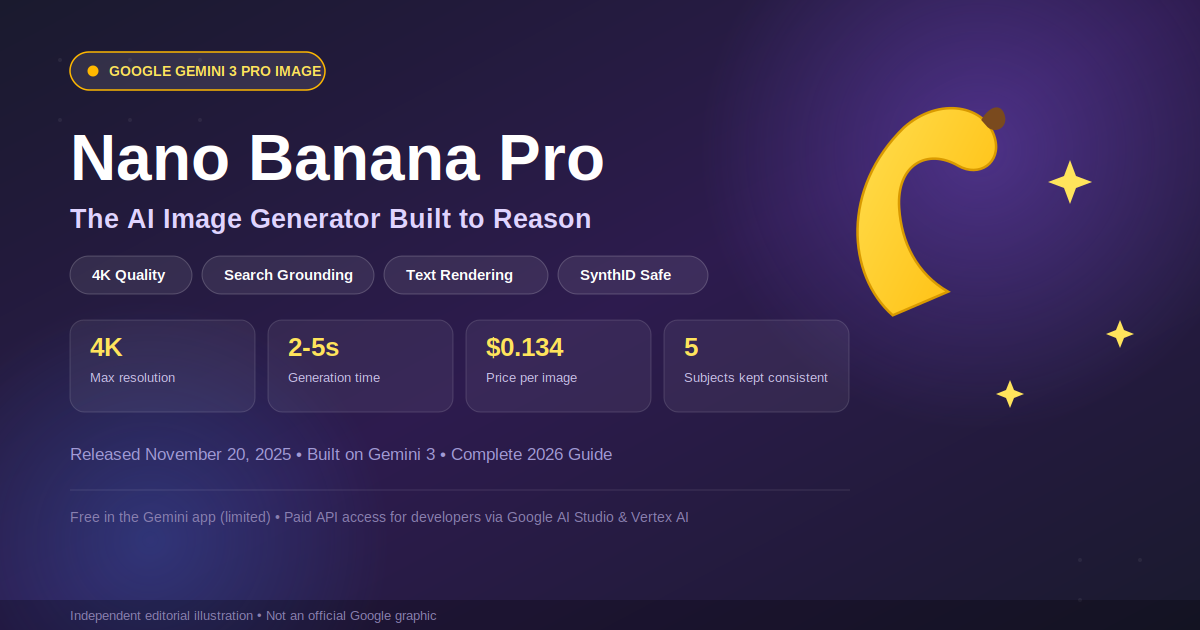
Nano Banana Pro is Google’s most advanced image-generation model, officially known as Gemini 3 Pro Image. It launched on November 20, 2025, built on top of Gemini 3. The model creates studio-quality images up to 4K, renders long blocks of text without breaking them, and pulls live facts from Google Search while generating infographics or diagrams. It’s free to try (with limits) inside the Gemini app, while developers pay per image through the API starting at $0.134.
Key Points
- Nano Banana Pro launched on November 20, 2025, as Gemini 3 Pro Image
- Generates images up to 4K resolution with the best text rendering Google has shipped so far
- Uses Google Search grounding to keep infographics, charts, and diagrams factually accurate
- Keeps up to five subjects visually consistent across multiple edits
- API pricing is $0.134 per image at 1K/2K resolution and $0.24 at 4K
- Every image carries a SynthID watermark plus C2PA Content Credentials
Introduction
If you’ve generated an AI image in the last few months, chances are it went through Google’s Gemini pipeline at some point. Nano Banana already became a household name in 2025. Now there’s a “Pro” version, and it’s built differently on the inside.
Nano Banana Pro isn’t just a bigger version of the original model. It runs on Gemini 3’s reasoning layer, which means it actually thinks through a prompt before it draws anything. That’s the part most write-ups skip, and it’s the part that matters if you’re deciding whether it’s worth the switch.
What Is Nano Banana Pro?
Nano Banana Pro is Google’s codename for Gemini 3 Pro Image, its flagship image generation and editing model. Where the original Nano Banana (and its faster sibling, Nano Banana 2) prioritize speed, Pro prioritizes accuracy.
The model was trained to reason through multi-step, multi-turn edits instead of just pattern-matching a prompt to pixels. Ask it to redesign a product photo for five different markets, and it keeps the product identical while adjusting language, layout, and cultural details around it. For the full technical rundown straight from the source, see Google DeepMind’s official Gemini 3 Pro Image model page.
“Nano Banana” started as an internal Google codename that leaked before launch, and stuck, because it was catchier than “Gemini 2.5 Flash Image.” Google never fully dropped it, even in official marketing. If you’re weighing Nano Banana Pro against other visual AI options, our breakdown of the best AI image creator tools compares Firefly, Midjourney, and Stable Diffusion for the same accuracy-vs-speed trade-off
Nano Banana Pro Release Timeline
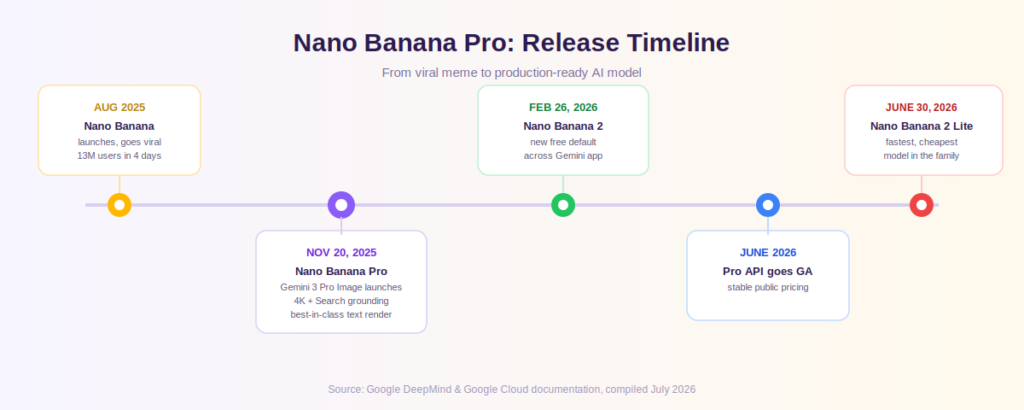
Nano Banana’s rise happened fast, even by AI standards. Here’s how it unfolded.
August 2025 — The original Nano Banana (Gemini 2.5 Flash Image) launched and went viral almost overnight, pulling in 13 million new users within four days.
November 20, 2025 — Nano Banana Pro (Gemini 3 Pro Image) launched, adding reasoning, 4K output, and live Google Search grounding.
February 26, 2026 — Nano Banana 2 (Gemini 3.1 Flash Image) launched as the new default across the Gemini app, Search, Lens, and Flow, offering faster and free-to-use generation.
June 2026 — Nano Banana Pro’s API went fully generally available (GA), with stable published pricing for developers.
June 30, 2026 — Nano Banana 2 Lite launched, the fastest and cheapest model in the family, aimed at high-volume, low-cost pipelines.
Nano Banana Pro: Real-Time Data & Stats (2026)
Here’s a snapshot of verified specs and figures for Nano Banana Pro, current as of mid-2026.
| Metric | Data |
| Official name | Gemini 3 Pro Image |
| Release date | November 20, 2025 |
| Built on | Gemini 3 |
| Maximum resolution | 4K (roughly 16MP) |
| Context window | 65,536 tokens |
| Maximum output tokens | 32,768 |
| Subject consistency | Up to 5 subjects per edit |
| API price (1K/2K image) | $0.134 per image |
| API price (4K image) | $0.24 per image |
| Input token price | $2.00 per million tokens |
| Output token price | $12.00 per million tokens |
| Watermarking | SynthID + C2PA Content Credentials |
| Access points | Gemini app, Google AI Studio, Vertex AI, Gemini Enterprise Agent Platform |
Data compiled from Google DeepMind’s official model page and Google Cloud documentation, current as of July 2026.
Key Features That Set Nano Banana Pro Apart
What actually separates Pro from the standard Nano Banana models isn’t a longer feature list, it’s how it handles the details that trip up other image generators.
Studio-Quality 4K Output
Nano Banana Pro generates crisp visuals at 1K, 2K, or 4K resolution. That’s high enough for print-ready posters, product mockups, and professional design work, not just social media thumbnails.
Advanced Text Rendering & Multilingual Support
Most AI image models still struggle with spelling words correctly inside an image. Nano Banana Pro is one of the few that reliably renders long passages, infographic labels, and multilingual text without garbling letters.
Real-Time Google Search Grounding
By tapping into Google Search, Nano Banana Pro can generate images grounded in current information , like an accurate weather map, a real stock chart, or a scene referencing a recent event. This is what makes its infographics genuinely useful instead of just decorative.
Multi-Image Blending & Character Consistency
The model can hold up to five distinct subjects consistent across a series of edits. That matters for storyboarding, product catalogs, or any workflow where the same character or object needs to reappear without drifting in appearance.
How to Use Nano Banana Pro (Step-by-Step)
- Open the Gemini app or Google AI Studio.
- Select “Create images” from the tools menu.
- Choose the Thinking or Pro model setting.
- Type a detailed prompt (subject + action + scene) or upload a reference image to edit.
- Refine with natural-language follow-up instructions — change lighting, swap colors, or adjust text.
- Download your image, or regenerate with “Redo with Pro” if you’re on Google AI Pro or Ultra.
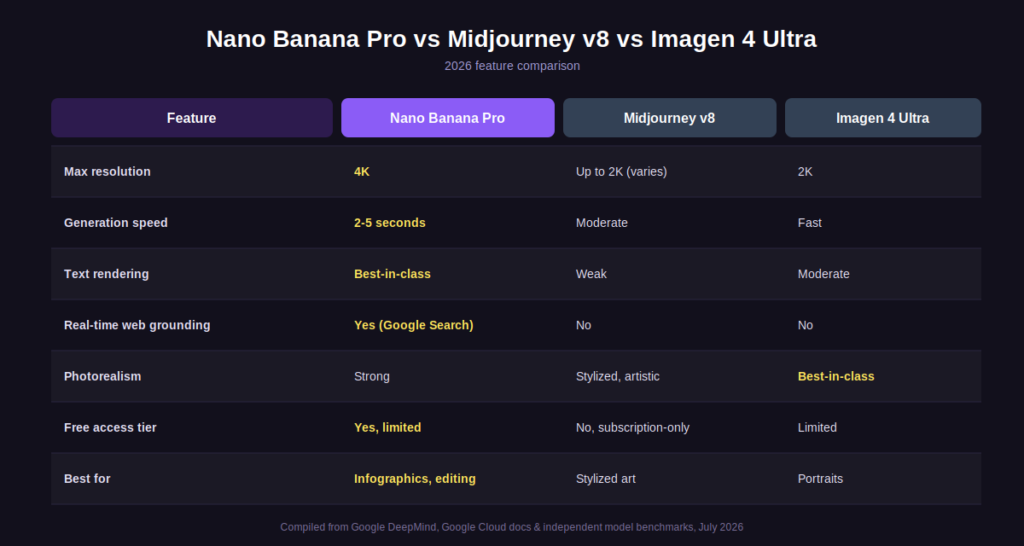
Nano Banana Pro vs Midjourney v8 vs Imagen 4 Ultra
| Feature | Nano Banana Pro | Midjourney v8 | Imagen 4 Ultra |
| Max resolution | 4K | Up to 2K (varies) | 2K |
| Generation speed | 2–5 seconds | Moderate | Fast |
| Text rendering | Best-in-class | Weak | Moderate |
| Real-time web grounding | Yes (Google Search) | No | No |
| Photorealism | Strong | Stylized, artistic | Best-in-class |
| Free access tier | Yes (Gemini app, limited) | No, subscription-only | Limited |
| Best for | Infographics, editing, brand consistency | Stylized, artistic visuals | Photorealistic portraits |
At a glance: Nano Banana Pro wins on real-time accuracy, in-image text, and editing consistency. Midjourney v8 still leads on stylized, artistic output. Imagen 4 Ultra edges ahead on raw photorealism. For a wider view of where these tools fit into a complete creative stack, see our top AI tools list, which ranks image, video, and productivity AI side by side.
Nano Banana Pro Pricing: Free vs Pro
Free Tier — available to anyone in the Gemini app with limited quotas, reverting to the faster Nano Banana 2 model once the quota runs out.
Google AI Pro / Ultra subscribers — get expanded access to Nano Banana Pro via the “Redo with Pro” option in the Gemini app.
Developers (API / AI Studio) — pay per image: $0.134 at 1K/2K resolution and $0.24 at 4K, billed through a linked API key with billing enabled.
Pros and Cons of Nano Banana Pro
Pros:
- Genuinely free to try, no credit card required
- Best-in-class text rendering inside images
- Real-time grounding for factual, current visuals
- Deep integration across Search, Ads, Workspace, and Gemini
Cons:
- Slower than lighter models like Nano Banana 2 Lite
- Occasional errors with small faces and fine detail
- Limited artistic “stylized” personality compared to Midjourney
- API access requires setting up billing, unlike some other Gemini models
Who Should Use Nano Banana Pro?
Nano Banana Pro is a strong fit for marketers building localized product mockups, designers producing infographics that need to be factually accurate, and e-commerce teams generating catalog-consistent product shots. If you mainly want fast, throwaway images for casual use, Nano Banana 2 or 2 Lite will likely serve you faster and cheaper. Designers building infographics and mockups may also want to compare it against dedicated options in our guide to the best AI tool for graphic design.
Final Verdict: Is Nano Banana Pro Worth It in 2026?
For anyone who needs facts, not just pretty pixels, Nano Banana Pro earns its “Pro” label. It won’t replace Midjourney for pure artistic experimentation, but for infographics, product design, and anything requiring readable text inside an image, it’s currently one of the strongest tools available. Curious how Gemini’s underlying model stacks up outside image generation? Our comparison of GPT-5 vs Claude vs Gemini breaks down the reasoning layer that powers Nano Banana Pro. for more info of ai tool explore Openaihit.
Conclusion
Nano Banana Pro has had a fast climb from internet meme to production-ready tool. Under a year after the original model went viral, its “Pro” sibling is now handling infographics, product mockups, and multilingual design work that older tools couldn’t touch reliably. For anyone building visual content at scale, it’s worth a real test drive.
FAQs
1. Is Nano Banana Pro free to use?
Yes, it’s available inside the Gemini app with limited quotas. Google AI Pro and Ultra subscribers get expanded access to the Pro model.
2. What’s the difference between Nano Banana Pro and Nano Banana 2?
Nano Banana Pro uses Gemini 3’s reasoning capabilities for higher accuracy, 4K output, and Search grounding. Nano Banana 2 trades some of that accuracy for speed and is the default free model a
cross Google’s consumer products.
3. Can Nano Banana Pro generate text inside images correctly?
Yes. It’s currently one of the strongest models for rendering legible, multilingual text in posters, infographics, and diagrams.
4. Is Nano Banana Pro better than Midjourney?
It depends on your use case. Nano Banana Pro wins for accuracy, real-time facts, and text rendering. Midjourney v8 still leads for stylized, artistic imagery.
5. Does Nano Banana Pro watermark its images?
Yes, every image includes an invisible SynthID watermark and C2PA Content Credentials so it can be identified as AI-generated.
6. Where can I access Nano Banana Pro besides the Gemini app?
It’s also available in Google AI Studio, Vertex AI, Google Search’s AI Mode, and the Gemini Enterprise Agent Platform for developers and businesses.