Choosing the right digital assistant can completely change your workflow, speed, and overall content quality. If you are trying to decide on the best setup for your work, the choice often comes down to a classic matchup: grammarly vs quillbot, with ChatGPT acting as the powerful wildcard.
The short answer is simple: Grammarly is the best choice for professional proofreading and real-time editing. QuillBot is the ultimate tool for sentence restructuring and academic citations. ChatGPT is the undisputed leader for raw content generation and heavy brainstorming. For the ultimate writing setup, many creators use ChatGPT to build their drafts, QuillBot to polish tricky paragraphs, and Grammarly to execute the final proofread.
This comprehensive best ai writing tool comparison will break down the features, pricing, and exact use cases for each platform. Whether you need a simple free ai writing checker or an advanced content generation system, this guide will help you determine if you should choose quillbot or grammarly, or pivot entirely to an ai grammar tool vs chatgpt.
The Core Competencies: An Overview of Each Tool
Before looking at the detailed features, it helps to understand what these platforms were originally built to do.
Grammarly: The Professional Proofreader
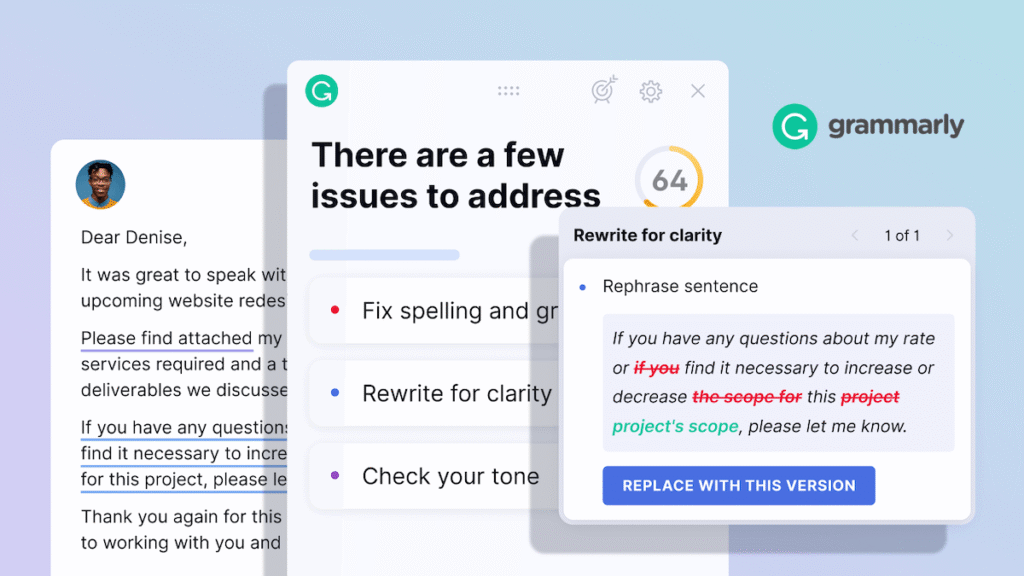
Grammarly remains the gold standard for writing precision. It acts like a strict editor looking over your shoulder. It catches typos, fixes complex punctuation issues, and scores your text based on clarity, engagement, and delivery. It works quietly in the background across your browser, emails, and desktop apps.
QuillBot: The Paraphrasing Powerhouse
QuillBot approaches writing from a different angle. Instead of just fixing a broken comma, QuillBot is designed to change how an entire sentence is structured. It specializes in rewriting, summarizing long documents, and building accurate academic citations in thousands of different styles.
ChatGPT: The Generative Giant
ChatGPT is not a traditional editor. It is a generative language model capable of creating full essays, long blog posts, scripts, and code from a simple prompt. While it can check your grammar when asked, its primary strength lies in creating new text from scratch and helping you brainstorm ideas.
Grammarly, QuillBot, and ChatGPT are three of the most popular options, but they exist within a much larger landscape our complete guide to AI tools for writing covers additional platforms like Writesonic, Sudowrite, and Jasper that may fit your specific content workflow even better.
Grammarly vs QuillBot vs ChatGPT: At a Glance
To give you a quick overview, here is how these three options compare across key features based on available data for 2026.
| Feature | Grammarly | QuillBot | ChatGPT |
| Primary Strength | Real-time grammar and style | Paraphrasing and summarizing | Content generation |
| Grammar Accuracy | Exceptionally high | Moderate to high | High |
| Workflow Integration | Works everywhere you type | Browser extension and web app | Web interface and API |
| Free Tier Value | Great for basic typos | Generous but has word limits | Highly capable for general use |
| Plagiarism Checker | Yes, against billions of pages | Yes, but restricted by page count | No native checker |
| Citation Generator | Yes, basic | Yes, highly advanced | Can create them if prompted |
Deep Dive: Grammar and Spell Checking
When looking for a free ai writing checker, you need to know how deep the tool actually digs into your text.
Grammarly’s Editing Precision
Grammarly is the clear winner for error detection. In standard testing on messy drafts, Grammarly consistently flags twice as many subtle errors as its competitors. It does not just look for misspelled words. It analyzes sentence flow, alerts you to passive voice, and tells you when your tone sounds too aggressive or too casual.
QuillBot’s Grammar Tool
QuillBot has a dedicated grammar checker that is completely free to use. It offers a convenient one-click button to fix all errors at the same time. This is excellent for rapid editing, but it can miss deeper stylistic flaws and complex contextual errors that Grammarly catches instantly.
ChatGPT as an Editor
Using an ai grammar tool vs chatgpt reveals an interesting trade-off. ChatGPT is highly accurate when you ask it to fix a piece of writing. However, it does not give you an interactive sidebar where you can accept or reject individual suggestions. Instead, it just outputs a completely new, clean version of your text.
If your primary need is polishing existing drafts rather than generating new content, our dedicated roundup of the best AI tools for editing documents covers specialized editors like Wordtune and EditMyEnglish that give you even more document-level control than any of these three tools alone.
The Battle of Rewriting: Paraphrasing Capabilities
Sometimes your writing is grammatically correct, but it just sounds clumsy. This is where paraphrasing tools become essential.
QuillBot’s Core Strength
If you are wondering whether to choose quillbot or grammarly for rewriting, QuillBot wins this category easily. It offers several specialized rewriting modes, including Formal, Creative, Simple, and Fluency. You can also use a slider to control how many synonyms the AI introduces into your sentences. It transforms dense, hard-to-read academic jargon into clear prose instantly.
Grammarly’s Tone Adjustments
Grammarly does offer full-sentence rewrites for clarity, but its features are more rigid. It focuses heavily on making your writing concise and professional. It will happily slice out unnecessary fluff, but it will not fundamentally redesign your creative paragraphs the way QuillBot does.
ChatGPT’s Flexible Transformations
ChatGPT is highly skilled at rewriting text, but it requires explicit prompting. You have to tell it exactly how to change the text, such as asking it to rewrite a paragraph in the style of a specific author or for a specific target audience. It is incredibly powerful but lacks the fast, click-and-change interface that makes QuillBot so efficient for manual editing.
Content Generation and Brainstorming
This is the area where the distinction between a traditional writing assistant and generative AI becomes completely clear.
ChatGPT’s Creative Freedom
ChatGPT can write a comprehensive outline, draft a thousand words of content, and generate title ideas in under a minute. It acts as a collaborative partner. If you run into writer’s block, you can talk to it to work through your ideas. Neither Grammarly nor QuillBot can compete with this level of creative output.
Grammarly and QuillBot’s Built-In AI Features
Both Grammarly and QuillBot have added generative AI features over time. Grammarly provides smart prompts to help you polish emails or draft quick replies. QuillBot has a Co-Writer tool that helps you research and write essays within their ecosystem. However, these features are designed to support your existing writing rather than replacing the blank page entirely.
Workflow and Integration: Where Do You Type?
A tool is only helpful if it fits naturally into your daily routine without causing friction.
Grammarly’s Universal Presence
Grammarly dominates workplace communication because its desktop application and browser extension follow you everywhere. Whether you are typing a quick message in Slack, drafting an email in Outlook, or updating a ticket in Jira, Grammarly highlights errors in real time before you hit send.
QuillBot’s Focused Workspace
QuillBot works best within its own web application, though it does offer useful extensions for Google Docs and Microsoft Word. It is a destination workspace. You usually copy your messy draft from another source, paste it into QuillBot to rewrite or summarize it, and then move it to its final destination.
ChatGPT’s Standalone Interface
ChatGPT operates almost entirely as a separate tab in your browser. You have to actively go to the platform, paste your text, give it instructions, and copy the results back out. While integrations exist, it is fundamentally designed as a conversational destination rather than a background assistant.
Academic Integrity and Citation Management
For students and researchers, the requirements for a writing assistant are unique. Accuracy and proper source tracking are mandatory.
QuillBot’s Research Toolkit
QuillBot is built heavily for academic tasks. Its citation generator supports over ten thousand styles, including APA, MLA, and Chicago formats. It allows you to paste a web link or an academic paper ID and instantly builds a flawless bibliography. It also includes a text summarizer that can take a long research article and condense it into bullet points.
For students specifically, the choice between these three tools becomes even more strategic our dedicated guide on the best AI tools for students breaks down how QuillBot, ChatGPT, and Grammarly each serve different academic needs, from citation building to plagiarism-free submissions.
Grammarly’s Plagiarism Protection
Grammarly Pro features an incredibly deep plagiarism checker that compares your writing against billions of web pages and academic databases. This ensures your work is completely original before submission. It also offers a basic citation finder, though it is less robust than QuillBot’s dedicated system.
Pricing and Value Analysis
Understanding what you get for your money is a major factor when choosing the best ai writing tool comparison plan for your budget.
-
Grammarly: The free version is highly reliable for basic spelling and typos. The paid tier is an investment, sitting at an estimated twelve dollars per month when billed annually. It is designed primarily for professionals and graduate students who cannot afford mistakes.
-
QuillBot: This is the budget friendly option. The premium plan sits at an estimated four to ten dollars per month depending on your subscription length. The free tier gives you unlimited grammar checks and allows you to paraphrase up to 125 words at a time.
-
ChatGPT: The standard model is completely free and highly versatile. Upgrading to the premium tier costs twenty dollars per month, providing access to their most advanced language models and data analysis features.

Which Tool Should You Choose?
The right choice depends completely on your specific goals and your daily writing habits.
You should choose Grammarly if:
-
You are a business professional, content marketer, or executive who needs flawless communication.
-
You need real-time error correction across multiple apps like Slack, Gmail, and Word.
-
You want to run deep plagiarism checks to protect your publishing credibility.
You should choose QuillBot if:
-
You are an undergraduate student or academic researcher working with heavy source material.
-
You frequently need to rephrase sentences, condense long articles, or manage complex bibliographies.
-
You need a premium writing assistant but are working with a tight budget.
You should choose ChatGPT if:
-
You need to break through writer’s block and generate long pieces of content from scratch.
-
You want a highly flexible AI partner that can brainstorm ideas, write outlines, and adapt to custom prompts.
-
You prefer an interactive editing experience where you can ask follow-up questions about your text.
Conclusion
There is no single winner in the matchup of grammarly vs quillbot and ChatGPT because each platform serves a completely different part of the creative process. If your priority is precision and professional editing, Grammarly is your best asset. If you need to reword complex thoughts and build citations, QuillBot is the ideal fit. If you want a tool that can generate ideas and write full drafts from scratch, ChatGPT remains unmatched.
The most successful writers do not limit themselves to just one program. They combine the unique strengths of these tools to create a seamless, high-speed workflow. For more insights on maximizing advanced digital platforms, optimizing your content strategy, and staying ahead of the latest industry shifts, be sure to explore the resources available at openaihit.
FAQs About AI Writing Tools
Is Grammarly more accurate than QuillBot?
Based on available testing data, Grammarly is significantly more accurate for advanced grammar, deep punctuation, and stylistic consistency. QuillBot is excellent for basic corrections, but its primary strength is sentence restructuring rather than pure proofreading.
Can ChatGPT replace Grammarly entirely?
ChatGPT can clean up your text beautifully, but it does not replace Grammarly’s core workflow. Grammarly works quietly inside your browser and apps as you type, whereas ChatGPT requires you to copy and paste your text into a separate window every time you need a check.
Which tool is better for avoiding plagiarism?
Grammarly is much better for plagiarism detection because its pro version scans billions of web pages with no strict text limitations. QuillBot does include a plagiarism checker, but it restricts users to a limited number of pages per month.
Is there a completely free AI writing checker?
Yes, both Grammarly and QuillBot offer highly capable free versions. QuillBot allows you to check your grammar for free with a single click, while Grammarly’s free extension fixes essential spelling and grammar errors across almost every website you visit.