Have you ever wanted to create a professional-looking image but struggled with design software or expensive photography? AI image generators have made this process easier, and Midjourney is one of the popular tools people consider.
Is Midjourney worth it? Yes, Midjourney is worth considering if you regularly create high-quality AI images for websites, marketing, social media, or creative projects. It offers impressive image generation, different artistic styles, and useful creative controls. However, its subscription cost, generation limits, and privacy restrictions may not suit everyone.
Midjourney is not just for professional designers. Bloggers, business owners, marketers, and beginners can also use it to turn written ideas into images. But before paying for a subscription, you should understand what the platform offers and where it falls short.
In this article, we will explore Midjourney’s subscription plans, features, limitations, and overall value to help you decide whether it is the right tool for your needs.
AI Overview:
Midjourney is an AI image generation platform that creates images from written prompts. It is worth paying for if you need detailed, creative, and visually attractive images regularly.
Here is a quick overview:
- Best for: Designers, artists, bloggers, marketers, and content creators.
- Main benefit: High-quality AI-generated images.
- Subscription: Basic, Standard, Pro, and Mega.
- Starting price: $10 per month.
- Free plan: No permanent free subscription is listed in its current plan comparison.
- Main limitation: Limited Fast GPU time and privacy options on lower plans.
- Best value for regular users: Standard plan.
Key Takeaways
- Midjourney creates images from simple written descriptions.
- It offers four paid subscription plans.
- The Basic plan starts at $10 per month.
- Standard, Pro, and Mega include unlimited image generation in Relax Mode.
- Stealth Mode is available with Pro and Mega.
- It is useful for marketing visuals, product concepts, and digital artwork.
- It may struggle with exact details and precise editing.
- Commercial use is allowed subject to Midjourney’s terms.
- It offers better value to regular image creators than occasional users.
What Is Midjourney and How Does It Work?

Midjourney is an AI-powered image generation platform that turns written descriptions into pictures.
You do not need professional drawing skills or advanced design knowledge to use it. Simply describe the image you want, and Midjourney generates visual options based on your instructions.
For example, you can enter a prompt asking for:
- A modern office with large windows and natural lighting.
- A luxury product photograph with a clean background.
- A realistic travel scene showing a beautiful coastal town.
- A creative illustration for a children’s book.
- A cinematic image for a YouTube thumbnail.
Midjourney uses your description to create images based on the subject, style, lighting, and composition.
Midjourney Subscription: How Much Does It Cost?

Before deciding whether Midjourney is worth it, you should understand its subscription cost.
Midjourney offers four main paid plans: Basic, Standard, Pro, and Mega. Each plan provides a different amount of Fast GPU time and access to additional features. If you are exploring other AI tools, you can also read our ElevenLabs review and learn how AI agents work to understand other ways AI can support creative and business workflows.
| Plan | Monthly Cost | Annual Cost | Fast GPU Time |
| Basic | $10 | $96 | 3.3 hours |
| Standard | $30 | $288 | 15 hours |
| Pro | $60 | $576 | 30 hours |
| Mega | $120 | $1,152 | 60 hours |
1. Basic Plan – $10 Per Month
The Basic plan is the entry-level subscription for people who want to explore Midjourney without spending too much money.
It includes 3.3 hours of Fast GPU time per month, which equals approximately 200 GPU minutes.
The Basic plan does not include Relax Mode or Stealth Mode.
Who should choose it?
- Beginners learning AI image generation.
- People creating occasional images.
- Students exploring creative projects.
- Users with a limited monthly budget.
If you only create a few images for personal projects, Basic can be a reasonable starting point.
2. Standard Plan – $30 Per Month
The Standard plan provides more generation time and adds unlimited image generation through Relax Mode.
This is an important difference because you can continue generating images without purchasing additional Fast hours, as long as you are comfortable waiting.
Who should choose it?
- Bloggers creating regular featured images.
- Social media managers.
- Freelance designers.
- Content creators producing images every week.
- Small businesses creating marketing visuals.
3. Pro Plan – $60 Per Month
The Pro plan is designed for people who use Midjourney more frequently and need additional flexibility. It includes 30 hours of Fast GPU time per month and unlimited image generation through Relax Mode.
One of its most important features is Stealth Mode, which allows users to keep their creations private on Midjourney’s website.
Who should choose it?
- Professional designers.
- Marketing agencies.
- Businesses working on private creative projects.
- Artists producing images regularly.
- Users who need more Fast GPU time.
If privacy is important to your work, Pro offers an advantage that Basic and Standard do not provide.
4. Mega Plan – $120 Per Month
The Mega plan is the highest-priced standard subscription and is designed for users with heavy image-generation requirements. It includes 60 hours of Fast GPU time per month and unlimited image generation through Relax Mode.
This plan is more suitable for professional users who create large volumes of visual content and need additional generation capacity.
Who should choose it?
- Large creative teams.
- Professional studios.
- High-volume content producers.
- Agencies handling several visual projects.
- Businesses that need substantial generation capacity.
What Makes Midjourney Worth Using?
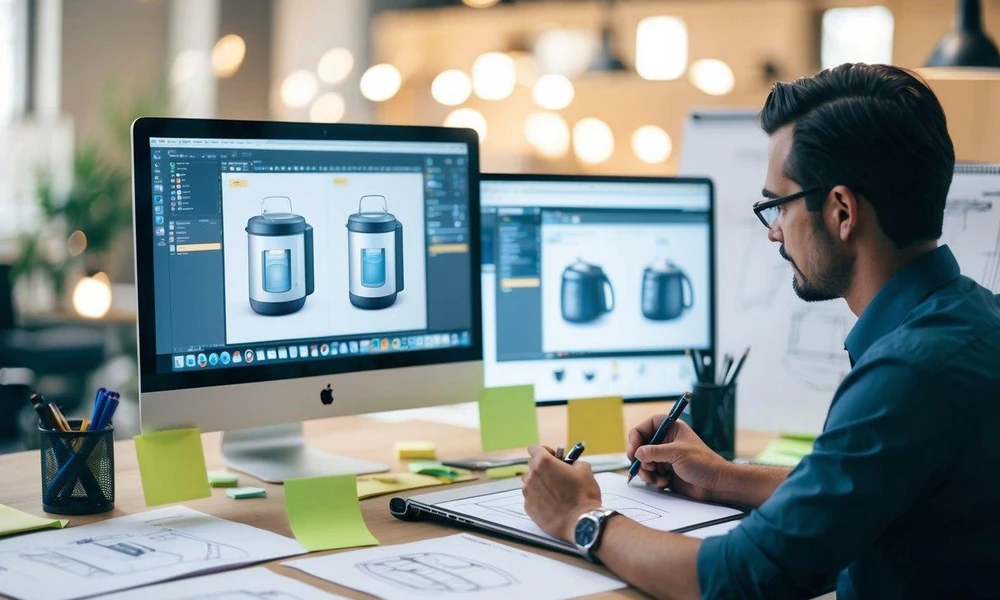
Midjourney offers more than basic text-to-image generation. Its value comes from the visual quality, creative flexibility, and different ways users can turn ideas into images.
1. High-Quality Image Generation
One of Midjourney’s biggest strengths is its ability to create detailed and attractive images.
For example, a business owner can create a professional product concept without hiring a photographer for an initial visual idea.
This is useful for:
- Website banners.
- Blog featured images.
- Social media graphics.
- Advertising concepts.
- Digital artwork.
The quality of the result still depends on your prompt, chosen settings, and the type of image you want.
2. Different Artistic Styles
Not every project needs a realistic photograph. Sometimes you need a digital painting, cartoon illustration, cinematic scene, or creative artwork.
For example, the same subject can be presented as:
- A realistic studio photograph.
- A 3D illustration.
- A cinematic movie scene.
- A watercolor painting.
- A futuristic digital artwork.
This flexibility makes Midjourney useful for people working on different types of creative projects.
3. Useful for Marketing and Business Content
Businesses need visual content for websites, advertisements, email campaigns, and social media. Creating every image manually can take time, especially when you need several design ideas for one campaign. Midjourney can help marketers create visual concepts quickly.
For example, a skincare company could generate different product photography concepts before deciding on the final advertising direction.
A blogger could also create a custom featured image instead of using the same stock photography found on many other websites. However, AI-generated images may still need editing before they are ready for professional use.
4. Image Variations and Creative Exploration
Sometimes the first image is not exactly what you wanted. Perhaps the lighting is too dark, the background is too busy, or the subject is positioned incorrectly.
Midjourney allows users to explore image variations and adjust their creative direction. This makes it easier to compare different ideas without starting the entire process from scratch every time. For designers, this feature can be especially useful during the early stages of a project when the main goal is to explore possibilities.
5. Website-Based Image Creation
Midjourney initially became widely known through its Discord-based image generation experience.
The web interface provides access to image creation, organization, and editing features. This is helpful for people who prefer working in a visual interface rather than learning several Discord commands.
It also makes the platform more accessible to users who are new to AI image generation.
Midjourney Limitations: What Should You Know Before Paying?

Midjourney can create impressive images, but that does not mean every result will be perfect.
Before purchasing a subscription, you should understand its limitations. These issues can affect your workflow, especially if you need accurate images for commercial projects.
1. Limited Fast GPU Time
Every Midjourney subscription includes a specific amount of Fast GPU time. The Basic plan provides 3.3 hours, while Standard, Pro, and Mega offer 15, 30, and 60 hours respectively.
When your Fast GPU time runs out, you may need to wait for your monthly allowance to reset, use Relax Mode if your plan includes it, or purchase extra GPU time.
One detail that many buyers overlook is that unused monthly Fast GPU time does not roll over to the next month. This means you could pay for hours that you never use.
2. Limited Privacy on Lower Plans
Privacy is another important limitation.
Midjourney operates as an open creative community. By default, your creations are publicly viewable and remixable.
Stealth Mode is available only with Pro and Mega subscriptions.
This matters if you are creating:
- Unreleased product concepts.
- Private marketing campaigns.
- Client design concepts.
- Business-related visual ideas.
If you are working with confidential material, you should understand how public visibility works before uploading prompts or reference images.
3. Results May Not Follow Every Instruction
Midjourney understands written prompts, but it does not always produce exactly what you describe.
For example, you might request a product image with three specific objects, a particular background, and precise positioning.
This can create problems when you need:
- Accurate product packaging.
- Specific object placement.
- Consistent brand elements.
- Exact visual proportions.
- Detailed technical illustrations.
4. Text and Typography Can Be Challenging
Creating images with accurate text is another area where AI image generators can require extra work.
For example, if you want an advertisement containing a product name, slogan, and price, the generated text may not always match your instructions.
- Promotional posters.
- Product labels.
- Website advertisements.
- Infographics.
- Social media announcements.
5. Subscription Is Required for Regular Image Generation
Midjourney’s current subscription comparison lists four paid plans and does not include a permanent free tier. This means users who want to generate images regularly need an active subscription.
For someone who only wants to create one or two images occasionally, paying every month may not be worthwhile.
It is better to compare your expected image-generation needs with the available subscription options before spending money.
6. Commercial Use Has Important Conditions
Midjourney allows subscribers to use images they create commercially, subject to its terms and applicable laws. However, there is an important business-related exception.
If your company generates more than $1 million in annual gross revenue, Midjourney requires a Pro or Mega subscription for commercial use under its current terms. You also cannot claim ownership of another user’s image simply because you upscale it.
This is particularly important for agencies, businesses, and professional creators who plan to use AI-generated visuals in paid projects.
Is Midjourney Good Value for Money?
The value of Midjourney depends on how often you generate images and what you use them for.
| User Type | Suitable Plan | why |
| Beginner | Basic | Low starting price |
| Casual creator | Basic | Limited monthly image generation |
| Blogger | Standard | Unlimited image generation in Relax Mode |
| Social media marketer | Standard | Regular creative content |
| Professional designer | Pro | More Fast time and private generation |
| Creative agency | Pro or Mega | Higher generation capacity |
| Large production team | Mega | More Fast GPU time and concurrent tasks |
The important thing is not to choose the most expensive subscription simply because it offers more hours.
For example, if you create a few images every week and do not need private generation, Standard may provide enough capacity without the additional expense of Pro. You can also explore other creative platforms through our Jasper AI review, compare the best AI video generators, or read our HeyGen vs Synthesia comparison to evaluate other AI content creation options.
Quick Comparison
| Platform | Main Strength | Consideration |
| Midjourney | Artistic and detailed visuals | Paid subscription required |
| ChatGPT | Conversational creation and editing | Usage limits depend on plan |
| Adobe Firefly | Design and editing workflow | Features depend on Adobe plan |
Who Should Use Midjourney?
Midjourney is not designed for every type of user. Its value becomes clearer when you match its features with your actual work.
Bloggers and website owners: Midjourney can help create original featured images, illustrations, and visual content for blog posts. It is useful when you want images that match the subject of an article rather than relying entirely on stock photos.
Social media managers: If you regularly prepare Instagram posts, Facebook campaigns, or Pinterest graphics, Midjourney can help you explore creative visual ideas.
Graphic designers: Designers can use it to develop concepts, explore color combinations, and create visual inspiration before preparing final designs.
Small business owners: Businesses can generate product concepts, advertising ideas, and website visuals without commissioning every initial design.
Artists and creative professionals: People who enjoy experimenting with different artistic styles can use Midjourney to explore ideas and develop creative projects.
However, if you need precise technical diagrams, exact product details, or complete control over every design element, you may need additional editing software.
Tips to Get Better Results From Midjourney
Getting good results is not only about having an expensive subscription. Your prompts and creative approach also matter.
Here are some practical tips:
- Describe the subject clearly: Explain exactly what you want to appear in the image.
- Mention the visual style: Specify whether you need realistic photography, digital artwork, or an illustration.
- Include lighting details: Words such as natural lighting, soft shadows, and studio lighting can help guide the visual direction.
- Explain the background: Describe whether you want a simple background, outdoor environment, or professional setting.
- Experiment with variations: Generate different versions before selecting your preferred result.
- Use reference images carefully: Visual references can help guide the appearance of generated images.
- Edit the final result: Use an additional design tool when you need exact text, logos, or product details.
1. Midjourney Subscription

This keyword focuses on the paid plans offered by Midjourney. Readers searching for this term want to know how much Midjourney costs and what they receive with each subscription.
You can explain the available plans, monthly and yearly pricing, Fast GPU hours, Relax Mode, and privacy features. Also discuss which plan is suitable for beginners, regular users, and professional designers. This section will help readers choose a subscription based on their budget and image-generation needs.
2. Midjourney Limitations
This keyword covers the disadvantages and restrictions users may experience while using Midjourney. Although it creates high-quality images, it does not always produce perfect results.
You can explain common challenges, such as generating accurate text inside images, following complex prompts, editing small details, and maintaining consistency between images. You can also discuss subscription-related restrictions, including limited Fast GPU hours on certain plans. This section helps readers understand what Midjourney cannot do well before paying for it.
3. Midjourney Value

This keyword focuses on whether Midjourney provides enough benefits to justify its subscription cost. Readers want to know if the image quality, creative tools, and available features are worth the money.
You can explain how Midjourney saves time, helps create professional-looking visuals, and supports designers, bloggers, marketers, and content creators. Also compare its benefits with its pricing and limitations. For example, people who generate images regularly may find it a good investment, while occasional users may not need a paid subscription.
Secondary Keywords Summary
| Secondary keyword | What to explain |
| Midjourney Subscription | Plans, pricing, features, and subscription options |
| Midjourney Limitations | Drawbacks, restrictions, and image-generation challenges |
| Midjourney Value | Benefits, cost-effectiveness, and whether it is worth paying for |
Conclusion
So, is Midjourney worth it? For people who regularly create AI images, the answer is yes. It offers impressive image quality, different artistic styles, and useful creative features for designers, bloggers, marketers, and businesses.
However, its subscription cost and limitations make it important to choose carefully. The Basic plan is suitable for beginners, Standard offers better value for regular image creation, and Pro is a practical option for professionals who need privacy and more Fast GPU time.
Before subscribing, think about how often you create images and what you expect from the platform. The real value of Midjourney is not just creating beautiful images; it is turning creative ideas into useful visuals without spending hours designing everything from scratch.
Frequently Asked Questions (FAQs)
1. Is Midjourney worth paying for?
Yes, Midjourney can be worth paying for if you regularly create detailed AI images for websites, marketing, artwork, or professional projects. However, occasional users may not need a monthly subscription.
2. How much does Midjourney cost?
Midjourney offers four subscription plans:
- Basic: $10 per month.
- Standard: $30 per month.
- Pro: $60 per month.
- Mega: $120 per month.
Annual billing provides a 20% discount, with the full yearly payment charged upfront.
3. Does Midjourney have a free plan?
Midjourney’s current subscription comparison lists four paid plans and does not list a permanent free subscription. You need an active paid subscription to generate images.
4. Which Midjourney subscription is best?
The Standard plan is a practical option for regular image creators because it includes 15 Fast GPU hours and unlimited image generation in Relax Mode. Pro is more suitable when you need Stealth Mode and additional Fast GPU time.
5. What are the biggest limitations of Midjourney?
Its main limitations include limited Fast GPU time, public image visibility on lower plans, difficulty following some detailed instructions, and occasional problems with text and precise visual elements.
6. Can I use Midjourney images commercially?
Yes. Subscribers can generally use images they create commercially under Midjourney’s terms. However, companies with more than $1 million in annual gross revenue must have a Pro or Mega subscription for commercial use. Copyright laws and third-party rights also apply.