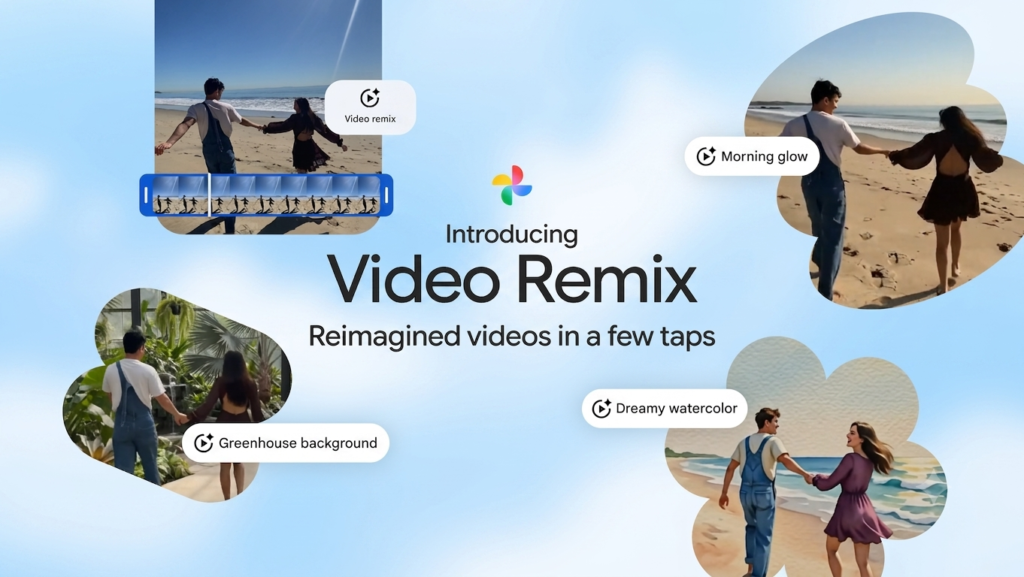
AI video editing has evolved far beyond simple filters and automated transitions. Today’s tools can transform ordinary footage into cinematic scenes, apply entirely new visual styles, and reduce hours of editing to just a few prompts. Google is entering this space with Google Video Remix, an AI-powered feature designed to help users restyle existing videos using generative AI.
But is it simply another AI video editor, or does it offer something genuinely different? More importantly, can it compete with established platforms like Runway for creators who need professional-looking results?
In this review, we’ll explore how Google Video Remix works, its standout features, real-world performance, strengths, limitations, and whether it’s worth using in 2026. Whether you’re a content creator, marketer, or casual user looking to enhance videos with AI, this guide will help you decide if Google Video Remix fits your workflow.
AI Overview
Google Video Remix is Google’s AI-powered video editing feature that transforms existing clips into new visual styles using prompt-based editing. Rather than creating videos from scratch, it focuses on applying cinematic effects, artistic styles, and scene transformations while preserving the original footage.
Integrated into Google’s growing AI ecosystem, it offers an intuitive editing experience for creators who want faster results without mastering traditional video editing software. While it excels in simplicity and AI-assisted creativity, advanced editors may still prefer tools like Runway for greater production control.
Key Takeaways
- IT transforms existing videos using AI-driven style transfer.
- Prompt-based editing makes cinematic effects accessible to beginners.
- Google Photos integration simplifies editing everyday videos.
- Runway offers more advanced professional controls, while Google focuses on speed and ease of use.
- It’s an excellent choice for creators who want polished videos with minimal editing experience.
What Is Google Video Remix?
Google Video Remix is an AI-powered video editing feature that transforms existing videos into new visual styles using simple text prompts. It applies cinematic effects, artistic looks, and scene enhancements without requiring advanced editing skills, making video creation faster and more accessible.
What Is Google Video Remix?
Google Video Remix is an AI-powered video editing feature that transforms existing videos using natural language prompts instead of traditional editing tools. Rather than manually adjusting timelines, keyframes, or effects, users simply describe the style they want, and the AI generates a remixed version of the original footage.
How Does Google Video Remix Work?
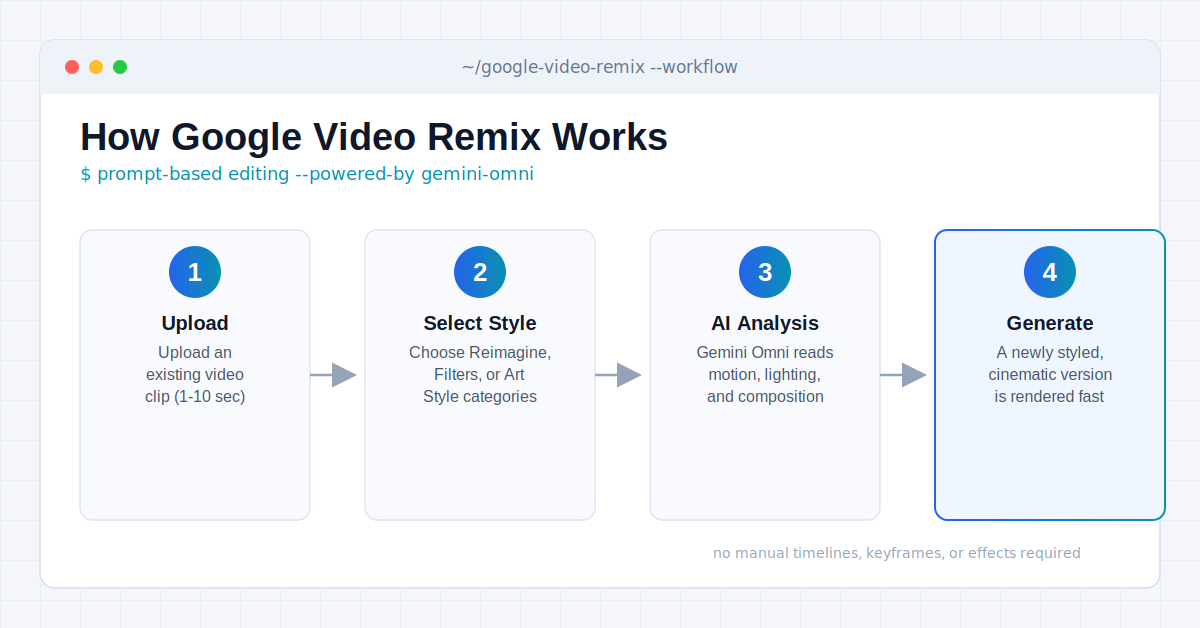
Instead of relying on manual editing, It uses generative AI to understand your prompt and apply a new visual style to your video.
The process is simple:
- Upload an existing video.
- Select a preset AI style category such as Reimagine, Filters, or Art Styles.
- Let the AI analyze the footage.
- Generate a newly styled version of the original video.
This workflow makes professional-looking edits accessible even to users with little or no editing experience.
Key Capabilities
Google Video Remix offers several AI-powered editing features, including:
- Prompt-based video editing
- AI video style transfer
- Cinematic visual effects
- Scene transformation
- Consistent visual styling
- Fast automated rendering
- Simple editing workflow
These tools allow creators to produce polished videos in minutes rather than spending hours on manual editing.
Integration with Google’s AI Ecosystem
One of biggest advantages is its connection to Google’s growing AI ecosystem.
It works alongside other Google AI video tools 2026, creating a more connected workflow for creators who already use Google’s products and services.
Instead of switching between multiple editing platforms, users can complete much of their creative process within Google’s ecosystem.
AI Video Style Transfer
A standout feature is AI video style transfer.
Unlike traditional filters that only adjust colors, It analyzes the video’s content and applies a consistent artistic style throughout the entire clip.
This helps preserve natural motion while producing a more cinematic and professional appearance.
Google Photos Video Remix
Google is also expanding support through Google Photos Video Remix.
This integration allows users to edit personal videos directly from their Google Photos library, making AI-powered enhancements much easier for everyday users.
It’s especially useful for:
- Family videos
- Travel memories
- Social media clips
- Event highlights
- Short-form content
Is It a Replacement for Professional Video Editors?
Not completely.
Google Video Remix is designed for speed and simplicity rather than advanced production work. It’s an excellent choice for creators who want cinematic results with minimal effort, while professional editors working on complex projects may still prefer dedicated tools like Runway or Adobe Premiere Pro.
Key Features of Google Video Remix
It focuses on making AI-powered video editing fast, intuitive, and accessible. Instead of replacing traditional video editors, it simplifies common editing tasks by combining generative AI with prompt-based controls.
Prompt-Based Video Editing
The core feature of Google Video Remix is prompt-driven editing. Rather than manually typing complex strings, you select from carefully curated style cards. The underlying Gemini Omni engine handles the heavy lifting, giving you options like cinematic relighting (such as Golden Hour) or artistic overhauls (like Anime and Watercolor) with a single tap.
Examples include:
- “Make this video look cinematic.”
- “Transform it into an anime style.”
- “Add dramatic sunset lighting.”
- “Give it a vintage film appearance.”
This conversational workflow makes editing approachable for beginners while saving time for experienced creators.
AI Video Style Transfer
One of the standout capabilities is AI video style transfer. Instead of applying simple filters, the AI analyzes the video’s subjects, motion, lighting, and composition before generating a consistent visual style throughout the entire clip.
Popular styles may include:
- Cinematic
- Watercolor
- Comic book
- Vintage film
- Futuristic
- Fantasy
- Sketch illustration
The result feels more natural than traditional filter-based editing because the transformation is applied intelligently across every scene. If image-based style transfer interests you too, this comparison of Canva AI vs Adobe Firefly covers a similar creative use case for still visuals.
Cinematic Scene Transformation
It can dramatically change the mood of a video without requiring manual editing.
For example, it can:
- Enhance lighting
- Change color grading
- Improve atmosphere
- Add cinematic depth
- Restyle visual elements
This makes ordinary smartphone footage appear much more polished.
Fast AI Processing
Speed is another major advantage. Instead of spending hours learning editing software, creators can generate multiple video variations within minutes using different prompts.
This is especially useful for:
- Social media creators
- Marketing teams
- Small businesses
- YouTubers
- Content agencies
Beginner-Friendly Experience
Unlike professional editing software, Google Video Remix requires very little technical knowledge. The interface is designed around simple prompts instead of advanced editing controls, making it accessible to users who have never edited a video before.
Feature Summary
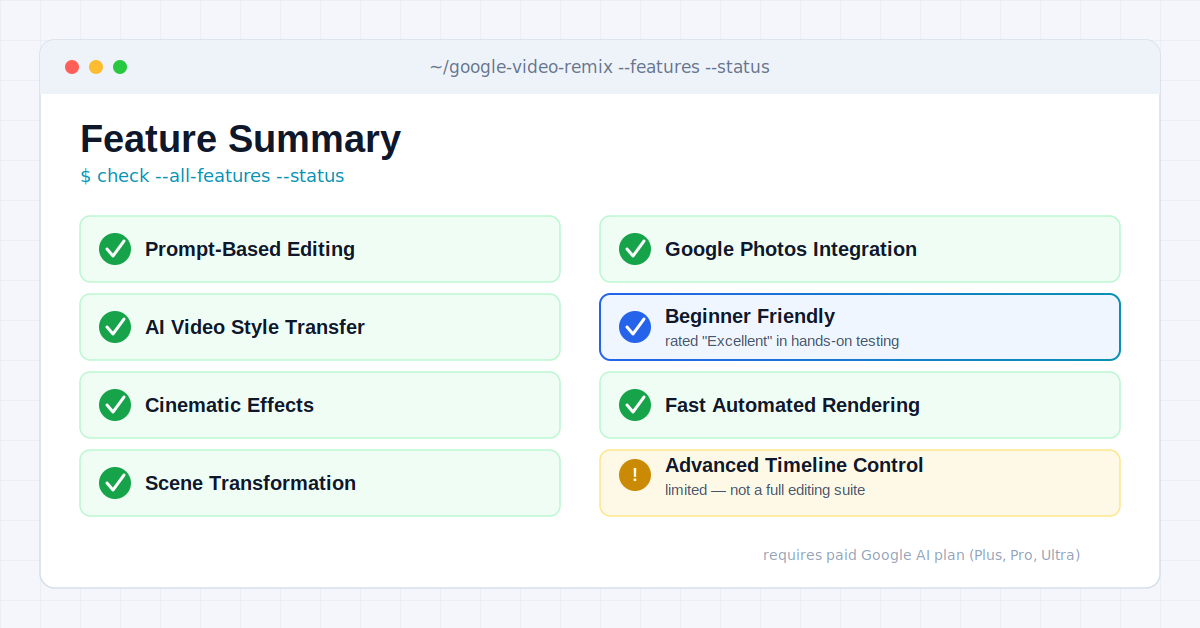
| Feature | Available |
| Prompt-Based Editing | Yes |
| AI Video Style Transfer | Yes |
| Cinematic Effects | Yes |
| Scene Transformation | Yes |
| Google Photos Integration | Yes |
| Beginner Friendly | Excellent |
Hands-On Performance Review
Features look impressive on paper, but real value comes from how well they perform during everyday use.
Video Quality
Google Video Remix produces visually appealing edits with improved lighting, color balance, and cinematic styling. It performs particularly well on short clips created for social media, travel highlights, and lifestyle content.
Style Accuracy
The AI generally follows prompts accurately and maintains a consistent visual style throughout the video. More descriptive prompts tend to produce better and more predictable results than short or vague instructions.
Motion Consistency
One of the biggest challenges for AI video editing is preserving smooth movement. Google Video Remix does a solid job of maintaining motion consistency, helping edited videos feel natural instead of overly artificial.
Processing Speed
Compared with traditional editing workflows, It is considerably faster. Instead of manually applying multiple effects, users can create polished edits with only a few prompts, making it ideal for quick content production.
Performance Scorecard
| Category | Rating |
| Video Quality | Excellent |
| Style Accuracy | Excellent |
| Motion Consistency | Very Good |
| Processing Speed | Excellent |
| Ease of Use | Excellent |
| Overall Experience | Excellent |
Google Photos Video Remix Integration
One of the most practical features is Google Photos Video Remix, which extends AI-powered editing to videos already stored in your Google Photos library. Instead of exporting files to separate editing software, users can remix personal videos directly from their existing collection.
What Can You Do?
With Google Photos integration, users can:
- Apply cinematic styles
- Enhance travel videos
- Restyle family memories
- Improve social media clips
- Generate creative visual variations
This streamlined workflow removes several editing steps and makes AI-powered video enhancement much more accessible for everyday users.
Current Availability
Google is gradually expanding Video Remix across its AI ecosystem, so availability may vary depending on your region, account, and supported Google services. As the rollout continues, Google Photos is expected to become one of the easiest places for everyday users to access AI-powered video remixing features.
Google Video Remix vs Runway
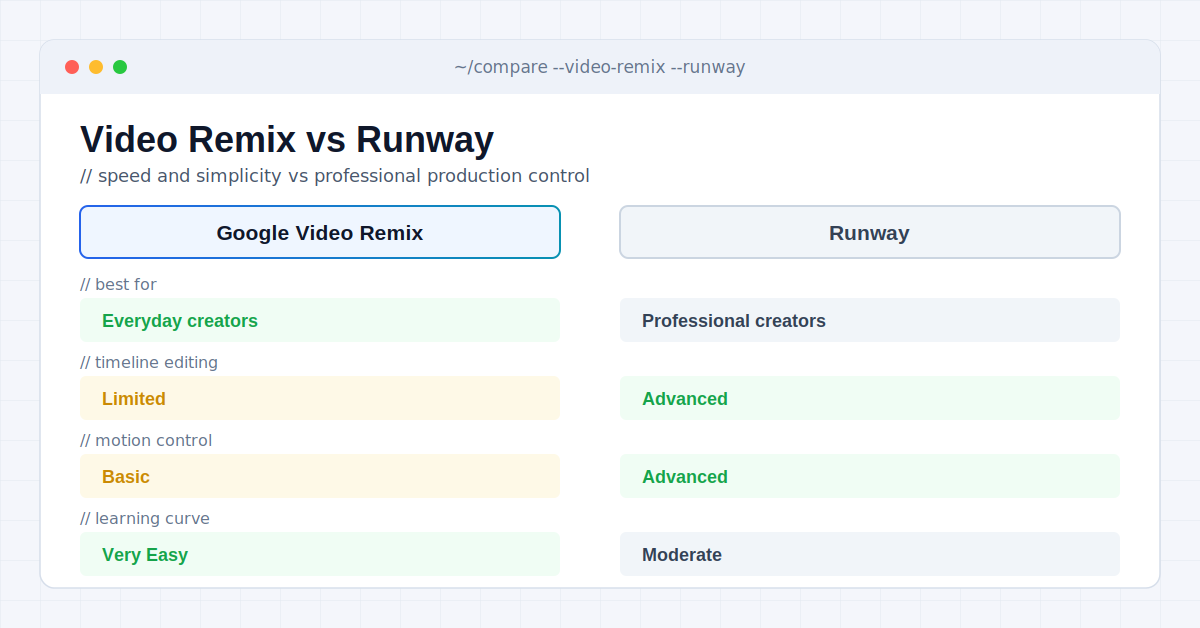
Both use AI to simplify video editing, but they’re designed for different audiences. Google emphasizes quick, prompt-based transformations within its ecosystem, while Runway provides advanced creative controls for professional video production. If you’re deciding between AI voice tools for the audio side of your videos too, this roundup of best AI voice generators for content creators pairs well with your editing choice.
| Feature | Google Video Remix | Runway |
| Best For | Everyday creators | Professional creators |
| Prompt-Based Editing | Excellent | Excellent |
| AI Video Style Transfer | Yes | Yes |
| Cinematic Effects | Yes | Yes |
| Timeline Editing | Limited | Advanced |
| Motion Control | Basic | Advanced |
| Google Integration | Yes | No |
| Learning Curve | Very Easy | Moderate |
| Overall Flexibility | Good | Excellent |
Which One Should You Choose?
Choose Google Video Remix if you:
- Create short-form social media videos.
- Want fast AI-powered editing with minimal effort.
- Already use Google Photos and other Google services.
- Prefer simple prompt-based workflows.
Choose Runway if you:
- Produce professional marketing videos.
- Need advanced editing controls and timeline tools.
- Create commercial or cinematic projects.
- Want greater creative flexibility.
For most casual users and content creators, Google Video Remix offers the easier experience. Professional editors, however, will likely appreciate Runway’s broader editing capabilities.
Real-World Use Cases
Google Video Remix is designed for practical, everyday video editing rather than complex film production.
Social Media Content
Quickly transform ordinary clips into cinematic videos for YouTube Shorts, Instagram Reels, TikTok, and Facebook.
Travel Videos
Enhance vacation footage with dramatic lighting, cinematic color grading, and artistic visual styles.
Product Marketing
Create engaging promotional videos without spending hours editing footage manually.
Family Memories
Refresh old family videos with creative styles that make special moments feel more polished and memorable.
Content Creation
Creators can generate multiple visual versions of the same clip for different audiences and platforms using only a few prompts.
Limitations
Although Google Video Remix is easy to use, it has several limitations.
- Designed primarily for AI-assisted editing rather than full video production.
- Limited manual editing controls compared with professional software.
- Feature availability may vary by region and supported Google services.
- Complex commercial projects may require more advanced editing tools.
- Processing quality depends on the source video’s resolution and clarity.
- Requires source clips to be trimmed down to between 1 and 10 seconds long.
- Strictly limited to paid Google AI subscribers (Plus, Pro, Ultra) on personal accounts; unavailable for corporate or school Workspace accounts.
Understanding these limitations helps set realistic expectations before choosing the platform.
Who Should Use Google Video Remix?
| User | Recommendation |
| Content Creators | Excellent choice |
| Social Media Managers | Highly recommended |
| YouTubers | Recommended |
| Small Businesses | Recommended |
| Casual Users | Excellent choice |
| Professional Video Editors | Consider Runway for advanced workflows |
Practical Implementation
To achieve the best results with Google Video Remix, follow these simple practices:
Write Better Prompts
Include details about the style, mood, lighting, and atmosphere instead of using short descriptions.
Start with High-Quality Footage
Clear, well-lit source videos give the AI more information to work with, producing cleaner and more realistic edits.
Experiment with Multiple Styles
Generate several versions of the same clip before choosing the final result. Small prompt changes can produce noticeably different outcomes.
Know When to Use Professional Software
For complex productions involving detailed timelines, motion graphics, or multi-scene editing, dedicated video editing platforms remain the better option.
How We Evaluated Google Video Remix
This review is based on publicly available Google product information, independent industry reporting, and an evaluation of the platform’s announced features, intended workflows, and comparison with leading AI video editing tools.
The goal is to provide a balanced assessment by highlighting both strengths and limitations so readers can determine whether Google Video Remix matches their creative needs.
Final Verdict
Google Video Remix makes AI-powered video editing more accessible by replacing complex editing tools with simple prompts. Its seamless integration with Google’s ecosystem, beginner-friendly workflow, and cinematic style transfer make it an excellent choice for creators, marketers, and casual users who want professional-looking videos without a steep learning curve.
While professional editors may still prefer Runway for its advanced controls, This strikes an impressive balance between ease of use, speed, and creative quality. For anyone looking to transform everyday footage into polished, cinematic content, it’s one of the most promising Google AI video tools 2026. For information of new tools explore Openaihit.
Frequently Asked Questions
What is Google Video Remix?
It is an AI-powered editing feature that transforms existing videos into new visual styles using simple text prompts instead of manual editing tools.
Is Google Video Remix free?
Basic access is expected through supported Google AI services, while premium features or higher usage limits may depend on Google’s subscription offerings.
Can Google Video Remix edit existing videos?
Yes. It is designed specifically to remix existing videos by applying cinematic styles, artistic effects, and AI-generated visual transformations.
Does Google Photos include Video Remix?
Google is expanding Video Remix through Google Photos, although availability may vary depending on your device, region, and account.
Is Google Video Remix better than Runway?
Google Video Remix is better for quick, beginner-friendly editing, while Runway remains the stronger choice for advanced creative workflows and professional production.
What is AI video style transfer?
AI video style transfer applies a consistent artistic or cinematic look across an entire video instead of using simple filters, helping maintain natural motion and visual consistency.
Can beginners use Google Video Remix?
Yes. The prompt-based interface makes it easy for beginners to create professional-looking videos without learning complex editing software.
Is Google Video Remix worth using in 2026?
Yes. It’s a strong option for creators who want fast, AI-powered video editing, especially if they already use Google’s ecosystem.