A few months ago, I was helping someone who needed an Android app that wasn’t available through the Google Play Store in their country. Like many people, they searched for an alternative and quickly found APKCheers. The website looked simple enough, but one question kept coming up: Can I actually trust this download?
That question isn’t unique. Every day, Android users search for APK download sites because they need region-restricted apps, older versions that still work on their devices, or software unavailable through official channels. Finding those apps is usually easy. Knowing whether the source is safe is much harder.
This article gives you an evidence-based review of APKCheers using the latest available research for 2026. You’ll learn how the platform works, what features it offers, where it performs well, where it falls short, how it compares with major competitors, and what precautions you should take before downloading any Android APK. By the end, you’ll have enough information to decide whether APKCheers deserves a place among your trusted sources for Android apps.
AI Overview
APKCheers is a third-party Android platform that provides APK files, app guides, and related resources for users who need applications outside the Google Play Store. It supports downloads for region-restricted apps, older versions, and some modified packages, but it does not provide the same level of public security verification as leading APK repositories.
Current research shows that APKCheers remains an active platform with a growing mobile audience, yet it operates as a relatively small player compared with established alternatives. If you choose to use it, following safe APK download practices is essential.
Key Takeaways
-
APKCheers is a third-party APK download site focused on Android applications and app-related guides.
-
The platform helps users access region-restricted apps, legacy versions, and selected APK packages.
-
APKCheers cannot currently be considered one of the safest APK repositories because it lacks transparent cryptographic verification.
-
According to Semrush, the website receives approximately 103,580 monthly visits, with mobile users accounting for nearly all of its traffic.
-
The website is built on WordPress and currently runs on PHP 8.3 using Hostinger infrastructure.
-
Users should always verify downloaded APK files before installing them on Android devices.
-
For maximum security, official app stores remain the safest choice whenever they provide the application you need.
What Is APKCheers?
APKCheers is a third-party website that provides Android APK files, app tutorials, and download resources for users looking beyond the Google Play Store. It mainly serves people searching for region-restricted apps, older application versions, and selected APK packages, but users should exercise caution because the platform does not publicly document advanced file verification procedures.
Overview of the Platform
APKCheers is an online repository built specifically for Android users who want access to application packages outside official app stores. Instead of downloading software directly through Google Play, users obtain APK files that can be installed manually on compatible Android devices.
An APK, or Android Package Kit, is the standard installation format used by Android operating systems. It performs a role similar to an executable installer on desktop operating systems, allowing applications to be installed locally.
Unlike official marketplaces, APKCheers focuses on giving users additional flexibility. That includes accessing apps unavailable in certain regions, downloading older releases, and finding software that may no longer appear in mainstream stores.
Origin and Background
APKCheers originally started as a lightweight directory for Android application files. Its goal was to help users who struggled to access certain apps because of regional restrictions or device compatibility issues.
Over time, the platform expanded into a more structured website featuring categorized content, download pages, and technology-related articles. According to the research report, it now operates through apkcheers.com while also offering a dedicated mobile experience through APKCheers 5.0.
Rather than becoming a large commercial marketplace, APKCheers has continued operating as a niche platform serving a focused audience looking for alternative Android software sources.
Current Status in 2026
As of 2026, APKCheers remains active within the competitive third-party Android ecosystem. Although it has not reached the scale of larger competitors, it continues attracting consistent traffic from Android users worldwide.
Research indicates that the website is powered by WordPress 6.9+ together with PHP 8.3, hosted on Hostinger servers using LiteSpeed infrastructure. It also employs standard Let’s Encrypt SSL certificates to encrypt data during transmission.
The platform recently introduced APKCheers 5.0, a FlutterFlow-built application designed to let users browse available content without relying entirely on a web browser. This reflects an industry trend toward dedicated applications instead of browser-based download portals.
What Does APKCheers Offer?
Android App Library
APKCheers organizes content into categories covering Android games, utility software, productivity tools, and various application types. Its primary purpose is helping users locate installation packages that may be difficult to obtain elsewhere. This includes software affected by regional availability or compatibility limitations. Unlike official stores, users manually install these files after downloading them onto their Android devices.
Guides for Latest APK Apps
Besides hosting download pages, APKCheers also publishes tutorials and informational articles related to Android software. These guides help users understand installation procedures, discover the latest APK apps, and navigate different categories available on the platform. Although the platform discusses recent applications, its value comes more from helping users locate alternative versions than from acting as a traditional app store.
APKCheers Download Experience
The APKCheers download process follows a familiar pattern seen across many independent APK websites. Users typically search for an app, open the relevant page, and click the download button. According to the research report, downloads often pass through advertising redirects before reaching the final installation file. This monetization model helps support the platform but also introduces additional navigation steps that some users may find confusing.
APK Installer and Installation Process
After downloading an APK file, Android does not install it automatically like applications from Google Play. Instead, users rely on the built-in APK installer, which requires enabling the “Install Unknown Apps” permission for their browser or file manager before installation begins. Understanding how the Android APK installer works is important because it places greater responsibility on users to verify file safety before opening any downloaded package.
Does APKCheers Offer Mod APKs?
Yes, APKCheers includes references to some mod APK packages alongside standard Android applications. Modified APKs can provide additional features or unlocked functionality, but they also introduce higher security risks because modified files may not originate from the original developer.
For that reason, downloading mod APKs should always be approached carefully. Users should verify files, understand the potential privacy implications, and recognize that modified packages generally carry more risk than official application releases.
Key Features of APKCheers
Organized Categories
The website separates applications into clear categories including Android games, utilities, optimization tools, and other software types. This structure makes navigation easier than browsing large unorganized download directories.
Mobile-First Experience
According to Semrush, approximately 92.79% of APKCheers traffic comes from mobile devices, while desktop users account for only 7.21% of visits. That distribution explains why the website and its newer APKCheers 5.0 application prioritize mobile usability over desktop browsing.
Growing User Base
Traffic analysis from Semrush estimates roughly 103,580 monthly visits during 2026. The same research indicates that monthly traffic increased by approximately 5.7% compared with the previous spring months, suggesting that the platform continues to attract new users despite intense competition.
Regional Accessibility
One of APKCheers’ biggest advantages is helping users obtain Android apps that may not be available in every country. Research shows that Pakistan represents the largest source of visitors, followed by the United States and the United Kingdom, demonstrating demand for alternative Android application sources across multiple regions.
Search Visibility
Traffic acquisition is almost evenly divided between Google organic search (48.3%) and direct visitors (48.07%), according to Semrush. This balance suggests that many users intentionally return to APKCheers rather than discovering it only through search engines, while organic visibility still plays an important role in attracting new visitors.
Is APKCheers Safe? A Complete Security Review
When choosing any third-party APK download site, safety matters more than convenience. APKCheers offers access to apps outside the Google Play Store, but that flexibility also places more responsibility on you to verify what you’re downloading.
The available research suggests that APKCheers provides useful functionality for some users, yet it does not currently match the security standards of leading APK repositories.
HTTPS and Website Security
Every secure website should encrypt the connection between your browser and its servers. APKCheers uses standard Let’s Encrypt SSL certificates, which means information transferred between your device and the website is encrypted during transit.
That is a positive baseline, but HTTPS alone does not guarantee that downloaded files are completely safe. It simply protects the connection while you’re visiting the website.
The research also shows that APKCheers runs on WordPress 6.9+, PHP 8.3, and Hostinger’s LiteSpeed infrastructure, providing a modern technical foundation for the website.
Does APKCheers Verify APK Files?
This is where APKCheers differs from the most trusted competitors.
According to the research, APKCheers does not publicly document cryptographic signature verification for the APK files it distributes. Platforms such as APKMirror verify application signatures to ensure files match those originally released by developers. That verification significantly reduces the risk of altered packages.
Without publicly documented verification procedures, users cannot independently confirm that every file has passed the same security checks.
Understanding the Risks of Third-Party APK Downloads
Downloading an Android APK outside the Google Play Store always introduces additional risk. Unlike official stores, independent websites generally do not benefit from Google’s built-in security ecosystem, including Play Protect and official developer verification.
The research identifies several concerns users should understand before downloading from APKCheers.
Malware and Repackaging Risks
Because APKCheers includes some mod APK packages, there is an increased possibility that modified applications could contain unwanted code. Modified APKs can sometimes include:
-
Adware
-
Spyware
-
Tracking software
-
Unauthorized modifications
This does not automatically mean every modified application is malicious, but it does increase the need for careful verification before installation.
Limited Security Transparency
Another limitation is the lack of publicly available information describing how APKCheers scans uploaded files. The research found no published security audit process or transparent malware verification framework similar to those used by larger repositories. For security-conscious users, transparency is often just as valuable as technical protection.
Ad-Heavy Download Process
One noticeable characteristic of APKCheers is its advertising model. According to the research report, download buttons often redirect users through advertising networks before reaching the final APK package.
Although this supports the platform financially, it can create confusion, especially for inexperienced users who may accidentally click misleading advertisements. Learning to distinguish genuine download buttons from advertising links is an important part of downloading safely.
Best Practices for Safe APK Download
Whether you use APKCheers or any other APK download site, following good security habits greatly reduces unnecessary risk.
Before Downloading
-
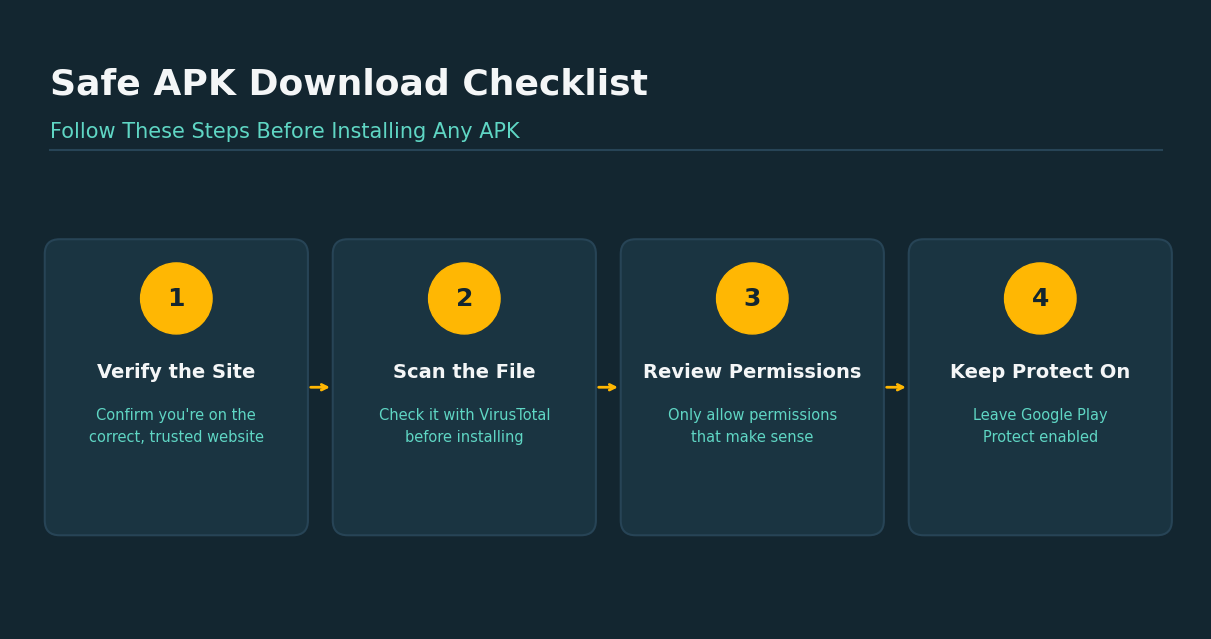
Confirm that you are visiting the correct website.
-
Read the application’s description carefully.
-
Compare the available version with the developer’s official release.
-
Avoid downloading files that appear unusually outdated or poorly documented.
During Installation
-
The Android APK installer will ask you to allow installation from unknown sources.
-
Only enable this permission temporarily for the browser or file manager you trust.
-
Once installation is complete, disable the permission again to reduce future risk.
After Installation
-
Before opening the app, scan the APK using a trusted malware scanner such as VirusTotal.
-
Review requested permissions carefully.
-
Keep Google Play Protect enabled.
-
Remove the application immediately if you notice suspicious behavior.
These simple habits provide an additional layer of protection regardless of which third-party repository you choose.
APKCheers Pros and Cons
Like any third-party platform, APKCheers has both strengths and limitations.
| Pros | Cons |
| Access to region-restricted Android apps | No publicly documented cryptographic signature verification |
| Offers older application versions | Ad-heavy download experience |
| Dedicated APKCheers 5.0 mobile application | Some modified APKs carry additional security risks |
| Mobile-friendly interface | Lower trust level than major competitors |
| Helpful app tutorials and guides | Limited transparency about malware screening |
| No Google account required | Manual updates required for installed apps |
Overall, APKCheers offers flexibility that many Android users appreciate. However, convenience should always be balanced against the additional responsibility of verifying downloaded files yourself.
APKCheers vs Other APK Download Sites
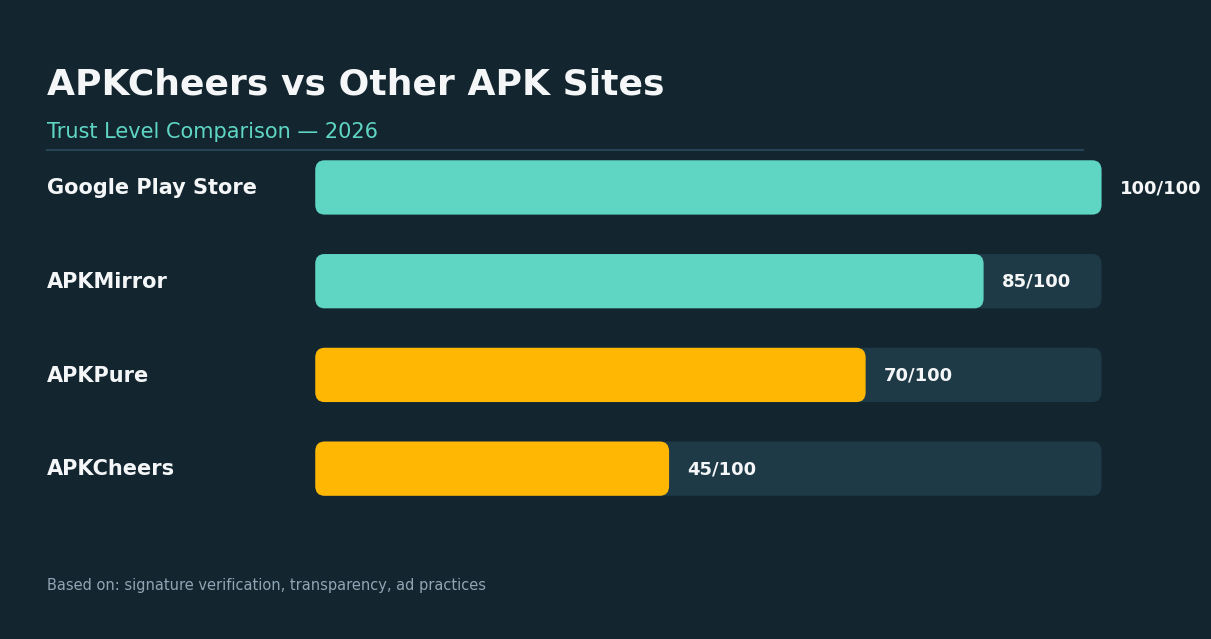
Choosing the right platform depends on what matters most to you.
| Feature | APKCheers | APKMirror | APKPure | Google Play Store |
| Primary Focus | APK downloads, guides, selected mod APKs | Original APK files | Large APK repository | Official Android apps |
| Security Verification | Basic and not publicly documented | Cryptographic signature verification | Independent verification processes | Google Play Protect |
| User Experience | Ad-supported with redirects | Clean interface | Streamlined | Fully integrated |
| Older App Versions | Yes | Yes | Yes | Limited |
| Mod APK Availability | Yes | No | Limited | No |
| Google Account Required | No | No | No | Yes |
| Overall Trust Level | Moderate | High | High | Very High |
For users who prioritize security above everything else, APKMirror and the Google Play Store remain stronger choices. APKCheers becomes more useful when you specifically need region-restricted applications, legacy versions, or resources unavailable through official channels. If you’re evaluating tools and platforms carefully before trusting them, the same due-diligence approach applies to AI tools that have actually been tested rather than just marketed.
Who Should Use APKCheers?
APKCheers may be a suitable option if you:
-
Need apps unavailable in your country.
-
Want access to older application versions.
-
Use Android devices without Google services.
-
Understand how manual APK installation works.
-
Know how to verify downloaded files independently.
The platform serves users who are comfortable managing APK installations and understand the additional responsibilities involved.
Who Should Avoid APKCheers?
APKCheers may not be the best choice if you:
-
Prefer maximum security with minimal risk.
-
Rarely install applications outside official stores.
-
Are unfamiliar with Android security settings.
-
Don’t know how to verify APK authenticity.
-
Want automatic application updates.
If your required app is available on Google Play, downloading it there remains the safest option.
Real-World Examples
The research highlights several practical situations where users may choose APKCheers.
One example involves a developer in Lahore, Pakistan, who needed access to an analytics application unavailable through local Google Play distribution. APKCheers provided an alternative download path for that region-restricted software.
Another example involves an Android user whose favorite photo editor became unstable after an official update. Instead of keeping the newer version, they downloaded an older APK release to restore compatibility on their device.
The report also mentions members of the FlutterFlow community using the APKCheers 5.0 framework to study how third-party application directories organize and display downloadable mobile assets.
These examples demonstrate why third-party repositories continue to attract users, even as Android security becomes more advanced.
Practical Guide: How to Use APKCheers More Safely
If you decide to use APKCheers, treating every download with caution is the smartest approach. Third-party APK websites can be useful, but they don’t provide the same protections as official app stores.
The following checklist can help reduce your risk before installing any APK file.
Step 1: Download Only the App You Need
Search for the exact application instead of browsing random recommendations. This reduces the chances of downloading unrelated software or clicking misleading advertisements.
Step 2: Check the App Information
Before downloading, compare the app name, version number, release date, and developer name (when available). If the information looks inconsistent or incomplete, consider using another source.
Step 3: Scan the APK File
One of the easiest safety measures is scanning the downloaded file before installation. The research specifically recommends using VirusTotal, which checks files with multiple antivirus engines before you install them. This simple step only takes a few moments but can help identify potentially harmful files. Verifying files before use is a habit worth building everywhere — the same logic applies when evaluating AI tools for developers before adding them to your workflow.
Step 4: Use the Android APK Installer Carefully
Installing applications outside Google Play requires Android’s built-in APK installer. Enable “Install Unknown Apps” only for the browser or file manager you’re currently using. Once installation finishes, disable the permission again to reduce future security risks.
Step 5: Review App Permissions
Don’t approve every permission automatically. Ask yourself whether the requested permissions actually make sense. For example, a camera app requesting camera access is expected, while a calculator requesting contacts and location deserves closer attention. Permission reviews are one of the simplest ways to detect suspicious applications.
Step 6: Keep Google Play Protect Enabled
Even if you install applications from outside the Play Store, Google Play Protect can still perform security checks on many installed apps. Keeping this feature enabled adds another layer of protection for your Android device.
Step 7: Update Apps Manually
Applications downloaded from APKCheers generally do not update automatically. You’ll need to revisit the website and install newer versions manually whenever updates become available. Ignoring updates may leave older versions exposed to security vulnerabilities.
Common Mistakes to Avoid
Many security problems happen because users rush through the installation process. Avoid these common mistakes:
-
Clicking every download button you see.
-
Ignoring Android security warnings.
-
Installing unknown mod APK files without checking their source.
-
Leaving “Install Unknown Apps” permanently enabled.
-
Downloading applications you don’t actually recognize.
-
Skipping malware scans before installation.
Most of these mistakes are easy to avoid with a few extra minutes of attention.
Market Position and Future Outlook
The Android ecosystem continues to change as Google strengthens security around sideloaded applications. According to the research report, several industry trends are likely to shape the future of APK download websites. As detection technology keeps evolving on both sides, it’s worth keeping an eye on our AI news category for the latest security and platform updates.
Stronger Android Security
Google continues improving on-device protection through technologies such as Android SafetyCore. These security improvements are expected to examine third-party applications more aggressively before allowing installation. As automated detection becomes more advanced, lower-authority repositories may receive additional security warnings during installation. Google continues improving on-device protection through technologies such as Android SafetyCore, which scans apps for malicious behavior directly on the device.
Growth of Native APK Platforms
Instead of relying only on websites, many APK platforms are developing dedicated mobile applications. APKCheers has already started this transition with APKCheers 5.0, built using FlutterFlow. This shift reflects a broader industry trend toward app-based browsing and package management.
More Competition Among APK Alternatives
The third-party Android ecosystem continues expanding. According to the research, APKCheers competes with platforms including:
-
APKMirror
-
APKPure
-
Apktodo.io
-
Happymod.cloud
Each platform targets users searching for APK alternatives, although they differ significantly in verification methods, user experience, and security practices. Competition is expected to become even stronger as Android introduces additional verification technologies.
Can APKCheers Improve?
Yes. The research identifies several improvements that could increase user confidence. These include:
-
Publishing transparent security policies.
-
Explaining malware scanning procedures.
-
Introducing cryptographic signature verification.
-
Reducing advertising redirects.
-
Improving direct download navigation.
Implementing these changes would help APKCheers compete more effectively with larger APK repositories. Transparency and verification are becoming baseline expectations across tech products, a trend we also track in our AI tools category.
Final Verdict: Is APKCheers Worth Using?
Returning to the question from the beginning, the answer isn’t simply yes or no.
If you’re searching for apps unavailable through official channels, APKCheers offers genuine value. It provides access to region-restricted software, legacy versions, Android tutorials, and selected download resources that many users find useful.
However, convenience shouldn’t be confused with trust. The research clearly shows that APKCheers operates as a relatively small third-party repository with a Semrush Authority Score of 9, limited public security transparency, and no documented cryptographic signature verification comparable to APKMirror. Those limitations mean you should approach every download carefully.
That doesn’t make APKCheers unsafe by default. It means you become part of the security process by checking permissions, scanning files, reviewing versions, and verifying downloads before installing them.
For most people, the Google Play Store remains the safest option whenever it offers the application you need. If you choose APKCheers, use it thoughtfully, understand its strengths and limitations, and make every installation a deliberate decision rather than a routine click.
Sometimes the safest download isn’t the fastest one; it’s the one you take a few extra minutes to verify. for more information of current ai tools visit Openaihit.
Frequently Asked Questions
What is APKCheers?
APKCheers is a third-party website that provides Android APK files, app guides, and download resources for users looking beyond the Google Play Store. It focuses on helping users access region-restricted apps, older versions, and selected application packages. It also offers the APKCheers 5.0 mobile application for browsing its content on Android devices.
Is APKCheers safe to use?
APKCheers uses HTTPS encryption and modern web infrastructure, but the research indicates that it does not publicly document advanced cryptographic signature verification like APKMirror. Because of this, users should verify downloaded files independently before installing them. Using malware scanners and reviewing permissions can significantly reduce potential risks.
Does APKCheers provide mod APK files?
Yes. According to the research report, APKCheers includes some mod APK packages alongside standard Android applications. Since modified applications may carry higher security risks, users should approach them carefully and verify files before installation.
How does the Android APK installer work?
The Android APK installer allows users to install application packages downloaded outside the Google Play Store. Before installation, Android requires permission to install apps from unknown sources. After the installation is complete, it’s recommended to disable that permission again for better security.
Where can I safely find the latest APK apps?
Official app stores remain the safest source whenever the application is available. If you need apps unavailable through official channels, choose reputable APK repositories, verify every file before installing it, and avoid downloading software from unknown or suspicious websites. Platforms discussing the latest APK apps should always be evaluated for transparency and security practices.
Is APKCheers better than APKMirror?
Based on the available research, APKMirror provides stronger security through public cryptographic signature verification and enjoys significantly higher authority within the Android community. APKCheers offers different advantages, such as region-restricted apps and older versions, but it requires users to take additional safety precautions before installing downloaded APK files.