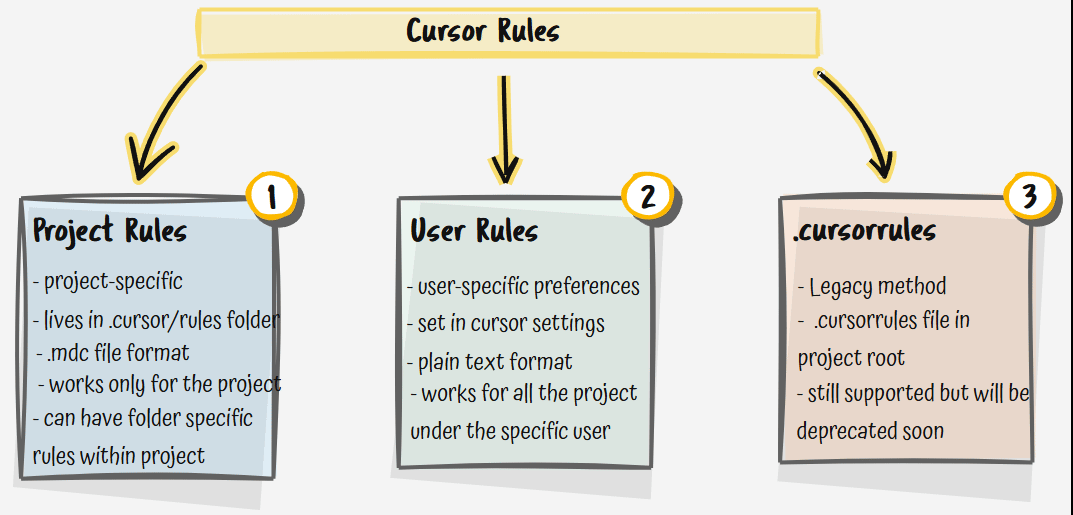
Setting up a new repository with an artificial intelligence assistant often leads to a predictable cycle of frustration. You open a new chat window and immediately find yourself pasting the same instructions regarding your framework, folder layout, and naming conventions. Without specific boundaries, the system might generate outdated packages or create excessive layers of abstraction for a simple functional task. To eliminate this repetitive overhead, developers utilize custom instructions to lock in formatting preferences and tech stack guidelines from day one.
Building a comprehensive cursor rules library allows you to inject persistent, contextual instructions directly into your development workflow. By establishing automated constraints, you ensure your coding assistant writes clean, production-ready code that perfectly matches your architecture. Whether you configure a global file or use path-specific routing, incorporating these automated guardrails saves time and prevents context drift across your codebase with Openaihit.
Why Every Project Needs a Cursor Rules Library
Whenever you trigger an AI prompt, code generation tool, or inline edit, the system scans your files to construct a response. However, it lacks inherent knowledge of your team standards or specific tech stack constraints unless you explicitly guide it. A custom cursor rules library solves this by acting as an omnipresent system prompt that attaches vital context to every interaction.
Before you configure your first rule file, it helps to know which underlying engine you are working with, our breakdown of the best AI for solving coding problems covers the top options that pair seamlessly with a cursor rules setup.
Implementing structured cursor rules prevents the assistant from using deprecated patterns or introducing conflicting design systems. Instead of correcting the model after it outputs buggy code, you establish definitive rules that intercept errors before they are written. This architectural consistency is incredibly useful when onboarding new engineers, as the shared configuration settings guarantee that every teammate receives the exact same high-quality outputs from the assistant.
9 Essential Cursor Rules to Add to Your Library
To maximize the efficiency of your coding environment, we have compiled nine essential constraints that protect code health and maximize clarity. You can add these directly to your own configuration repository.
1. The High-Level Architectural Overview
Every codebase needs a foundational constitution. This rule should always apply to provide the assistant with an accurate mental model of the system architecture, primary languages, and deployment targets.
Project Overview Directive
Instruction: This project is a NextJS app utilizing TypeScript, Tailwind CSS, and Supabase. Always prioritize functional programming patterns over object oriented structures. Do not write classes unless building a data connector to an external service.
2. Strict Type Safety Constraints
Prevent the assistant from taking shortcuts that compromise your compilation layer. This boundary eliminates weak types and forces explicit data declarations. Enabling TypeScript strict mode in your project config works hand-in-hand with your type safety cursor rule, ensuring the compiler enforces the same boundaries your AI assistant is instructed to follow.”
TypeScript Enforcement
Instruction: Maintain absolute type safety. Never use the
anytype under any circumstances. Enable strict null checks and explicitly define return types for all exported functions and API endpoints.
3. Early Return and Guard Clauses
Keep your logic readable and deeply nested conditions out of your files by forcing a clean, flat code style.
Control Flow Rule
Instruction: Avoid deeply nested if or else blocks. Implement clean guard clauses and return early when handling error states or invalid function inputs.
4. Zero Placeholder Implementations
Tired of seeing the assistant leave comments instead of finishing the job? This rule stops the model from skipping vital logic blocks.
Complete Code Guarantee
Instruction: All generated code blocks must be fully functional and complete. Never include comments like
// TODO: implement lateror leave placeholder strings in place of production logic.
5. Deprecated Pattern Blacklisting
When frameworks upgrade, models often hallucinate old solutions. Explicitly outline what the assistant is forbidden from writing.
Anti Pattern Boundary
Instruction: We use Supabase SSR for authentication. Never import from the legacy auth helpers package. If you detect old import patterns, halt execution and rewrite using
getAll()andsetAll().
6. Automated Code Verification Steps
Force the model to critique its own work before presenting it to you, reducing runtime syntax bugs.
Self Verification Protocol
Instruction: Before outputs are completed, run a mental syntax check. Verify that all import paths are accurate, variables are explicitly defined, and bracket pairings match perfectly.
7. Structured Proposal Output Format
For complex refactoring tasks, instruct the assistant to outline its thinking process before altering critical code infrastructure.
Step by Step Reasoning
Instruction: For any major architectural changes, provide a concise markdown plan detailing the target file, potential breaking impacts, and the explicit lines of code being altered before generating the code blocks.
8. Directory and File Naming Conventions
Maintain a uniform repository appearance by enforcing precise file name formatting rules automatically.
Naming Standards
Instruction: All component directories must use lowercase with dashes. Component files must use the
.tsxextension, while utility modules use.ts. Use PascalCase for component declarations.
9. Token Budget Optimization
Keep your conversations fast and affordable by banning conversational fluff and filler phrasing.
Conciseness Command
Instruction: Avoid conversational pleasantries, introductory statements, or generic summaries. Respond in a direct, highly technical tone and focus purely on providing dense, actionable code snippets.
How to Set Up and Organize Your Rule Files
Setting up a robust automation framework requires moving beyond a single file configuration. By exploiting modern IDE capabilities, you can assign rules to activate only when relevant files are open.
The Modern MDC Folder Setup
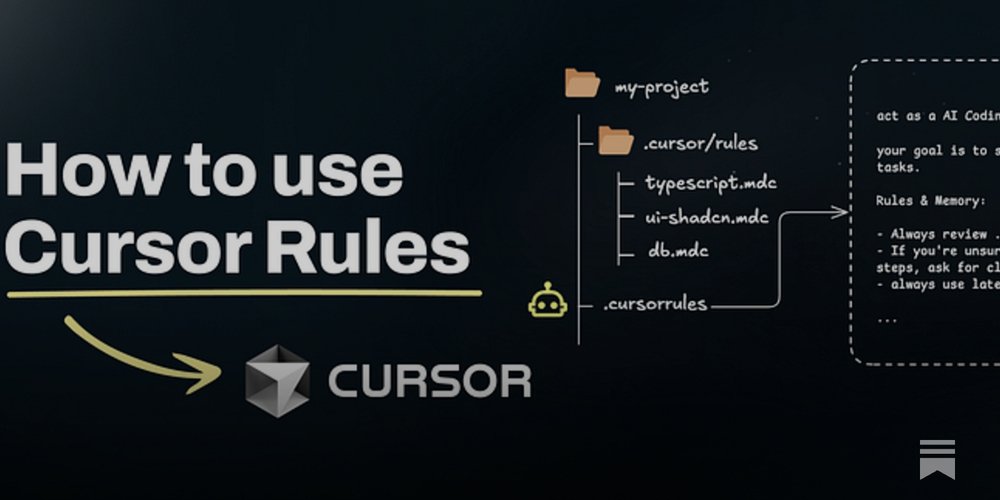
Create a folder named .cursor/rules/ at the root of your project directory. Inside this folder, you can store individual markdown files for different areas of your stack, such as a rule for frontend styles and another for backend database migrations.
Managing Activation Metadata
Each .mdc file utilizes a simple block of frontmatter text at the top to tell the system when to load the contents. You can configure a rule to apply universally or tie it to specific file extensions using glob expressions.
Advanced Strategies for Token Conscious Developers
While it is tempting to build a massive system that covers every single edge case, overloading your configuration can severely degrade your coding experience. Every line of text in an active rule consumes valuable tokens from your model context window.
To maintain lightning-fast response times, keep your instructions dense and actionable. Instead of pasting a fifty-line code example to demonstrate a layout style, point the assistant to an existing file in your repository by using a line like: Refer to src/components/button.tsx for our standard button architecture. The AI can read that file directly when needed, saving your active token budget for the task at hand.
Furthermore, make extensive use of conditional triggers rather than setting every file to apply globally. Your database schema rules do not need to load when you are simply tweaking a Tailwind CSS padding class in a layout file. Keep your base configurations light, and let path-specific routing handle the heavy lifting to keep your internal cursor ai rules lightning fast.
The Psychological Value of Group Brain Teasers
There is a distinct scientific reason why persistent configuration instructions function so effectively in collaborative engineering settings. When developers solve complex deployment puzzles together under unified rules, it activates shared patterns that mimic strict structural code validation.
When engineers with varying skill levels gather, finding uniform alignment on code formatting can be difficult. Senior developers and junior interns might find it hard to maintain identical code aesthetics, but a timeless selection of operational setting files bridges that workflow gap seamlessly. A senior engineer might write a complex backend protocol that an intern missed, while an automated prompt executes a visual layout check, allowing everyone to contribute their unique skills to a safe repository update.
Conclusion
Integrating a standardized automation setup into your development workflow is the most effective way to eliminate repetitive prompting and ensure architectural consistency. By moving away from generic instructions and enforcing granular, automated constraints, you save thousands of tokens and keep your coding assistant perfectly aligned with your engineering standards.
When you organize your repository configurations, remember that effective custom patterns succeed when they are dense, specific, and updated regularly. Rather than relying on the default behavior of an AI model, you can use tailored cursor ai rules to protect your code quality, enforce strict testing, and prevent technical debt. Skip the manual corrections on your next software build and establish an automated workflow instead. For more production-ready configurations, markdown files, and cutting-edge engineering templates, explore our collection of development resources at Openaihit.
Frequently Asked Questions
What are cursor rules and how do they function?
They are persistent markdown instructions that provide explicit guardrails for an AI assistant inside your development workspace. By reading these files, the system understands your tech stack, formatting guidelines, and architectural boundaries before it generates suggestions, keeping your outputs consistent without manual prompting.
What is the difference between a legacy configuration and the modern MDC format?
The legacy approach utilizes a single file named .cursorrules located at the root of your repository, which applies universally to every file. The modern format relies on multiple .mdc files inside the .cursor/rules/ directory, allowing you to use specific glob patterns to scope instructions to targeted folders or languages dynamically.
How do you prevent context rot in a cursor rules library?
To maintain an optimal token budget, audit your cursor rules quarterly and remove instructions that the underlying AI model already handles natively. You should only codify a specific pattern or boundary after the assistant fails to implement it correctly three times in a live environment.
Can cursor ai rules be shared across an engineering team?
Yes. By storing your .mdc rules inside the .cursor/rules/ directory and committing that folder directly to your Git repository, every developer who clones the project automatically inherits the identical automated guardrails and formatting boundaries.
Where can I find verified cursorrules examples for popular frameworks?
You can discover extensive, real world configurations and pre built templates by exploring specialized developer networks, open source repositories, and comprehensive technical platforms like openaihit.com, which provides curated assets for modern development workflows.