AI Overview:
Chat GPT is a handy option for generating images and handling basic edits. You can upload a photo highlight the area you want to change, and simply explain what you’d like to fix or add.
However, it may not be the right fit for every type of image editing task.
Depending on your needs, you might want fewer restrictions, more precise editing controls, or tools designed for specific jobs. Some users need social media templates while others need image upscaling, background removal, product photo editing, or a faster way to handle multiple images at once.
For example, an online store owner may need to remove backgrounds from dozens of product photos and keep the final images consistent. A social media manager might prefer templates that make it easy to add text, logos, and brand colors. Content creators, meanwhile, may simply want a quick way to remove an unwanted object, replace something in a photo, or correct a small mistake before publishing.
User discussions on Reddit also show that while many people appreciate Chat GPT image quality some become frustrated when certain edits are restricted, produce inconsistent results or require several attempts to get right.
That’s why it’s worth looking beyond Chat GPT . In this guide, we’ll explore the best AI image editing alternatives for 2026, explain what each tool does best, and help you find an option that matches your workflow without forcing you to test every tool yourself.
Key Takeaways
- Google Gemini is one of the strongest Chat GPT alternatives for conversational image editing.
- Adobe Firefly is a better choice when professional editing control matters.
- Canva is useful when edited images need to become social posts ads or other designs.
- Photoroom is especially practical for ecommerce and product photography.
- Pixlr, Picsart, and Fotor are good options for straightforward everyday edits.
- Krea is best when you want more creative control over image generation and editing.
- Do not judge an AI editor only by the quality of the generated picture. Check how well it preserves faces, products, logos, text, lighting, and composition.
- Free access, commercial-use terms, output resolution, privacy, and regional availability can change, so check the provider’s current terms before relying on a tool for professional work.
What Is a Chat GPT Alternative for AI Image Editing?
A Chat GPT alternative for AI image editing is an AI powered service that can perform image generation or image editing tasks similar to those users perform in Chat GPT.
Instead of manually selecting pixels or working through complicated menus, you can often upload an image and write an instruction such as:
Change the background to a modern office while keeping the person, clothing, face, and lighting unchanged.
The AI then interprets the instruction and creates an edited version.
This is different from a traditional photo editor. Traditional software gives you precise manual control, while conversational AI focuses on understanding what you want to accomplish.
For many everyday tasks, that makes AI editing considerably faster.
What Should You Look for in a Chat GPT Image Editing Alternative?
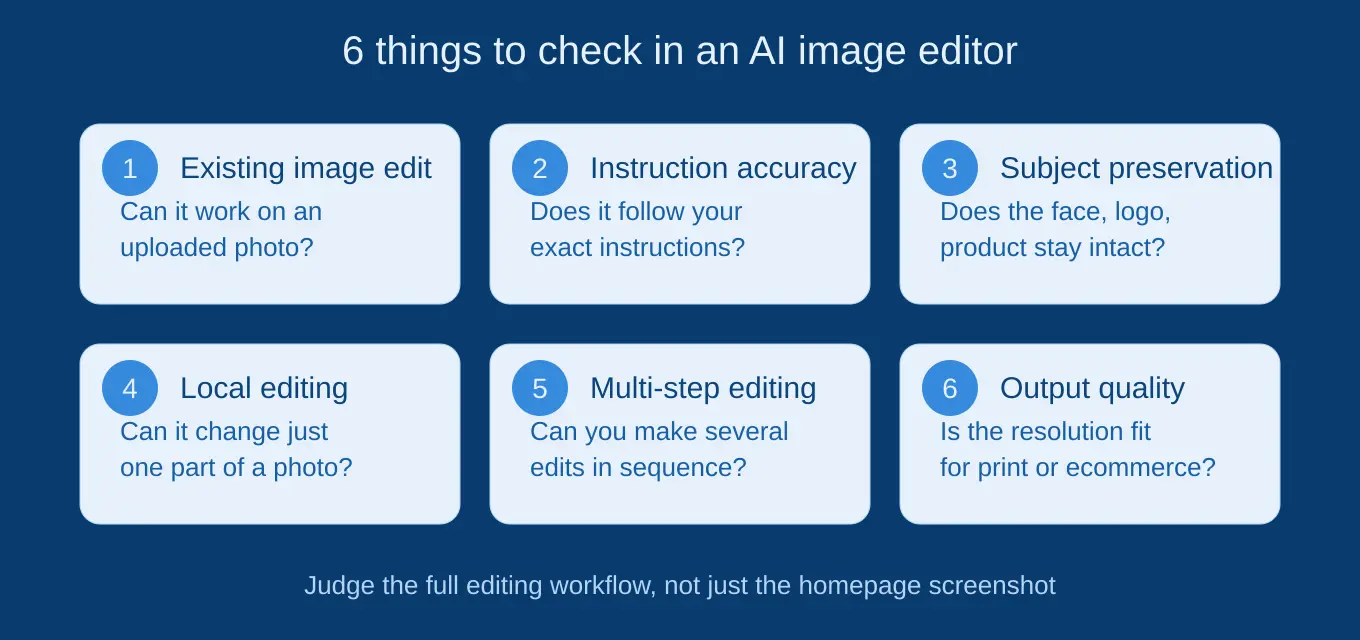
A good alternative should do more than produce attractive images.
The most useful way to compare these tools is to evaluate the editing workflow, not just the final screenshot shown on a product’s homepage.
1. Existing image editing
First determine whether the tool can actually edit an uploaded image.
This matters because someone looking for a Chat GPT alternative may already have a photograph, product image, portrait, sketch, or design that needs modification.
2. Instruction accuracy
Can the AI understand exactly what you asked it to change?
For example if you say Remove the person in the background but keep the main subject unchanged, a good editor should modify the requested area without unnecessarily rebuilding the entire photograph.
3. Subject preservation
This is one of the most important tests.
An AI editor may successfully change clothing but accidentally alter the person’s face. It may remove an unwanted object but distort nearby objects.
For product photography the problem can be even more serious because logos, packaging, proportions and colors may need to remain accurate.
4. Local editing
Look for tools that can make changes to a specific part of an image rather than regenerating everything.
Local editing is useful for removing objects, changing clothing, fixing backgrounds, modifying individual elements, or correcting small visual problems.
5. Multi step editing
The ability to make several changes progressively is extremely useful.
A practical workflow might look like this:
- Upload a portrait.
- Change the background.
- Change the clothing.
- Adjust the lighting.
- Remove an unwanted object.
- Request a final composition.
The fewer times you need to start over, the more useful the tool becomes.
6. Output quality and resolution
A result that looks good in a browser preview may not be suitable for printing, ecommerce, advertising, or professional publishing.
Check the available resolution and export options before choosing a tool for important work.
8 Best Chat GPT Alternatives for AI Image Editing
1. Google Gemini Best Overall Chat GPT Alternative for Conversational Editing
Google Gemini is one of the closest alternatives if what you like about Chat GPT is the ability to upload an image, describe an edit, inspect the result, and continue the conversation.
Google’s current Gemini documentation says users can edit images generated in Gemini, upload an existing image and request edits, or upload multiple images and ask Gemini to create a new image based on them. Its current Nano Banana 2 system also emphasizes local edits, character consistency, improved instruction following, and better text rendering.
That makes Gemini particularly useful for portraits, creative transformations, reference based compositions, and multi step edits.
Best for
- Conversational image editing
- Portrait and character edits
- Background changes
- Multi image references
- Creative transformations
- Users already using Google’s ecosystem
Example
Upload a portrait and ask:
Replace the background with a luxury hotel lobby. Keep my face, hairstyle, clothing, pose, and body proportions unchanged.
You can then continue with another instruction rather than beginning from scratch.
Verdict: If you want the experience most similar to conversational Chat GPT image editing, Gemini should be one of the first tools you test.
2. Adobe Firefly Best for Professional AI Editing
Adobe Firefly is a stronger choice when image editing needs to fit into a professional creative workflow.
Instead of focusing entirely on conversation, Adobe’s ecosystem combines generative AI with more traditional editing and design capabilities.
That makes it particularly attractive to designers, marketers, photographers, agencies, and people already working with Adobe software.
Best for
- Professional image editing
- Generative Fill style workflows
- Marketing creatives
- Designers
- Commercial projects
- Users who need greater editing control
The major advantage is control.
If your project requires more than simply telling an AI what to change, a professional creative environment can be more practical than a general purpose chatbot.
Verdict: Choose Firefly when precision and professional workflow matter more than conversational simplicity.
3. Canva Best for Social Media and Marketing Designs
Canva makes sense when your image editing is only one step in a larger design project.
For example, you might edit a product photograph and then immediately place it into:
- An Instagram post
- A Facebook advertisement
- A presentation
- A promotional banner
- A blog graphic
- A marketing campaign
This is where Canva has an advantage over standalone AI image generators.
You are not simply editing an image. You are turning that image into a finished visual asset.
Best for
- Social media content
- Marketing graphics
- Presentations
- Blog images
- Simple promotional designs
- Beginners
Verdict: Canva is particularly useful when you need AI editing plus a broader design workflow.
4. Photo room Best for Product Photos and Ecommerce
If your main goal is editing product images, a specialized tool can be more useful than a general conversational AI.
Photo room is designed around product photography and ecommerce workflows, where background removal, clean compositions, product presentation, and consistent visuals are common requirements.
Imagine an online seller photographing a handbag against a bedroom wall.
The goal isn’t to create an entirely different handbag. The goal is to preserve the product while creating a cleaner commercial presentation.
That distinction matters.
Best for
- Ecommerce sellers
- Product photography
- Background removal
- Catalog images
- Marketplace listings
- Promotional product visuals
Verdict: For ecommerce, choose a product focused workflow rather than automatically choosing the most powerful general purpose AI.
5. Pixlr Best for Quick Browser Based Editing
Pixlr is useful if you want an accessible browser based image editor without committing to a heavyweight professional workflow.
It can be a practical choice for everyday changes such as removing unwanted elements, modifying backgrounds, enhancing images, and making quick creative adjustments.
Best for
- Quick edits
- Browser based workflows
- Beginners
- Simple photo improvements
- Lightweight creative work
The main attraction is convenience.
If you only need to fix an image occasionally, a simple browser editor may be more appropriate than learning an advanced professional application.
Verdict: A practical choice for quick, everyday AI assisted editing.
6. Picsart Best for Creator Focused Editing
Picsart is particularly relevant for users creating content for social platforms.
Its broader creative environment makes it useful when you want to experiment with visual styles, effects, backgrounds, and other modifications rather than perform strictly technical photo retouching.
Best for
- Social media creators
- Mobile editing
- Creative effects
- Lifestyle images
- Quick visual experimentation
Verdict: A good alternative for creators who care about creativity and speed rather than traditional professional retouching.
7. Fotor Best for Everyday AI Photo Editing
Fotor is another option for users who want a straightforward AI assisted photo workflow.
It fits common tasks such as improving photos, changing backgrounds, removing objects, and applying creative transformations without requiring advanced editing knowledge.
Best for
- Beginners
- Everyday photo edits
- Quick enhancements
- Creative transformations
- Simple background changes
Verdict: Consider Fotor when ease of use is more important than advanced professional controls.
8. Krea Best for Creative Control and Experimentation
Krea is worth considering if you want to move beyond basic change this object edits and experiment with more advanced AI assisted good creation.
It is more relevant to creative users who want to explore image generation, references, styles, and iterative visual development.
Best for
- Creative experimentation
- Designers
- AI artists
- Visual concept development
- Advanced image workflows
Verdict: Krea is more attractive to users who want creative flexibility rather than a simple replacement for a chatbot’s image feature.
ChatGPT Alternatives for Image Editing: Quick Comparison
| Tool | Best for | Conversational editing | Professional control | Beginner-friendly |
| Google Gemini | General AI image editing | Excellent | Good | Excellent |
| Adobe Firefly | Professional creative work | Good | Excellent | Good |
| Canva | Social and marketing graphics | Good | Good | Excellent |
| Photoroom | Product photography | Good | Good | Excellent |
| Pixlr | Quick browser edits | Good | Good | Excellent |
| Picsart | Creator content | Good | Good | Excellent |
| Fotor | Everyday photo editing | Good | Moderate | Excellent |
| Krea | Creative experimentation | Moderate | Advanced | Moderate |
These ratings are best understood as workflow guidance, not laboratory scores. AI tools change rapidly and features, limits, pricing and regional availability can change.
Which Chat GPT Alternative Is Best for Your Specific Job?
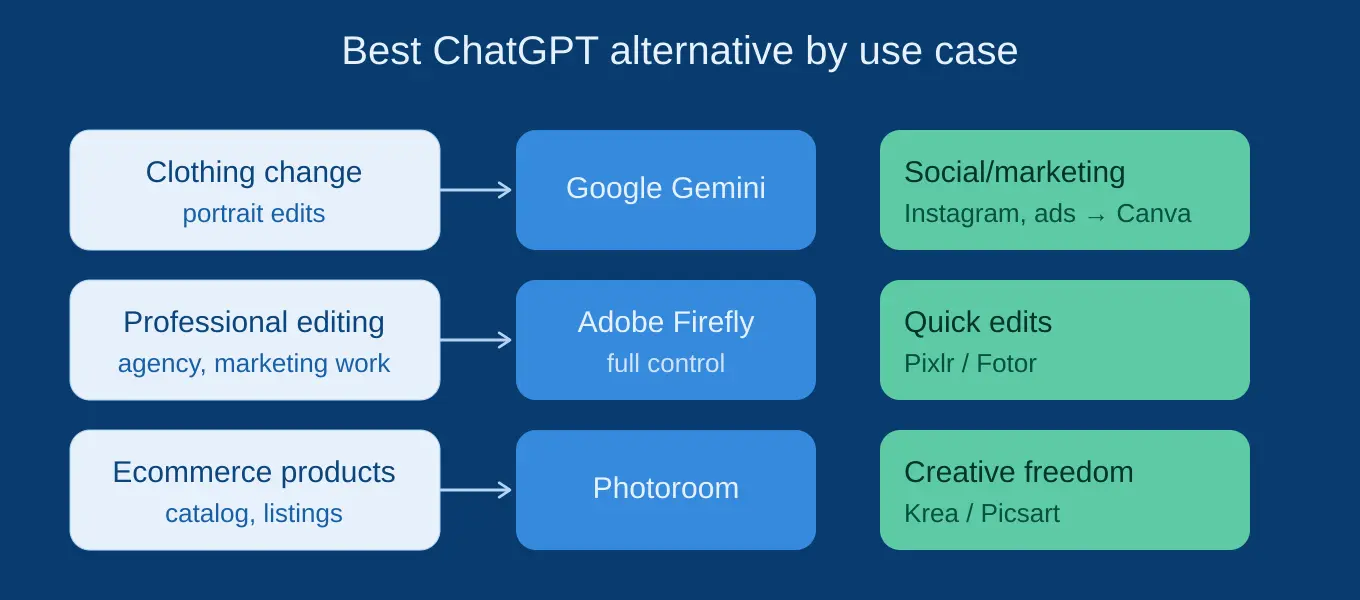
Choosing by use case is more useful than choosing by a generic number one ranking.
For changing a person’s clothing
Start with Gemini.
Conversational editing makes it easy to specify what should change and what must remain untouched.
For example:
Change the blue shirt to a black formal blazer. Preserve the person’s face, hair, skin tone, hands, pose, lighting, and background.
For professional photo editing
Choose Adobe Firefly or an Adobe workflow.
You are more likely to benefit from the combination of AI assistance and traditional editing controls.
For ecommerce product images
Try Photo room first.
The most important requirement is usually product preservation rather than unlimited creativity.
For Instagram graphics
Canva is often the more practical choice because image editing can immediately continue into graphic design.
For quick edits
Try Pixlr or Fotor.
There is little reason to use a complicated professional workflow for a simple background removal or basic enhancement.
For creative experimentation
Explore Krea or Picsart.
These are more suitable when the objective is creative transformation rather than strictly preserving the original image.
How to Test an AI Image Editor Before Choosing It
Do not judge an AI editor from its homepage examples.
Use the same image and the same prompts across several tools.
Test 1: Background replacement
Replace the background with a modern coffee shop. Keep the subject, clothing, face, lighting, and proportions unchanged.
Test 2: Object removal
Remove the red bag from the table. Do not change anything else in the image.
Test 3: Clothing change
Change the white T shirt to a dark green jacket while preserving the person’s face, hair, hands, pose, and background.
Test 4: Product photography
Place this product in a premium studio setting. Preserve its exact shape, proportions, logo, packaging, color, and visible details.
Then inspect the results carefully.
Look at faces, hands, logos, small text, reflections, product geometry, shadows, and background objects.
An editor that makes the requested change but damages everything around it may not actually be the better tool.
Why You May Want a Chat GPT Alternative for Image Editing
Chat GPT can be convenient, so why switch?
The answer usually isn’t that another tool is universally better.
Instead, you may need a specialized capability.
For example, you might want:
- More professional editing controls
- Better product photo workflows
- Easier social media design
- More precise local edits
- Different creative models
- A dedicated mobile editing experience
- A workflow connected to your existing design software
- More control over image references
- Different export or resolution options
That is why comparing tools by job to be done produces better results than simply searching for the best AI image generator.
Important Things to Check Before Publishing AI Edited Images
AI editing is powerful, but it should not be treated as automatically accurate.
Always review the final result before using it commercially or publicly.
Check:
Faces and people: Make sure identity and anatomy have not changed unexpectedly.
Text: AI generated or modified text can contain spelling errors or altered information.
Products: Verify logos, dimensions, colors, packaging, and product features.
Copyright: Do not assume that an AI tool gives you unlimited rights to every source image or reference.
Privacy: Avoid uploading sensitive photographs unless you understand the platform’s data practices.
Commercial use: Review the current terms of the service if the image will be used for advertising, client work, ecommerce, or other commercial purposes.
Google itself advises users of Gemini image generation and editing to consider copyright and privacy rights and to use discretion before relying on or publishing generated content.
What Google’s Current Search Guidance Means for This Topic
A page targeting this keyword should not simply repeat the phrase Chat GPT alternative image edit AI dozens of times.
Google’s current guidance says its systems prioritize helpful, reliable, people first information and specifically warns against creating content primarily to manipulate rankings. Google also says there is no preferred word count that guarantees ranking.
That matters for this topic because AI tool comparison articles can easily become repetitive lists of features.
A better approach is to provide original decision making value:
- Explain why users switch from Chat GPT.
- Separate conversational editing from professional editing.
- Compare tools by actual use case.
- Explain what to test.
- Discuss preservation problems.
- Highlight practical limitations.
- Keep claims current.
- Clearly distinguish facts from recommendations.
Google’s current AI Search guidance also says there are no special requirements for appearing in AI Overviews or AI Mode beyond the normal technical and Search requirements. The same people-first SEO fundamentals remain important.
Google also warns that using generative AI to create many pages without adding user value can fall under scaled content abuse.
That makes genuinely useful comparison content more important than simply producing another long list of AI tools.
Conclusion
The best Chat GPT alternative for AI image editing depends on what you expect the tool to do.
If you want the closest conversational experience, Google Gemini is a strong starting point.
If professional control is the priority, Adobe Firefly deserves serious consideration.
For marketing graphics, Canva is more practical; for ecommerce products, Photo room is a better fit. Pixlr and Fotor are useful for straightforward edits, while Picsart and Krea appeal more to creators who want experimentation.
At Openaihit, our recommendation is not to choose an AI editor simply because someone calls it the best. Take one of your real images, run the same editing prompts through two or three tools, and compare what happens to the details you actually care about.
The winner is the tool that changes what you asked it to change and leaves everything else alone.
Frequently Asked Questions
What is the best Chat GPT alternative for AI image editing?
For a conversational experience, Google Gemini is one of the strongest choices. Adobe Firefly is better suited to professional editing, while Canva, Photo room, Pixlr, and other tools make more sense for specific workflows.
Is there a free Chat GPT alternative for image editing?
Several AI platforms offer some form of free access, but limits can apply to generations, resolution, features, or usage. Because these plans change frequently, check the provider’s current pricing and usage terms before choosing a tool.
Can AI edit an existing photo instead of creating a new one?
Yes. Modern AI editors can work with uploaded images and perform tasks such as changing backgrounds, removing objects, modifying clothing, adding elements, and transforming visual styles. Gemini’s current documentation explicitly supports uploading an image and requesting edits.
Which Chat GPT alternative is best for product photos?
Photo room is a strong option for ecommerce oriented product photography. Adobe Firefly can be a better choice when the project requires more professional creative control.
Which AI image editor is easiest for beginners?
Gemini, Canva, Pixlr, and Fotor are among the easier options to start with because they reduce the need for traditional image editing knowledge.
Is Gemini better than Chat GPT for image editing?
There is no universal winner. Gemini is a particularly strong alternative if you prefer conversational editing and reference based workflows. ChatGPT may remain preferable if you already use its broader ecosystem. The best choice depends on the images you edit and the level of control you need.
Can AI image editing replace Photoshop?
Not completely.
AI can dramatically speed up many editing tasks, but professional workflows can still require layers, masks, exact selections, color management, pixel level retouching, and repeatable manual adjustments.
AI is best viewed as an accelerator rather than a complete replacement for every professional editing workflow.