Editing a podcast episode used to mean spending two to three hours cutting “ums,” adjusting volume levels, and manually aligning multi-track recordings for every single hour of raw conversation. For solo creators and production teams alike, post-production remains the most time-consuming phase of content creation.
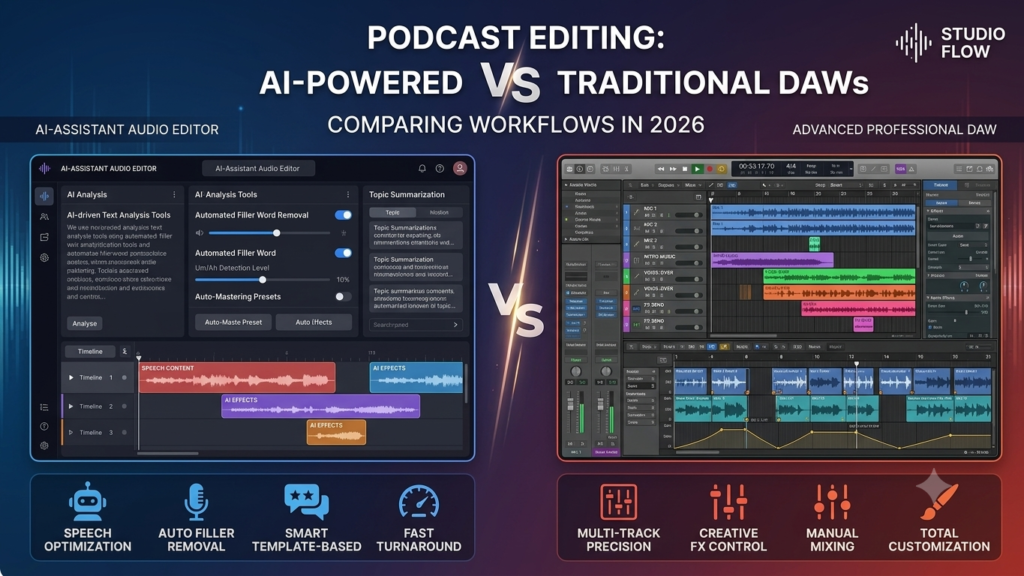
In 2026, the landscape of audio post-production looks vastly different. On one side, AI-powered podcast editing tools like Descript, Adobe Podcast, and Podcastle promise to automate tedious edits, strip away background noise, and turn audio editing into text editing. On the other side, traditional Digital Audio Workstations (DAWs) such as Audacity, Adobe Audition, Pro Tools, and Reaper offer granular waveform precision and professional-grade signal processing that veteran sound engineers swear by.
If you are trying to decide between ai podcast editing tools vs daw setups, this comprehensive guide breaks down the performance, editing speed, sound quality, pricing, and real-world workflows of both options. You will learn exactly when AI tools excel, where traditional DAWs still reign supreme, and how to combine both for maximum efficiency.
fAES Quick Summary Table
Quick Answer (AI Overview & Featured Snippet Focus):
AI podcast editing tools like Descript and Podcastle cut total post-production time by up to 70% using automated text-based editing, instant filler word removal, and AI noise suppression. However, traditional DAWs like Adobe Audition and Pro Tools provide superior manual waveform control, custom plugin chains, and uncompromised audio quality needed for complex multi-speaker or high-end sound design projects.
| Category | Details |
| Who This Guide Is For | Podcasters, audio producers, content creators, and media agencies. |
| Best Overall For Speed | AI-Powered Podcast Editors (Descript, Podcastle, Adobe Podcast) |
| Best Overall For Control | Traditional DAWs (Pro Tools, Adobe Audition, Reaper, Audacity) |
| Optimal Production Strategy | Hybrid Workflow (AI rough cut + DAW final master) |
| Estimated Reading Time | 12 minutes |
Key Takeaways
-
Massive Time Savings: AI editing platforms reduce audio cutting time by 50% to 70% by letting creators edit audio through auto-generated text transcripts.
-
Granular Precision: Traditional DAWs remain unmatched for surgical audio repairs, custom EQ/compression chains, and complex multi-mic Phase alignment.
-
The Noise Reduction Trade-off: AI dialogue enhancers perform miracles on poor rooms, but aggressive AI processing can introduce digital artifacts or hollow-sounding vocals.
-
Pricing Models: Traditional DAWs favor one-time perpetual licenses or standard creative suite subscriptions, while AI tools rely primarily on monthly audio-export minute tiers.
-
The Hybrid Solution: Top production houses combine both—using AI for fast text-based rough cuts and text-search cleanup, then exporting stems to a DAW for final mixing and mastering.
Complete Article
What Are AI-Powered Podcast Editing Tools?
AI-Powered Podcast Editing Tools Definition: Software applications that utilize machine learning, natural language processing (NLP), and automated neural audio models to streamline audio creation. They allow users to edit spoken audio through written text transcripts, clean background noise automatically, and perform automated leveling.
AI-powered podcast editing tools treat spoken audio as text. Instead of staring at complex spectral waveforms, you interact with a live transcript generated right after importing your media files.
+-----------------------------------------------------------------------+
|                       TRANSCRIPT-BASED EDITING                        |
|                                                                       |
|  "Welcome to the show. [Um], today we are talking about [you know]    |
|   audio editing workflows for 2026."                                  |
|                                                                       |
|  Action: Highlight & Press Backspace                                  |
|  Result: Audio cut perfectly; word and silence removed instantly.     |
+-----------------------------------------------------------------------+
How AI Editing Works
-
Transcript-Based Editing: Speech recognition algorithms map spoken words directly to audio timestamps. Deleting a word, phrase, or sentence from the text transcript cuts the corresponding audio track instantly without requiring manual blade tool selection.
-
Automated Filler Word Removal: Machine learning models detect verbal stutters and filler words like “um,” “uh,” “like,” and “you know.” Users can delete hundreds of occurrences across an entire episode with a single click.
-
Automated Audio Enhancement: Neural network enhancers analyze room acoustics, isolated room tone, and background noise. They equalize frequencies, remove HVAC hums, normalize loudness units (LUFS), and add dynamic compression automatically.
Popular AI Tools in 2026
-
Descript: The industry standard for text-based video and audio editing, offering synthetic voice cloning, room tone matching, and multi-track transcription.
-
Adobe Podcast (Enhance Speech): A cloud-based processing engine that restores poor quality microphone recordings to near-studio standards.
-
Podcastle: An all-in-one web platform featuring remote multi-track studio recording, text-to-speech AI voices, and rapid noise removal.
-
Riverside.fm: A remote recording studio with integrated AI text editing, automatic clipping for social media shorts, and dynamic speaker view switching.
What Are Traditional DAWs?
Traditional DAW (Digital Audio Workstation) Definition: Electronic software environments designed for recording, editing, mixing, and mastering multi-track audio. DAWs give audio engineers full manual control over audio waveforms, time alignment, frequency spectra, and signal routing using third-party software plugins (VST, AU, AAX).
Traditional DAWs have powered professional music and broadcast studios for decades. They do not interpret language; they process raw audio signals, voltage parameters, and frequency spectra.
Core Features of DAWs
-
Waveform and Spectral Editing: Allows producers to zoom down to individual sample points or view audio via a visual frequency spectrum to isolate transient clicks, pops, and squeaks.
-
Plugin Architecture: Full support for professional third-party software plugins (FabFilter, iZotope RX, Waves, Universal Audio) for specialized equalization, dynamic control, reverb, and noise gating.
-
Advanced Multi-Track Routing: Enables complex bus routing, sub-mixing, sidechain compression, stem exports, and precise automation over pan and volume curves over time.
Popular DAWs Used by Podcasters
-
Audacity: A free, open-source, cross-platform audio editor ideal for beginners learning basic waveform cutting and noise reduction.
-
Adobe Audition: A specialized broadcast audio workstation featuring detailed spectral display tools, automatic speech leveling, and multi-track session layouts.
-
Reaper: An ultra-lightweight, highly customizable, and affordable professional DAW favored by sound designers for its efficiency and plugin flexibility.
-
Pro Tools: The standard software in commercial recording studios worldwide, designed for high-end multi-track mixing and post-production workflows.
AI Editing Tools vs Traditional DAWs: Side-by-Side Comparison
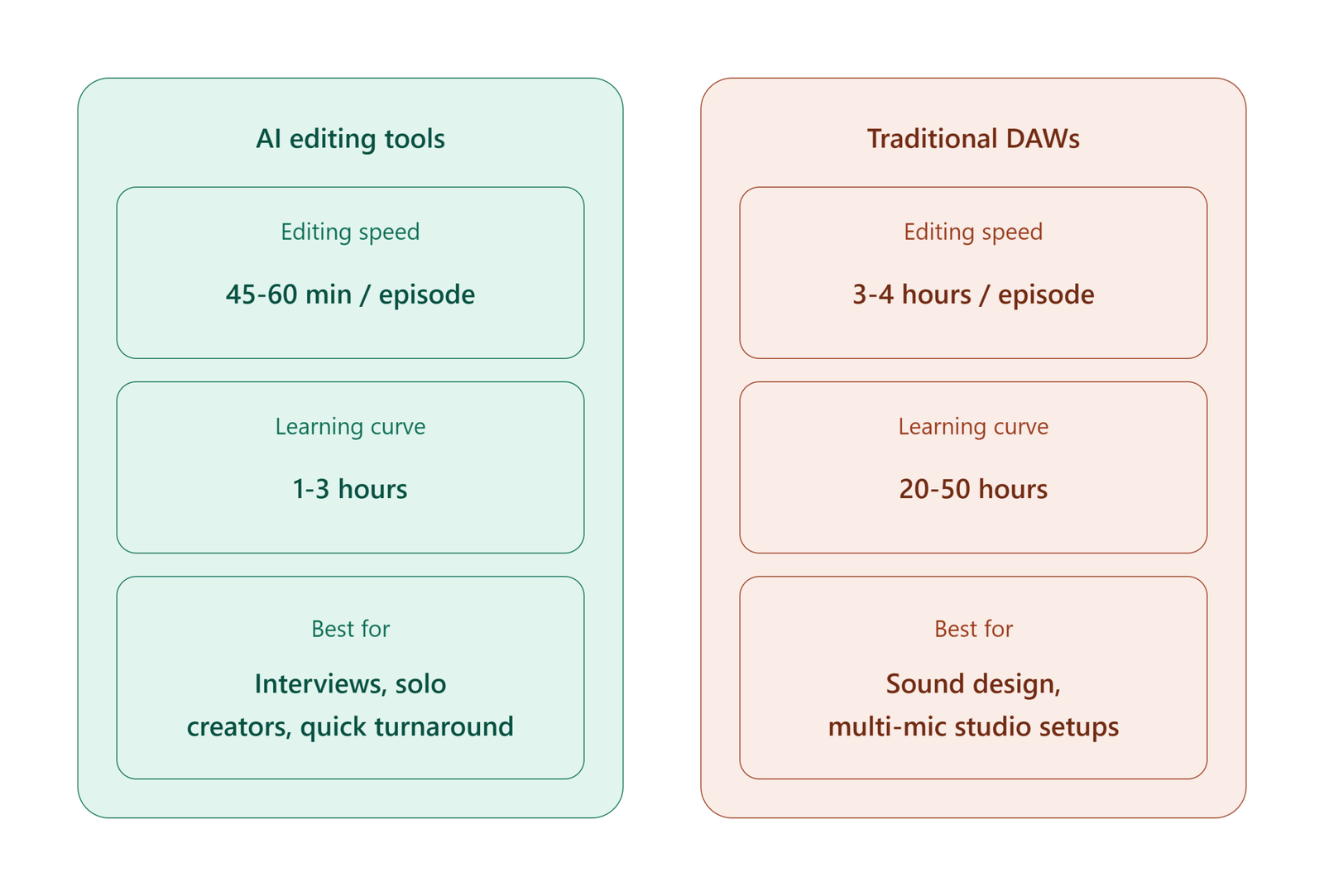
Selecting between ai podcast editing tools vs daw options requires balancing editing speed against the degree of technical precision you require.
| Feature Category | AI Podcast Editing Tools | Traditional DAWs |
| Editing Method | Text transcript manipulation | Waveform / Spectral display timeline |
| Editing Speed | Extremely fast (50–70% faster) | Moderate to slow (1:1 to 3:1 real-time ratio) |
| Learning Curve | Gentle (minutes to hours) | Steep (weeks to months) |
| Audio Quality Control | Automated presets; limited manual tweaks | Full manual parameter adjustment |
| Noise Suppression | One-click AI reconstruction | Manual spectral repair, parametric gates |
| Multi-Track Management | Automated speaker separation | Complex manual bus routing & grouping |
| Best Used For | Solo creators, interview shows, quick turnarounds | Narrative audio, audio dramas, multi-mic setups |
Speed and Efficiency: Which Saves More Time?
Speed Performance Summary: For conversational podcasts, AI-powered tools cut editing time down significantly compared to manual editing in a traditional DAW.
Average Post-Production Time (60-Minute Episode):

Traditional DAW:  [====================================] 3 to 4 Hours
AI-Assisted Tool: [============] 45 to 60 Mins
Manual podcast editing in a traditional DAW requires listening to the recording in real time or at slightly accelerated playback speeds (1.2x to 1.5x). Editors must split tracks manually, insert room tone patches, draw volume automation curves, and eliminate long pauses piece by piece.
Tasks AI Automates Instantly
-
Silence Removal: Trims awkward silences longer than a set duration (e.g., cut all pauses over 1.5 seconds) across all tracks simultaneously.
-
Bulk Filler Word Removal: Identifies all instances of unwanted filler words for mass deletion or soft attenuation.
-
Automatic Chaptering & Show Notes: Generates accurate timecodes, summaries, and social media clips automatically upon export.
-
Auto-Leveling: Normalizes multi-speaker volume differences to industry broadcast standards (-16 LUFS for stereo, -19 LUFS for mono) without setting up manual compressor pipelines.
Sound Quality and Control: Where DAWs Still Win
Sound Quality Summary: Traditional DAWs remain the gold standard when handling complex acoustic challenges, multi-speaker phase alignment, and natural-sounding dynamic range.
While AI audio enhancers perform well on basic microphone tracks, they often struggle when processing poor acoustics, heavy bleed between multiple microphones, or extreme background ambient noise.
         AI Processing vs Manual DAW Signal Chain

  AI Model:   [Raw Audio] ---> [Neural Net Box] ---> [Processed Audio]
                              (Limited Parameter Adjustments)

  DAW Chain:  [Raw Audio] ---> [High-Pass Filter] ---> [Parametric EQ]
                          ---> [De-Esser]         ---> [Dynamic Comp]
                          ---> [Spectral Repair]  ---> [Master Limiter]
                              (Full Precision Control at Every Step)
Manual EQ, Compression, and Noise Gating
In a traditional DAW, an audio engineer tailors every processor to match a voice’s unique tonal qualities:
-
High-Pass Filtering: Cuts low-end mechanical rumble without stripping away the natural warm chest resonance of the speaker’s voice.
-
Parametric Equalization: Isolates and surgical dips harsh room frequencies without introducing muddy phase artifacts.
-
Multi-band Compression: Smooths out loud outbursts while lifting subtle whispers naturally, maintaining human vocal dynamics.
When Professional Studios Still Choose DAWs
-
Microphone Bleed Issues: When two host microphones pick up each other’s voices in the same room, automated AI processors can cause phase cancelation and comb filtering. DAWs allow manual automixing or phase alignment.
-
Over-Processing Artifacts: Heavy AI enhancement often causes “robotic” metallic artifacts, underwater acoustics, or unnatural truncated word endings.
-
Complex Sound Design: Audio dramas, immersive narrative podcasts, and soundscapes demand precise panning, reverb busses, dynamic sound effects (SFX) cues, and master limiting that AI text editors cannot manage effectively.
Cost Comparison: AI Tools vs DAWs in 2026
Evaluating the cost of ai podcast editing tools vs daw platforms involves weighing recurring subscription fees against perpetual one-time software licenses.
| Tool Name | Type | Pricing Model | Starting Price (2026) |
| Audacity | Traditional DAW | Free / Open-Source | $0 |
| Reaper | Traditional DAW | Discounted / Commercial License | $60 one-time (60-day trial) |
| Adobe Audition | Traditional DAW | Monthly / Annual Subscription | $22.99/month |
| Pro Tools | Traditional DAW | Monthly / Annual Subscription | $29.99/month |
| Descript | AI Tool | Freemium Tiered Subscription | $12 to $24/month |
| Podcastle | AI Tool | Freemium Tiered Subscription | $11.99 to $23.99/month |
| Adobe Podcast | AI Tool | Standalone / Creative Cloud | Included in CC or Freemium limits |
Learning Curve: Beginner vs Professional Workflow
The time required to reach proficiency varies significantly between these two software categories.
AI Tool Onboarding (1–3 Hours)
-
Designed for creators without an audio engineering background.
-
Interface mirrors word processing software like Google Docs or Microsoft Word.
-
Common actions rely on simple toggles, sliders, and drop-down menu presets.
-
Keyboard shortcuts align with standard text editing functions.
Traditional DAW Onboarding (20–50 Hours)
-
Requires an understanding of audio principles: signal flow, decibels (dBFS), sample rates, bit depth, and frequency ranges (Hz).
-
Interface consists of complex track timelines, meters, pan knobs, routing matrices, and plugin slots.
-
Mastering surgical tools requires practice in visual waveform editing and listening skills.
Hybrid Workflows: Using AI Tools + DAWs Together
Top audio production teams rarely limit themselves to just one category. Instead, they build a hybrid workflow that combines the rapid editing speed of AI with the precise mastering capabilities of a traditional DAW.
                     RECOMMENDED HYBRID WORKFLOW

+--------------------------------------------------------------------+
| STEP 1: IMPORT & TRANSCRIBE                                        |
| Load raw multi-track recordings into AI Tool (Descript/Podcastle)  |
+--------------------------------------------------------------------+
                                  |
                                  v
+--------------------------------------------------------------------+
| STEP 2: TEXT-BASED ROUGH CUT                                       |
| Delete mistakes, filler words, tangents, and awkward silences      |
+--------------------------------------------------------------------+
                                  |
                                  v
+--------------------------------------------------------------------+
| STEP 3: EXPORT STEMS / AAF / TIMELINE                              |
| Export clean multi-track audio files into Traditional DAW          |
+--------------------------------------------------------------------+
                                  |
                                  v
+--------------------------------------------------------------------+
| STEP 4: FINAL MIX & MASTER                                         |
| Apply precise EQ, compression, de-essing, and final LUFS limiting  |
+--------------------------------------------------------------------+
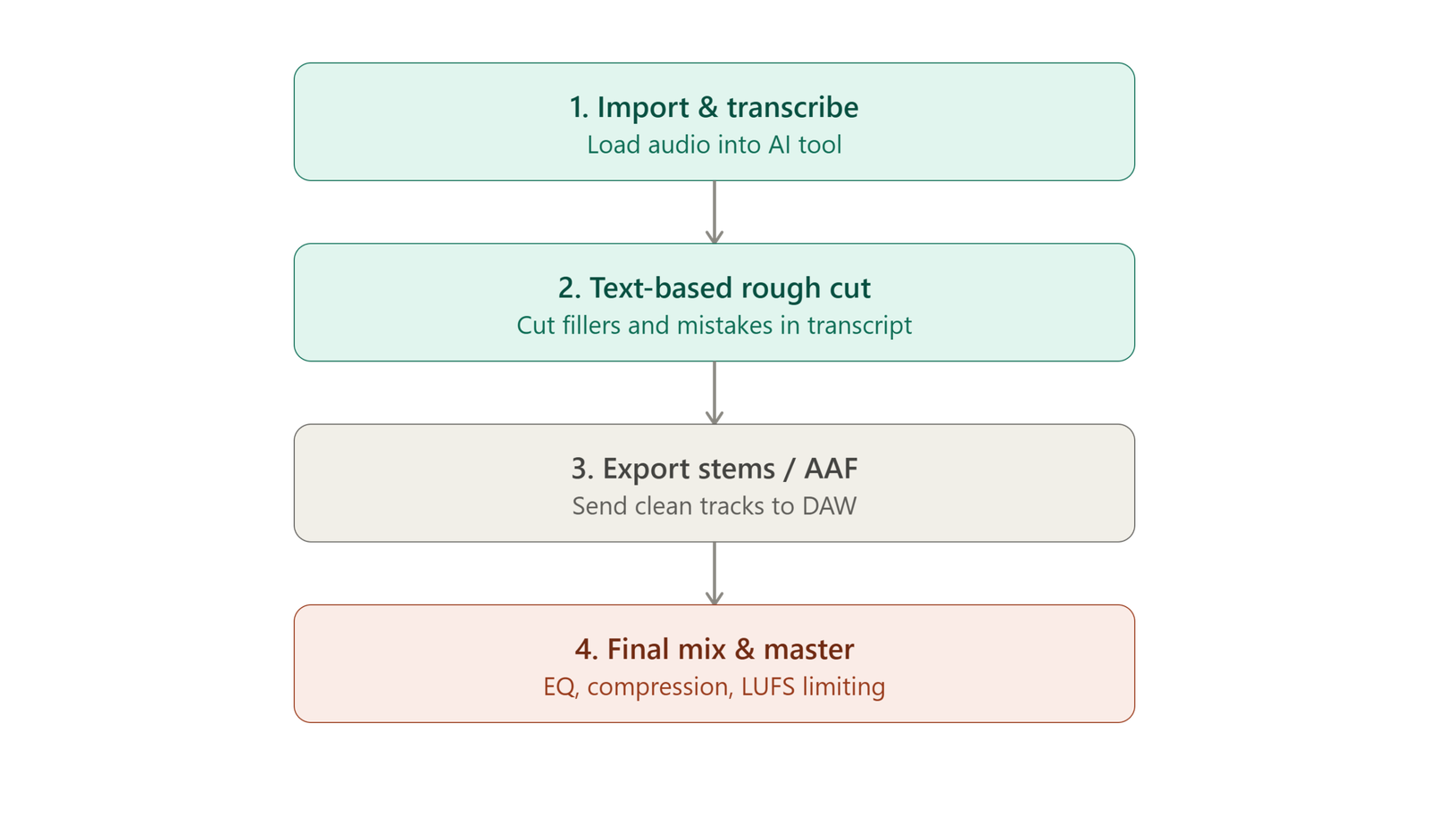
4-Step Hybrid Workflow
-
Import Raw Tracks to AI Editor: Run multi-track recordings through an AI engine to establish an immediate, accurate script transcript.
-
Perform Content Editing via Text: Cut content, reorder segments, and delete filler words in seconds within the text transcript window.
-
Export Stems or Timeline Interchange Files: Export the edited session as clean multi-track WAV files, an AAF, or an XML session file.
-
Final Mix and Master in DAW: Open the timeline inside Reaper, Adobe Audition, or Pro Tools. Apply custom plugin chains, add background music beds with sidechain ducking, and perform final broadcast limiting.
Which One Should You Choose? (Decision Framework)
Use the following framework to decide whether an AI editor or a traditional DAW matches your production demands.
| Scenario | Recommended Choice | Primary Reason |
| Solo Interviewer (Weekly Show) | AI Editing Tool | Speed is critical; transcript editing saves hours per episode. |
| Narrative / Audio Drama | Traditional DAW | Precise sound design, dynamic panning, and Foley placement. |
| Video Podcaster | AI Editing Tool | Simultaneous text-based editing of video cutouts and captions. |
| Studio Engineer / Agency | Hybrid Workflow | Rapid client rough cuts combined with professional audio mastering. |
| Strictly Zero Budget | Audacity (DAW) | Free, powerful, open-source software with no minute limits. |
Recommendations by User Type
-
Choose AI Tools If: You prioritize speed, produce interview-style or conversational podcasts, publish video podcasts on YouTube, or lack time to learn audio engineering software.
-
Choose Traditional DAWs If: You require precise sound control, record complex multi-person studio setups with open bleed, manage immersive sound design, or already own professional VST plugin suites.
Future of Podcast Editing: AI Trends to Watch in 2026 and Beyond
As generative audio models continue to evolve, the distinction between text editors and traditional DAWs is blurring rapidly.
-
Real-Time Generative Contextual Editing: AI tools are beginning to analyze conversation context, suggesting cuts for off-topic tangents automatically while preserving natural phrasing.
-
Ethical Voice Repair and Overdubbing: Replacing mispronounced words or adding missed technical terms by typing them into a transcript via trained voice clones is becoming standard practice.
-
DAWs Integrating Native AI Engines: Major traditional DAWs are embedding neural noise reduction and AI-powered speech separation directly into their native track strips, bringing AI speed into precision environments.
Common Mistakes Podcasters Make When Choosing an Editing Tool
-
Over-Relying on AI Noise Enhancement: Over-processing audio with AI enhancement tools often introduces robotic artifacts. Always test settings at reduced intensity.
-
Ignoring the Recording Environment: Relying on AI to clean up bad audio in post-production is never as effective as recording in a well-treated room with proper mic technique.
-
Assuming DAWs Are Obsolete: Assuming AI makes traditional DAWs unnecessary leads creators to struggle when facing complex audio repairs or detailed multi-mic phase alignment.
-
Over-Editing Natural Speech: Removing every single pause and breath with automated AI tools can make speech sound rushed, uncomfortable, and unnatural to listeners.
Conclusion
Choosing between ai podcast editing tools vs daw setups is not about finding one absolute winner—it is about picking the right tool for your specific workflow goals.
If your primary bottleneck is post-production speed and transcript-based content pruning, AI-powered tools like Descript, Podcastle, and Adobe Podcast offer game-changing time savings. On the other hand, if you require surgical control over complex room acoustics, multi-speaker phase alignment, and specialized VST plugin chains, traditional DAWs like Reaper, Adobe Audition, and Pro Tools remain essential.
For most creators in 2026, the ultimate approach lies in a hybrid workflow: leveraging AI speed for rapid content rough cuts, then bringing stems into a traditional DAW for professional mixing and mastering. Explore more in-depth reviews and software breakdowns across our AI tools categories at openaihit.com to keep your media creation stack ahead of the curve.
FAQs
Are AI podcast editing tools as good as traditional DAWs?
AI podcast editing tools match or exceed traditional DAWs in speed, ease of use, and quick noise reduction for simple vocal tracks. However, they do not match traditional DAWs for deep sound design, surgical spectral repair, custom plugin signal routing, or complex multi-track mixing.
Can beginners use a DAW without prior audio experience?
Yes, beginners can start with accessible DAWs like Audacity or GarageBand. However, expect a steeper learning curve compared to AI tools. Mastering waveform editing, equalization, dynamics processing, and loudness standards typically requires several weeks of study and practice.
Do AI editing tools remove background noise effectively?
Yes, modern AI noise suppression algorithms excel at removing consistent background noise, room reverberation, HVAC hums, and mild traffic sounds. However, aggressive processing can degrade vocal clarity and create unnatural digital artifacts.
Is Descript better than Audacity for podcast editing?
Descript is better than Audacity for rapid content editing, filler word removal, and video podcast production through text manipulation. Audacity is better if you require a completely free tool without export minute limits or need basic visual waveform editing without relying on cloud processing.
Which tool is cheaper for long-term podcast production?
Open-source DAWs like Audacity are completely free, while DAWs like Reaper offer an affordable $60 one-time license. AI tools operate on recurring monthly subscription models ($10–$30/month) based on export minutes, making traditional DAWs cheaper over years of high-volume production.
Can I use AI tools and DAWs together in one workflow?
Yes, using a hybrid workflow is common among professional podcast producers. You can use an AI tool like Descript to perform fast text-based content cuts and filler word cleanup, then export the multi-track audio stems into a DAW like Adobe Audition or Reaper for final mixing and mastering.
Do AI tools work well for video podcasts too?
Yes, AI editing platforms like Descript, Riverside, and Podcastle are built specifically for video podcasts. Editing the transcript automatically cuts both the video and audio tracks in sync, while generating automated captions and clip highlights for social media.
What skills are needed to master a traditional DAW?
Mastering a traditional DAW requires understanding audio engineering principles, including gain staging, parametric EQ, dynamic compression, de-essing, noise gating, reverb/delay bus routing, spectral audio repair, and LUFS loudness normalization standards.