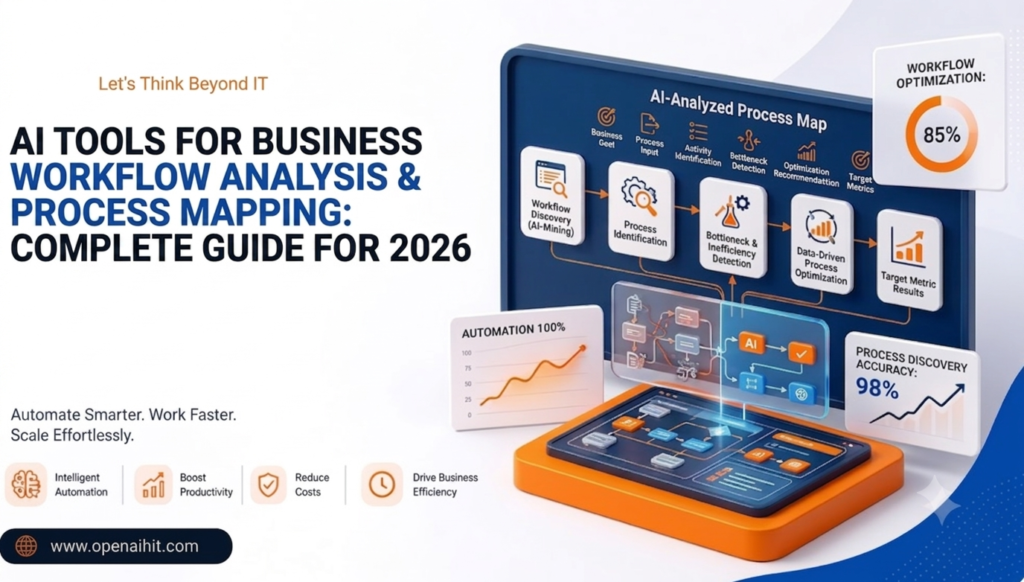
Utilizing ai tools for business workflow analysis and process mapping allows companies to identify operational bottlenecks, auto-generate process diagrams, and optimize daily operations without hiring expensive consultants. In 2026, generative AI and process discovery engines automatically convert screen recordings, activity logs, and simple text prompts into clear visual flowcharts, standard operating procedures (SOPs), and automated triggers. By leveraging these tools, small businesses can eliminate repetitive task friction, accelerate employee onboarding, and scale operational productivity seamlessly.
-
Automated Process Discovery: Turn manual screen steps and textual prompt ideas into clear, interactive flowcharts in seconds.
-
Bottleneck Identification: Pinpoint redundant manual tasks, handoff delays, and high-cost operational steps using AI analysis.
-
Cost & Time Efficiency: Replace expensive external business process analysts with intuitive, low-code AI platforms.
-
Seamless Integrations: Connect visual workflows directly to automation triggers across tools like Slack, CRMs, and project management apps.
Introduction
Businesses lose hundreds of hours every month to disconnected software stacks, redundant manual handoffs, and outdated standard operating procedures (SOPs). For small teams, identifying where work gets delayed is often a frustrating guessing game. Without a dedicated operations or process analyst team, business owners end up managing daily chaos rather than growing their revenue.
This is precisely where modern ai tools for business workflow analysis and process mapping are changing the game. Powered by generative AI and real-time process discovery, these tools automatically capture, visualize, and optimize complex operational steps within minutes. In this guide, we will explore the best ai tools for small business teams looking to map, analyze, and streamline their operational workflows in 2026, without needing a technical background or a massive budget.
What Is Workflow Analysis & Process Mapping?
Workflow analysis is the practice of documenting, evaluating, and reviewing the individual steps involved in completing a business task—from receiving a customer lead to delivering the final product. Process mapping takes this analysis a step further by converting those steps into visual diagrams, swimlane flowcharts, or SOP guides to highlight operational handoffs and structural delays.
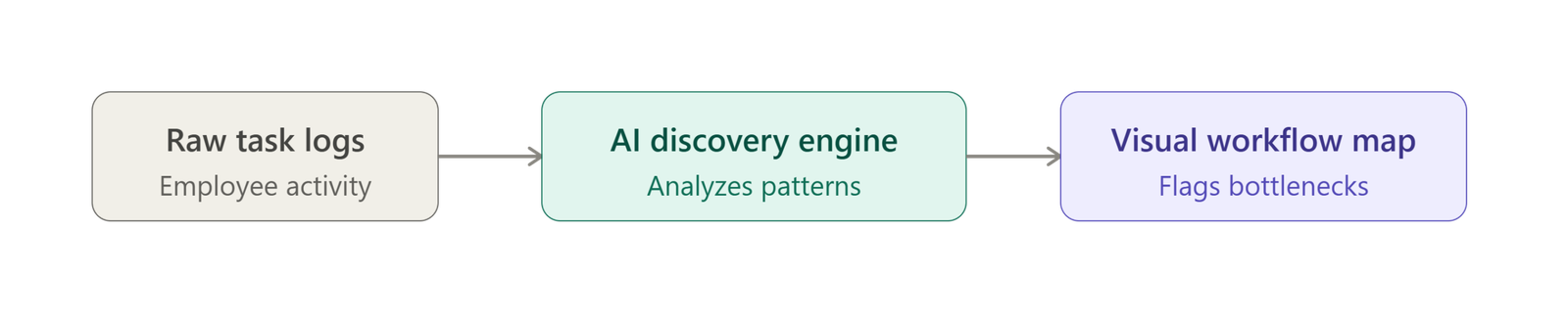
[ Raw Employee Tasks & Logs ] ──► [ AI Process Discovery ] ──► [ Interactive Visual Workflow Map & Bottleneck Flags ]
In 2026, effective process mapping has become critical due to distributed remote teams, rapidly growing app stacks, and operational complexity. Rather than drawing static flowcharts on a whiteboard, ai tools for business conduct continuous, real-time process mapping, translating raw employee activity, text prompts, or software event logs into living, actionable operational blueprints.
Why Small Businesses Need AI Tools for Workflow Optimization
Small businesses often operate with lean teams and tight profit margins. While large enterprises hire expensive operations consultants to run Six Sigma analysis, small businesses must find smarter, faster ways to eliminate wasted time.
Deploying dedicated ai tools for small businesses provides several immediate advantages:
-
Eliminates High Consulting Fees: AI platforms act as an automated operations analyst, identifying structural flaws without five-figure consulting retainer fees.
-
Rapid Bottleneck Detection: Instantly spot where tasks stall, whether it is waiting for manager invoice approvals or delayed client onboarding follow-ups.
-
Data-Driven Time Savings: For example, auto-mapping a multi-step client onboarding sequence can reveal redundant manual data entries, cutting onboarding duration from 5 days down to 2 hours through simple automation. If workflow mapping is just one piece of your operational puzzle, our broader roundup of the best AI tools for business covers the full stack small teams need.
How We Selected These AI Tools for Business
To determine the top-tier platforms, we evaluated dozens of software solutions against five core operational criteria tailored specifically for small business adoption:
| Selection Benchmark | Evaluation Focus |
| Ease of Use | No-code/low-code interfaces with instant text-to-diagram generation |
| Integrations | Native connectivity with popular business stacks (Slack, Gmail, HubSpot, Zapier) |
| Pricing Accessibility | Generous free tiers or cost-effective monthly plans for small teams |
| Process Mining Accuracy | Ability to analyze workflows accurately without creating false operational maps |
| Scalability | Smooth growth capacity from simple task documentation to cross-department automation |
Top 10 AI Tools for Business Workflow Analysis & Process Mapping
1. Scribe AI
Scribe AI turns screen recordings of any digital workflow into step-by-step visual SOPs, complete with annotated screenshots, text instructions, and AI-generated process guides.
-
Core Use Case: Automated visual process documentation and SOP creation.
-
Key Features:
-
Auto-captures browser and desktop actions in real time.
-
Generates titles, step descriptions, and redacted sensitive data using AI.
-
Scribe Optimize identifies redundant manual steps and calculates automation ROI.
-
-
Pricing: Free basic plan available; Pro plans start at $12/user/month.
-
Pros & Cons:
-
Pros: Extremely fast setup; zero manual diagramming required.
-
Cons: Best suited for digital screen-based tasks rather than physical operations.
-
-
Best For: Small business operations, IT support, and client onboarding teams.
2. Miro AI
Miro AI enhances collaborative digital whiteboarding by allowing users to generate complex process maps, BPMN diagrams, and customer journey maps from simple text prompts.
-
Core Use Case: Interactive process mapping, brainstorming, and swimlane workflow generation.
-
Key Features:
-
Text-to-diagram AI prompt generation for rapid flowchart creation.
-
Automatic clustering of workflow sticky notes into structured process stages.
-
Integrates with Jira, Asana, Slack, and Zoom.
-
-
Pricing: Free plan with 3 boards; Starter plan starts at $8/user/month.
-
Pros & Cons:
-
Pros: Great for visual workshops and collaborative team alignment.
-
Cons: Requires manual refinement for complex, strict compliance diagrams.
-
-
Best For: Creative teams, agile product managers, and cross-functional workshops.
3. Lucidchart AI
Lucidchart AI is an intelligent diagramming workspace that converts natural language prompts and data spreadsheets into technical process flowcharts.
-
Core Use Case: Standardized process modeling, technical flowcharts, and system mapping.
-
Key Features:
-
Prompt-to-diagram generation and automatic process summarization.
-
Live data-linking to Google Sheets or Excel to show real-time metrics on maps.
-
Conditional formatting to automatically highlight process bottlenecks.
-
-
Pricing: Free plan (up to 3 editable documents); Individual plans start at $7.95/month.
-
Pros & Cons:
-
Pros: Industry-standard diagramming shapes and deep technical depth.
-
Cons: Slightly steeper learning curve than simple whiteboard tools.
-
-
Best For: Small business IT leads, systems architects, and compliance managers.
4. Process Street AI
Process Street leverages AI to convert flat SOP documents into dynamic, interactive workflows with conditional logic, task assignments, and automated triggers.
-
Core Use Case: Interactive recurring workflow management and compliance checklists.
-
Key Features:
-
Process AI Generator builds full workflow workflows from brief plain-text descriptions.
-
Conditional logic that adapts workflow paths based on user inputs.
-
Automated data collection and approval assignment chains.
-
-
Pricing: Startup plans start at around $100/month for team packages; free trial available.
-
Pros & Cons:
-
Pros: Excellent for operational consistency in recurring tasks.
-
Cons: Higher entry price point compared to simple diagramming tools.
-
-
Best For: Growing agencies, property management, and HR onboarding operations.
5. Zapier Canvas & Zapier Central
Zapier Canvas provides an AI-assisted diagramming workspace that lets teams map business processes and immediately convert them into live automated Zaps.
-
Core Use Case: Mapping operational handoffs and converting them directly into no-code app automations.
-
Key Features:
-
AI-powered workflow suggestions that highlight missing steps.
-
Direct connectivity to over 7,000 web applications.
-
Visual representation of human-to-app and app-to-app data flows.
-
-
Pricing: Free plan available; premium automation plans start at $19.99/month.
-
Pros & Cons:
-
Pros: Seamless transition from visual mapping to actual execution.
-
Cons: Requires Zapier integration setup to run automated actions.
-
-
Best For: Lean operations teams wanting to map and automate without writing code.
To see how this fits into a bigger automation strategy, check our guide on AI automation tools for connecting mapped workflows to live triggers.
6. Tallyfy
Tallyfy uses AI to convert messy, unstructured emails, SOP PDFs, and notes into structured, automated business processes without complex flowcharts.
-
Core Use Case: Transforming unstructured process documentation into trackable, actionable tasks.
-
Key Features:
-
AI-driven document parser that extracts steps and roles automatically.
-
Real-time progress tracking across open client tasks and approvals.
-
Eliminates manual status-check emails with automated client portals.
-
-
Pricing: Standard plans start at $5/user/month; free trial available.
-
Pros & Cons:
-
Pros: Exceptionally straightforward for non-technical team members.
-
Cons: Less focused on visual flowchart graphics, more on step lists.
-
-
Best For: Client service agencies, law firms, and accounting practices.
7. ClickUp AI
ClickUp combines project management with built-in AI mind maps, whiteboards, and process docs to analyze task dependencies and streamline team capacity.
-
Core Use Case: All-in-one project management, task workflow mapping, and operational tracking.
-
Key Features:
-
AI Brain converts raw project notes into visual sub-task workflows.
-
Automatic bottleneck detection for overdue task dependencies.
-
Dynamic timeline, Kanban, and Mind Map visual views.
-
-
Pricing: Free plan available; Unlimited plan starts at $7/user/month; ClickUp AI add-on $5/user/month.
-
Pros & Cons:
-
Pros: Unifies process mapping and daily execution in one workspace.
-
Cons: Feature-dense dashboard can require initial onboarding time.
-
-
Best For: Small businesses looking to centralize docs, tasks, and process maps in one place.
8. Asana AI
Asana AI assists business managers by analyzing workflow velocity, flagging resource bottlenecks, and drafting smart workflows based on project goals.
-
Core Use Case: Workflow management, capacity analysis, and cross-departmental coordination.
-
Key Features:
-
Smart Workflows generate custom operational stages based on plain-text prompts.
-
Intelligent status reporting that summarizes process health and delay causes.
-
Goal-tracking linked directly to daily execution workflows.
-
-
Pricing: Free personal plan; Starter plan starts at $10.99/user/month.
-
Pros & Cons:
-
Pros: Highly polished UI; outstanding team adoption rate.
-
Cons: Advanced workflow intelligence features require paid tiers.
-
-
Best For: Mid-sized teams and marketing departments managing multi-step campaigns.
9. Make.com AI
Make.com provides a visual automation platform where AI enables users to design, map, and execute complex, multi-branch app workflows.
-
Core Use Case: Visual workflow engineering and complex data routing across SaaS platforms.
-
Key Features:
-
Visual drag-and-drop builder for custom logic and data transformations.
-
AI Assistant helps design complex automation paths and error-handling steps.
-
Real-time execution tracking to monitor data flow health.
-
-
Pricing: Free plan with 1,000 operations/month; Core plans start at $9/month.
-
Pros & Cons:
-
Pros: Powerful visual logic capabilities for complex data flows.
-
Cons: Can feel overwhelming for non-technical users taking first steps.
-
-
Best For: Tech-savvy entrepreneurs, developers, and digital marketing agencies.
10. KYP.ai / ClearWork AI
KYP.ai and ClearWork AI represent next-generation agentic process discovery engines, designed to continuously monitor system activity and identify operational friction points automatically.
-
Core Use Case: Automated process intelligence, task mining, and operational bottleneck discovery.
-
Key Features:
-
Unobtrusive task mining that identifies actual human work patterns vs. written SOPs.
-
Quantifies precise ROI and financial waste for every operational bottleneck.
-
Generates production-ready process maps and automation recommendations.
-
-
Pricing: Enterprise custom pricing; free demo evaluations available.
-
Pros & Cons:
-
Pros: Provides complete objective truth on operational efficiency.
-
Cons: Tailored more toward scaling teams than solo entrepreneurs.
-
-
Best For: Rapidly scaling companies, e-commerce brands, and ops executives.
Comparison Table: Best AI Tools for Business
| Tool | Pricing Model | Best For | Standout Key Feature | Platform Rating |
| Scribe AI | Free / Paid ($12/mo) | SOP & Step-by-Step Guides | Auto-captures screen actions to SOPs | 4.9 / 5.0 |
| Miro AI | Free / Paid ($8/mo) | Collaborative Brainstorming | Text-to-flowchart interactive whiteboards | 4.8 / 5.0 |
| Lucidchart AI | Free / Paid ($7.95/mo) | Technical Process Modeling | Prompt-based diagramming & data-linking | 4.8 / 5.0 |
| Process Street AI | Paid (Free Trial) | Recurring SOP Checklists | Conditional logic AI workflow generator | 4.7 / 5.0 |
| Zapier Canvas | Free / Included in Zapier | Mapping to Direct Automation | Converts visual maps into active Zaps | 4.8 / 5.0 |
| Tallyfy | Paid ($5/mo) | Simple Unstructured Workflows | Converts emails/PDFs into task chains | 4.6 / 5.0 |
| ClickUp AI | Free / Paid ($7/mo) | Unified Project & Process Ops | AI Mind Maps & task dependency tracking | 4.7 / 5.0 |
| Asana AI | Free / Paid ($10.99/mo) | Team Task Coordination | Smart workflow generation & capacity insights | 4.7 / 5.0 |
| Make.com | Free / Paid ($9/mo) | Complex Visual Automation | Drag-and-drop multi-branch logic builder | 4.8 / 5.0 |
| KYP.ai / ClearWork | Custom / Enterprise | Process Intelligence & Mining | Real-time task mining & ROI calculations | 4.9 / 5.0 |
AI SEO Tools for Small Business: A Related Efficiency Layer
Fixing your internal operational workflows is only half the efficiency equation. To build a highly profitable company, small businesses must also streamline their customer acquisition engines. Combining internal workflow tools with dedicated ai seo tools for small business creates an end-to-end efficiency system.
Just as process mapping eliminates manual task waste, implementing modern ai seo tools for small businesses automates keyword discovery, content optimization, and competitor analysis. For a deeper dive into this side of the stack, our dedicated guide on AI SEO tools for small business breaks down each tool’s setup and pricing in detail.
Top AI SEO Tools to Pair with Your Workflows:
-
Surfer AI / Frase: Automatically analyzes search engine results pages (SERPs) and outlines SEO-ready content briefs in seconds, saving hours of manual writer briefing.
-
Semrush AI Writing Assistant: Streamlines local search optimization, content scoring, and keyword tracking within a unified dashboard.
-
SE Ranking AI: Ideal for small business owners seeking automated rank tracking, site audits, and local marketing insights on a budget.
By connecting an ai seo tool for small business to an automated workflow tool like Zapier or ClickUp, your marketing team can automatically generate content briefs, assign writing tasks, and schedule social posts without manual oversight.
How to Choose the Best AI Tools for Small Business
Selecting the ideal software stack requires aligning platform capabilities with your current operational complexity:
                      ┌───────────────────────────────────────────┐
                      │  What is your main process mapping goal?  │
                      └─────────────────────┬─────────────────────┘
                                            │
           ┌────────────────────────────────┴────────────────────────────────┐
           ▼                                                                 ▼
[ Document Screen Tasks & SOPs ]                                 [ Map & Automate Apps ]
   • Goal: Fast step-by-step documentation                         • Goal: Visual flowcharts linked to software
   • Recommended: Scribe AI, Tallyfy                               • Recommended: Zapier Canvas, Lucidchart, Make
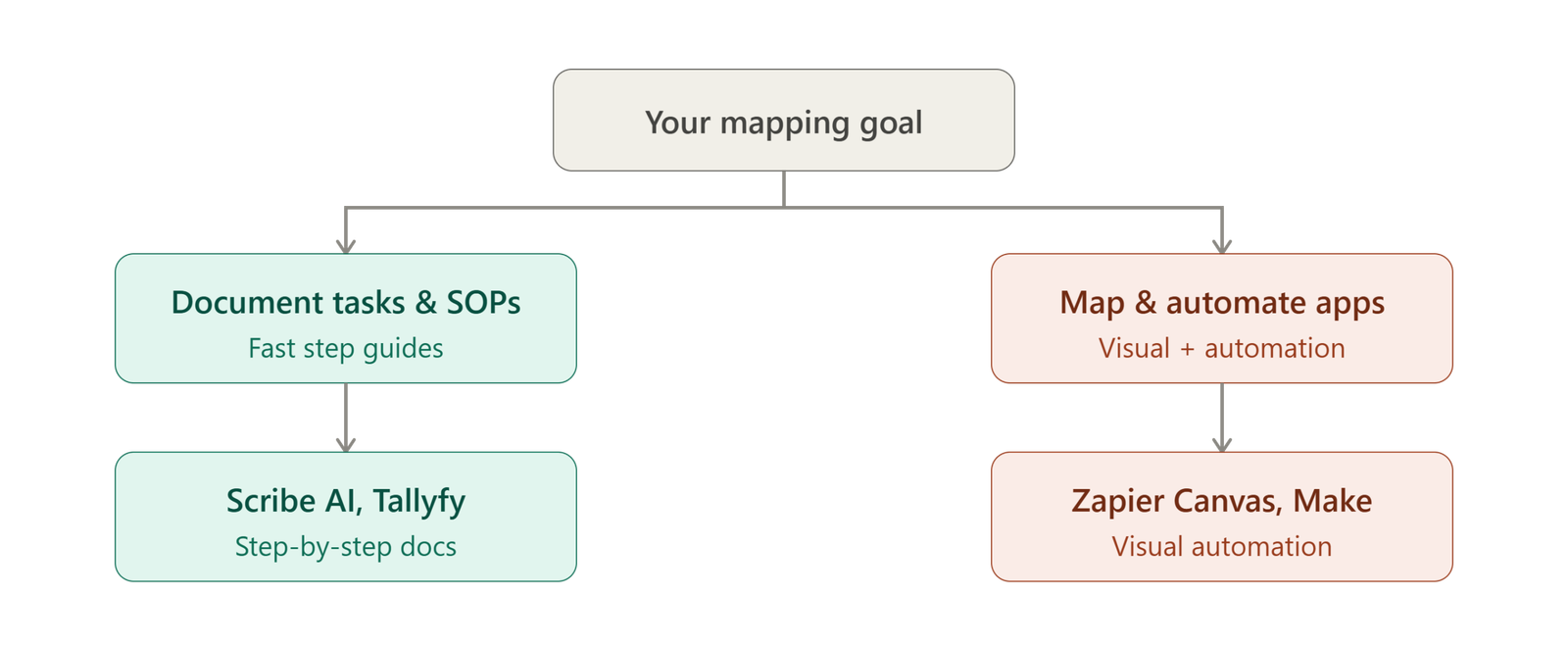
Decision Matrix:
-
Assess Technical Skill: If your team prefers simple lists, choose Scribe AI or Tallyfy. If you have visual engineers, choose Make.com or Lucidchart AI.
-
Evaluate Existing Stacks: Pick tools that connect natively to your primary communication platforms like Slack or Microsoft Teams.
-
Avoid Over-Engineering: Do not purchase high-end enterprise process mining platforms if a simple no-code flowchart generator solves your immediate bottleneck.
Common Mistakes When Implementing AI Workflow Tools
Even the best ai tools for small business can fail if implemented incorrectly. Avoid these common operational traps:
-
Automating Broken Processes: Automating a chaotic, ill-defined process only accelerates chaos. Map and refine your workflow manually before turning on AI automations.
-
Ignoring Employee Adoption: Software is only useful if your team actively uses it. Involve team leads during initial testing to ensure smooth adoption.
-
Chasing Feature Hype over Utility: Avoid switching platforms simply for shiny AI branding. Focus strictly on whether the tool saves measurable hours each week.
Conclusion
Transforming chaotic daily operations into scalable, reliable systems is the fastest way to grow a business in 2026. By deploying the right ai tools for business workflow analysis and process mapping, small businesses can easily uncover operational bottlenecks, automate repetitive task handoffs, and free up critical employee bandwidth.
Whether you start by auto-generating visual SOPs with Scribe AI, mapping complex logic on Miro AI, or deploying visual automations with Zapier Canvas, taking the first step is what matters most. For more expert software evaluations, in-depth AI guides, and complete digital technology strategies, make sure to visit Openaihit. We continuously evaluate, test, and feature the best emerging tools to help you build a smarter, faster, and more profitable digital business.
Frequently Asked Questions
Q1: What are the best free AI tools for small business workflow mapping?
Scribe AI (for automated SOP step creation), Miro AI (for prompt-to-flowchart whiteboards), and Zapier Canvas (for process mapping linked to app automations) offer the most powerful free plans for small businesses.
Q2: How do AI tools help with business process analysis?
AI tools analyze system activity logs, screen recordings, or user prompts to build interactive visual flowcharts. They automatically flag redundant manual steps, measure step completion times, and calculate automation ROI.
Q3: Can AI tools replace a business process consultant?
For small and mid-sized businesses, yes. AI tools eliminate the need for costly external operations analysts by automatically capturing actual team workflows and recommending optimization paths in real time.
Q4: What is the difference between workflow automation and process mapping?
Process mapping is the visual documentation and structural analysis of steps within a business workflow. Workflow automation is the technical execution that performs those mapped steps automatically using software integrations.
Q5: Do AI SEO tools help with overall business workflow efficiency?
Yes. Pairing ai seo tools for small business (like Surfer AI or Semrush) with workflow tools automates content research, brief creation, and task assignments, streamlining your entire marketing pipeline.