
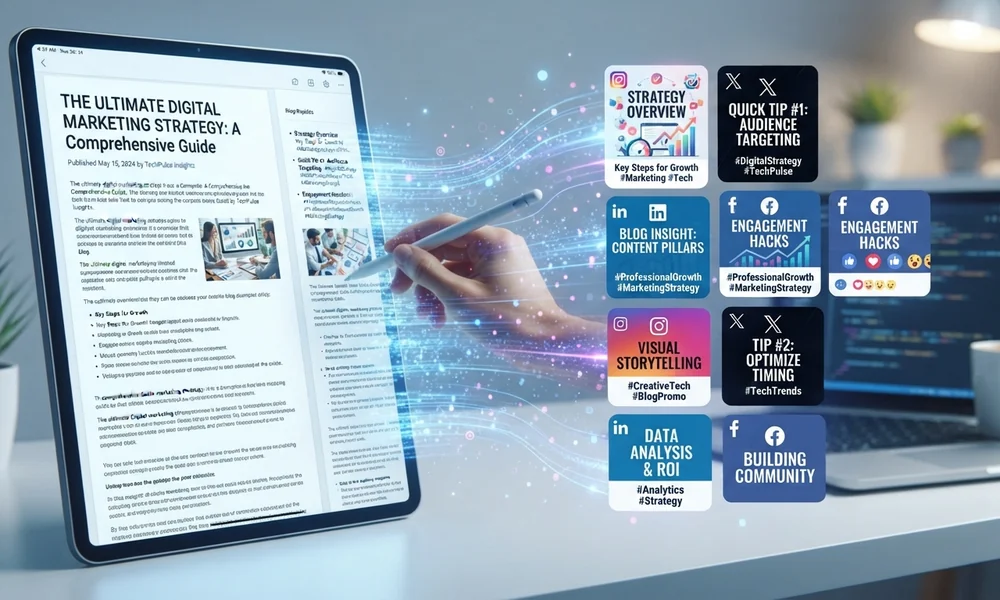
Creating LinkedIn content from long-form articles can take a lot of time. After publishing a detailed blog post, you may also want to turn it into LinkedIn posts, short updates, professional insights, carousel content, and engaging discussions. Writing all these formats manually can be difficult, especially when you publish content regularly.
This is where AI tools for LinkedIn content can make your work easier. These tools help transform long articles into short, engaging, and professional LinkedIn posts. They can identify important ideas, create attention-grabbing introductions, rewrite paragraphs, suggest hashtags, and organize content for different audiences.
Instead of starting from zero every time, you can use AI to turn one article into multiple LinkedIn posts. This helps you save time, maintain a consistent publishing schedule, and share useful information with your professional audience.
In this article, we will explore the 10 best AI tools for creating LinkedIn content from long-form articles. You will learn about their features, benefits, and how each tool can help you create better LinkedIn content.
AI Overview
AI tools for LinkedIn content help writers, marketers, business owners, and content creators convert long-form articles into engaging LinkedIn posts. These tools can summarize articles, extract key points, generate professional captions, rewrite content, and create multiple post variations.
Popular options include ChatGPT, Claude, Jasper, Copy.ai, Taplio, Supergrow, Canva, Buffer, Hoaotsuite, and Lately AI. Each tool offers different features for writing, designing, scheduling, or publishing content.
By using an article-to-LinkedIn workflow, you can turn one blog post into several social media updates while keeping the original message, professional tone, and important information.
Key Takeaways
- AI tools can turn long-form articles into short and engaging LinkedIn posts.
- You can create multiple LinkedIn updates from one blog post.
- AI writing tools help generate hooks, captions, summaries, and calls to action.
- Some platforms also offer LinkedIn scheduling and content management.
- Editing AI-generated content helps maintain your natural writing style.
- Different AI tools offer different features for writing, designing, and publishing.
- Combining AI tools with human editing can improve content quality and audience engagement.
10 Best AI Tools for Creating LinkedIn Content From Long-Form Articles
1. ChatGPT
ChatGPT is one of the most flexible tools for turning long-form articles into engaging LinkedIn content. You can provide a complete blog post and ask it to create several LinkedIn updates using the most important information.
Key Features:
- Converts long articles into multiple LinkedIn posts.
- Creates professional hooks and captions.
- Summarizes important information into short updates.
- Generates different writing styles and post formats.
- Suggests hashtags and calls to action.
Why Choose ChatGPT?
ChatGPT is a good choice for beginners, bloggers, and marketers who want flexible content creation. You can control the writing style, audience, and length by providing clear instructions.
2. Claude

Claude is useful for working with long articles and transforming detailed information into clear, natural-sounding LinkedIn content. It can understand the main message of an article and identify important ideas that deserve separate social media posts.
Key Features:
- Analyzes long-form articles and documents.
- Extracts important ideas and key takeaways.
- Creates natural and professional LinkedIn posts.
- Rewrites complicated paragraphs into simple wording.
- Helps maintain a consistent writing style.
Why Choose Claude?
Claude is a strong option for writers who publish detailed articles and want to turn them into meaningful professional discussions. It is especially useful when you want to preserve the original message instead of creating unrelated content.
3. Jasper
Jasper is an AI writing platform designed for marketing and business content. It helps teams create professional social media updates while keeping their brand message consistent.
You can use Jasper to rewrite article sections, develop LinkedIn captions, create promotional posts, and generate different versions of the same message.
Key Features:
- Creates marketing-focused LinkedIn posts.
- Helps maintain brand voice and messaging.
- Rewrites article content into shorter updates.
- Generates different content variations.
- Supports multiple marketing content formats.
Why Choose Jasper?
Jasper is a useful option for marketing teams, agencies, and businesses that publish content regularly. It can help maintain consistency when several people create LinkedIn posts for the same brand.
4. Copy.ai
Copy.ai helps users turn existing information into different types of marketing content. Instead of manually rewriting an entire article, you can provide its main points and use AI to create shorter LinkedIn updates.
Key Features:
- Generates short social media content.
- Creates multiple versions of marketing messages.
- Helps rewrite and summarize existing content.
- Supports repeatable content workflows.
- Organizes content creation tasks.
Why Choose Copy.ai?
Copy.ai is suitable for marketers and businesses that want to create different content variations without rewriting everything manually. It can help speed up repetitive content production.
5. Taplio
Taplio is a platform focused on LinkedIn content creation and personal branding. It helps creators develop post ideas, write professional updates, organize content, and manage their LinkedIn publishing activities. You can also explore Claude SEO prompts to generate SEO-focused ideas and insights that can support your LinkedIn content strategy.
It is especially useful when you want to turn your existing blog content into LinkedIn posts while maintaining a regular publishing schedule.
Key Features:
- Helps generate LinkedIn post ideas.
- Supports AI-assisted post writing.
- Provides content scheduling features.
- Helps organize LinkedIn publishing activities.
- Offers content performance insights.
Why Choose Taplio?
Taplio is a good option for professionals, founders, and creators who want a LinkedIn-focused content workflow. It is particularly useful when content creation and publishing need to happen in one place.
6. Supergrow
Supergrow is designed to help professionals create and manage LinkedIn content. It offers AI writing assistance and content repurposing features that can help transform existing material into professional posts.
You can use it to develop new post ideas from articles, create different content formats, and organize your publishing schedule.
Key Features:
- Repurposes existing content into LinkedIn posts.
- Helps create professional post drafts.
- Supports carousel content creation.
- Offers content planning and scheduling.
- Helps maintain a consistent content style.
Why Choose Supergrow?
Supergrow is useful for personal brands, consultants, and business owners who want to publish regularly on LinkedIn. It can reduce the time needed to move from an existing article to a ready-to-edit post.
7. Canva
Canva is a popular design platform that helps turn written information into attractive visual content. While many AI writing tools focus on text, Canva is especially useful for transforming article information into LinkedIn carousels, graphics, and presentations.
For example, you can take a blog post about digital marketing and divide its main ideas into several carousel slides. Each slide can explain one important point using simple text and relevant visuals.
Key Features:
- Creates LinkedIn carousel designs.
- Provides ready-made social media templates.
- Helps create professional graphics.
- Supports AI-assisted design and content features.
- Makes visual content easier to edit and customize.
Why Choose Canva?
Canva is an excellent choice for bloggers and marketers who want to make their LinkedIn content more visual. It works especially well when combined with an AI writing tool that extracts the main points from your article.
8. Buffer

Buffer helps creators organize, prepare, and schedule social media content. Its AI Assistant can help rewrite existing text, generate content ideas, and adapt messages for different platforms.
After turning a long article into several LinkedIn posts, you can use Buffer to organize your drafts and plan when to publish them.
Key Features:
- Helps rewrite and improve social media content.
- Provides AI-assisted post creation.
- Supports LinkedIn scheduling.
- Organizes posts through a content calendar.
- Offers publishing and performance management features.
Why Choose Buffer?
Buffer is suitable for bloggers, freelancers, and small businesses that want a simple way to manage their LinkedIn publishing schedule. It is particularly helpful when you already have posts prepared and need an organized publishing system.
9. Hootsuite
Hootsuite is a social media management platform that helps businesses create, manage, and schedule content across different social networks.
Its OwlyWriter AI feature helps users generate social media captions, develop content ideas, and rewrite existing posts. You can use these capabilities to adapt important information from a long-form article into shorter LinkedIn updates.
Key Features:
- Supports AI-assisted social media writing.
- Helps create and rewrite captions.
- Provides social media scheduling.
- Offers content calendar management.
- Includes social media monitoring and analytics features.
Why Choose Hootsuite?
Hootsuite is a strong option for businesses and marketing teams that need more than just an AI writing tool. It combines content management, scheduling, and performance tracking in one platform.
10. Lately AI

Lately AI focuses on transforming longer content into smaller social media updates. It is designed to help marketers get more value from content they have already created.
Instead of writing every LinkedIn post from the beginning, you can use its content repurposing approach to identify useful sections and turn them into shorter social media messages.
Key Features:
- Repurposes long-form content into social updates.
- Helps extract important messages from existing material.
- Generates multiple short-form content variations.
- Supports brand voice consistency.
- Helps organize social media content production.
Why Choose Lately AI?
Lately AI is worth considering for businesses that have a large library of existing content. Its repurposing approach can help turn older articles and marketing materials into new social media content.
Comparison Table: 10 Best AI Tools for LinkedIn Content
| AI Tool | Best For | Main Use |
| ChatGPT | Flexible writing | Article-to-post conversion |
| Claude | Long articles | Summaries and insights |
| Jasper | Marketing teams | Brand-focused posts |
| Copy.ai | Content variations | Marketing captions |
| Taplio | LinkedIn creators | Writing and scheduling |
| Supergrow | Content repurposing | LinkedIn post creation |
| Canva | Visual content | LinkedIn carousels |
| Buffer | Content scheduling | Publishing management |
| Hootsuite | Business teams | Social media management |
| Lately AI | Content repurposing | Short social updates |
1. LinkedIn AI Tools

LinkedIn AI tools are software platforms that help users create, improve, organize, and manage professional content for LinkedIn.
These tools can generate post ideas, write captions, summarize articles, create professional introductions, and suggest ways to improve existing posts.
For example, ChatGPT and Jasper can help write LinkedIn updates, while Taplio and Supergrow offer LinkedIn-focused content features.
How They Help:
- Save time when creating professional posts.
- Generate fresh content ideas.
- Improve writing quality and readability.
- Maintain a consistent publishing schedule.
- Create different versions of existing content.
2. Article to LinkedIn Posta
Article to LinkedIn post means converting a long blog post or detailed article into shorter LinkedIn updates.
Instead of sharing the entire article, you can extract its most useful information and present it in a format that is easier for LinkedIn readers to understand.
For example, one 2,000-word article can provide ideas for several LinkedIn posts, including important lessons, practical tips, industry insights, and questions for your audience.
How This Process Works:
- Upload or paste your existing article.
- Ask AI to identify the main ideas.
- Select the most valuable information.
- Convert each idea into a separate LinkedIn post.
- Add an interesting opening and a clear conclusion.
- Review and publish the final content.
3. LinkedIn Content Generator

A LinkedIn content generator is an AI-powered tool that helps create professional social media content for LinkedIn.
It can generate captions, short posts, introductions, questions, promotional updates, and educational content based on your instructions or existing articles. You can also use effective ChatGPT research prompts to explore topics, identify valuable insights, and develop more informative LinkedIn content.
For example, you can provide an article about SEO and ask an AI content generator to create five LinkedIn posts explaining its most important lessons.
Benefits of a LinkedIn Content Generator:
- Creates posts from existing articles.
- Generates engaging opening lines.
- Produces multiple content variations.
- Helps simplify complicated information.
- Supports different professional writing styles.
Secondary Keywords Comparison Table
| Secondary Keyword | Search Intent | Content Focus |
| LinkedIn AI tools | Informational | AI platforms for LinkedIn |
| Article to LinkedIn post | Informational | Repurposing long articles |
| LinkedIn content generator | Informational | Automated post creation |
Frequently Asked Questions (FAQs)
1. What are the best AI tools for creating LinkedIn content from long-form articles?
Some of the best options include ChatGPT, Claude, Jasper, Copy.ai, Taplio, and Supergrow. These tools help transform existing articles into shorter and more engaging LinkedIn posts.
2. Can AI turn a blog article into multiple LinkedIn posts?
Yes. AI tools can analyze a blog article, extract important ideas, and create multiple LinkedIn posts. You can also request different writing styles and formats.
3. Which AI tool is best for converting articles into LinkedIn posts?
ChatGPT and Claude are flexible options for converting articles into posts. Supergrow and Taplio are also worth exploring for LinkedIn-focused content workflows.
4. Can I create LinkedIn carousels from blog articles?
Yes. You can use ChatGPT to extract important points from your article and Canva to turn those points into attractive LinkedIn carousel slides.
5. Are AI-generated LinkedIn posts good for engagement?
AI-generated posts can help create useful content, but engagement depends on relevance, originality, writing quality, and audience interest. Adding personal experience can make posts more valuable.
6. How many LinkedIn posts can I create from one article?
You can create five, ten, or even more posts from one detailed article. The number depends on the article’s length, quality, and number of useful ideas.
Conclusion
Creating LinkedIn content from long-form articles does not have to be a time-consuming process. With the right AI tools, you can turn one detailed blog post into multiple professional LinkedIn updates, engaging captions, and attractive carousel designs.
Tools like ChatGPT, Claude, Jasper, and Copy.ai are useful for writing and rewriting content. Taplio and Supergrow offer LinkedIn-focused features, while Canva helps create visual posts. Buffer and Hootsuite make scheduling and content management easier.
The best approach is to choose tools according to your needs and combine AI assistance with your own ideas and experience. Always review your content before publishing to ensure it provides real value to your audience.
Start with one existing article, extract its most useful ideas, and transform them into several meaningful LinkedIn posts. You can also use helpful Claude rompts for writing to develop engaging content ideas and refine your drafts. This simple strategy can help you save time, reach more professionals, and build a stronger presence on LinkedIn.