AI data annotation is one of the most important steps in building smart AI systems. Without labeled data, machine learning models can’t learn patterns correctly. This guide will help you understand annotation types, workflows, tools, and costs. You’ll also learn how to improve labeling quality and reduce errors.
What Is AI Data Annotation?
AI data annotation is the process of adding labels to raw data so AI can learn from it. This raw data can be images, text, audio, video, or even 3D point clouds. The labeled output is often called “ground truth data” because it becomes the reference for training. In simple words, annotation helps AI understand what it sees.
Annotated datasets are used in supervised learning, where the AI learns from examples. For example, an image annotation task may label objects using bounding boxes or segmentation. Text annotation might tag names and locations using named entity recognition (NER). These labels allow AI training data labeling to become structured and usable.
Why AI Models Need Annotated Data (And What Happens Without It)
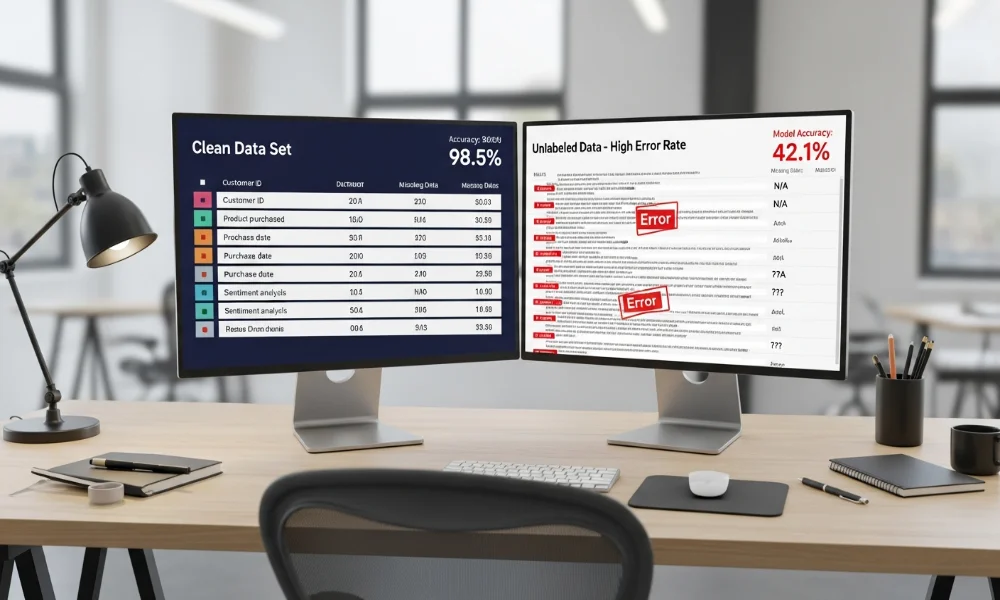
AI models need annotated data because they learn from examples, not guesses. If data is not labeled, the model cannot understand what output is correct. That leads to poor accuracy, bias, and unreliable predictions. Bad labels create bad models, even with powerful algorithms.
When annotation quality is weak, the model picks up wrong patterns. This is especially risky in sensitive fields like medical image labeling or financial fraud detection. For example, unclear guidelines can cause inconsistent labels and reduce inter-annotator agreement. This results in noisy training data and lower model performance.
Types of Data Annotation (With Real Examples)
Different AI projects need different types of data annotation. The label format depends on the model type and use case. Computer vision datasets often need detailed image labeling. NLP models require structured text tags and classifications. Each annotation type supports a specific machine learning goal.
Below is a quick overview of common raw data types and annotation outputs.
| Raw Data Type | Annotation Output | Model Use Case |
|---|---|---|
| Image | Bounding boxes, segmentation, keypoints | Object detection, medical AI |
| Text | NER, sentiment labels, intent tags | Chatbots, search, NLP models |
| Audio | Transcription, timestamps, speaker tags | Speech recognition, emotion AI |
| Video | Frame labeling, object tracking, events | Surveillance, sports AI |
| 3D Point Cloud | Cuboids, lane labeling, object tags | Autonomous driving |
Image Annotation
Image annotation is used to train computer vision models to recognize objects. It includes labeling images with categories, bounding boxes, or polygons. This is common in retail, healthcare, robotics, and security systems. Image labeling works best when labels follow consistent rules.
There are several image annotation types used in AI projects. Classification assigns a label to an entire image, like “cat” or “dog.” Bounding boxes locate objects, while semantic segmentation labels each pixel. Keypoints help detect body poses and facial features accurately.
Text Annotation
Text annotation helps AI understand language by adding tags to words or sentences. It includes sentiment labeling, intent classification, and named entity recognition. This is widely used in customer support tools, search engines, and content moderation. Text annotation makes language data usable for NLP models.
NER is one of the most valuable text annotation methods. It marks entities like names, dates, organizations, and locations. Sentiment analysis labels emotional tone, such as positive, negative, or neutral. These tags improve chatbot accuracy and search relevance instantly.
Audio Annotation
Audio annotation includes labeling sound data with transcripts, timestamps, and speaker identity. It helps build speech recognition tools like voice assistants and call analytics platforms. The data can include different accents, noise levels, and speaking speeds. Audio labels must stay accurate across varied environments and speakers.
Speaker diarization is another important audio labeling method. It identifies who is speaking in multi-speaker recordings. Emotion recognition tags vocal tone like happy, angry, or calm. These labels support AI for customer service and mental health tools.
Video Annotation
Video annotation is more complex because it includes time-based labeling. It involves frame-level tags, object tracking, and activity recognition. Video annotation is used in security, autonomous systems, and sports analysis. It requires strong QA to prevent inconsistent frame labeling.
Object tracking follows the same object across frames. Event detection labels specific actions like “falling” or “running.” Video annotation often uses hybrid labeling, where AI pre-labeling speeds up work. Human-in-the-loop review ensures accuracy stays high throughout.
3D Point Cloud Annotation
3D point cloud annotation is used in self-driving cars and robotics. It labels objects in LiDAR data using cuboids and lane markings. This data type is critical for safe navigation and obstacle detection. 3D labeling needs expert-level accuracy because small errors matter.
Cuboids define object shape and position in space. Lane and road marking annotation helps vehicles follow traffic rules. Because point cloud data is dense and complex, teams use advanced annotation tools. This is where enterprise platforms often outperform basic open-source tools.
The AI Data Annotation Workflow (Step-by-Step Framework)

A structured annotation workflow makes labeling accurate and scalable. Many teams skip planning and regret it later. A good workflow reduces ambiguity and improves dataset consistency. Clear steps make large labeling projects much easier to manage.
A strong AI data annotation workflow usually includes:
-
defining goals
-
creating guidelines
-
running a pilot
-
production labeling
-
quality assurance
-
iteration and refinement
Step 1 : Define the annotation objective
Start by defining what the model should learn. The goal might be object detection, classification, or language understanding. This helps you choose the right annotation type and tool. Without a clear objective, teams often label the wrong things.
Clear objectives also reduce labeling confusion. For example, in medical imaging, you must decide if you’re labeling tumors or tissue types. In NLP, you must define if you’re tagging intent or sentiment. The objective drives every annotation decision after this step.
Step 2 : Create annotation guidelines
Annotation guidelines are written rules that tell labelers what to do. They explain how to handle edge cases and tricky examples. Strong guidelines increase consistency and improve inter-annotator agreement. Guidelines should include visual examples and clear definitions.
Good guidelines also reduce labeling bias. They help annotators make the same decision every time. Without guidelines, labels become inconsistent and the dataset becomes noisy. This can ruin model performance even if the dataset is large.
Step 3 : Pilot labeling (small dataset)
Before labeling a huge dataset, always run a pilot first. Label a small batch and check if guidelines work properly. This helps you find unclear rules and fix them early. A pilot saves cost and prevents major errors later.
Pilot labeling also helps estimate annotation cost and time. You can measure label speed and difficulty. If quality scores are low, revise guidelines and train annotators again. This makes production labeling smoother and more reliable.
Step 4 : Production labeling
Once the pilot is successful, move to full production labeling. This is where most of the labeling volume happens. Large teams or outsourced labelers may work in parallel. Production labeling needs task tracking and label version control.
This stage benefits from workflow automation. Many teams use pre-annotation, where models generate labels first. Then humans correct mistakes and confirm final outputs. This hybrid labeling reduces cost and improves speed significantly.
Step 5 : Quality assurance (QA)
Quality assurance checks if labels are correct and consistent. This step is often missed, but it’s critical. QA reduces errors, improves ground truth accuracy, and builds trust in datasets. QA is the difference between usable data and wasted effort.
QA can include gold standard checks, sampling, and inter-annotator agreement scoring. Teams should create a clear error taxonomy to track common mistakes. These insights help refine guidelines and retrain labelers. Strong QA also supports compliance and audit-ready datasets.
Step 6 : Dataset refinement + iteration
Annotation is not a one-time task. After model training, you often find weak areas and need more data. Refinement helps fix edge cases and improve dataset coverage. Iteration is normal, especially in real-world AI deployments.
This is where active learning becomes useful. The model identifies uncertain samples, and humans label those first. This method reduces workload and improves training efficiency. It helps teams focus on the most valuable data points.
Annotation Quality Assurance (QA): Metrics & Methods
Quality is what makes annotation valuable. If labels are wrong, the model learns wrong patterns. QA ensures datasets remain consistent and reliable. Even small improvements in label quality can boost model accuracy.
QA also protects against data drift and labeling bias. It helps teams maintain consistency across multiple annotators. Many businesses now demand QA reports and audit trails. This is especially common in enterprise and regulated environments.
Gold standard datasets
Gold standard data is a small set of expertly labeled samples. It is used to measure annotator performance and consistency. You can run labelers against this set regularly. Gold sets help detect errors early and maintain high standards.
Gold data can also be used for training new labelers. It clarifies tricky cases and reduces confusion. Teams can update gold sets as new edge cases appear. This keeps your QA process aligned with real-world needs.
Inter-annotator agreement (IAA)
Inter-annotator agreement measures how often labelers agree on the same task. High IAA indicates consistent guidelines and clear labeling criteria. Low IAA suggests confusion, unclear rules, or subjective labels. IAA is a key metric for annotation reliability.
IAA is commonly used in text annotation and medical labeling. It helps identify tasks that require better definitions. If agreement is low, revise guidelines and train annotators again. This prevents inconsistent data from entering your training set.
Spot-check + random sampling
Spot-checking involves reviewing random samples from the dataset. It is a fast and scalable way to find common mistakes. Sampling can be done daily or weekly depending on project size. Spot-checking catches errors that automated tools might miss.
This method works best when paired with a scoring system. Reviewers can grade labels and highlight issues. Teams then adjust workflows and provide feedback to annotators. Sampling keeps production quality stable without slowing progress too much.
Conflict resolution workflows
Conflicts happen when annotators disagree. A good workflow includes a process to resolve these differences. Usually, a senior reviewer or subject expert makes the final decision. Clear conflict resolution improves dataset consistency over time.
Conflict logs also help refine annotation guidelines. If the same issue repeats, guidelines need improvement. Some platforms provide built-in conflict resolution tools. This saves time and keeps the labeling pipeline organized.
Error taxonomy (what errors matter most)
An error taxonomy is a list of common labeling mistakes. It helps teams track recurring problems in a structured way. For example, common errors include missing objects, wrong class labels, or poor segmentation. Tracking errors makes QA faster and more accurate.
Once you know which mistakes happen most, you can fix the root cause. You might update guidelines, provide training, or redesign tasks. Over time, error taxonomy improves both speed and accuracy. It also helps justify dataset quality to stakeholders.
QA Methods Table
| QA Method | Best For | When to Use |
|---|---|---|
| Gold set testing | consistency checks | early and ongoing |
| IAA scoring | ambiguity detection | guideline refinement |
| Multi-pass review | high-stakes domains | medical or legal data |
| Automated checks | speed and scale | large datasets |
Tools for AI Data Annotation (Best Platforms in 2025)

Annotation tools make the labeling process easier and faster. They provide features like task assignment, quality checks, and export formats. Some tools work best for images, while others focus on NLP or audio. Choosing the right tool depends on data type and scale.
Modern annotation platforms also support model-in-the-loop workflows. They allow AI pre-labeling and human review in one interface. Many enterprise tools also offer security controls and audit logs. This is important for compliance and sensitive datasets.
Open-source tools (Label Studio, CVAT)
Open-source tools are popular because they are flexible and cost-effective. Label Studio supports text, image, and audio annotation. CVAT is widely used for computer vision datasets and video annotation. These tools are great for startups and research teams.
However, open-source tools require setup and maintenance. You may need developers to host and manage them. Security, scaling, and integrations can be more challenging. They work best when you have technical support in-house.
Enterprise platforms
Enterprise annotation platforms offer better scaling and security features. They support large teams, advanced QA workflows, and role-based access control. Many also provide audit trails for compliance needs. Enterprise tools are built for speed, governance, and long-term stability.
These platforms often include automation features like active learning and pre-annotation. They reduce manual workload and speed up dataset production. The downside is cost, which can be high for small teams. Still, they save time and reduce risk for enterprise AI projects.
When to use which
Choosing between open-source and enterprise tools depends on your needs. Open-source is ideal for limited budgets and smaller datasets. Enterprise tools are better for high-stakes projects with strict deadlines. Your tool decision should match your budget, scale, and compliance needs.
Tool Comparison Table
| Tool Type | Pros | Cons | Best For |
|---|---|---|---|
| Open-source | free, flexible | setup and maintenance | startups |
| Enterprise | secure, scalable | expensive | enterprises |
| Hybrid | balanced approach | vendor reliance | mid-size teams |
AI Data Annotation Cost (Pricing Models Explained)
The cost of data annotation varies based on complexity and volume. Image and video labeling usually costs more than text labeling. Costs also increase when you need expert labelers. Complex tasks take more time, and time increases total cost.
Pricing models differ across annotation services. Some charge per label, others charge per hour or per task. Many vendors also offer pricing per dataset or per project. Understanding these models helps you plan annotation budgets realistically.
Cost by data type (image/video/text)
Different data types require different effort levels. Image annotation can include simple classification or complex segmentation. Video annotation takes longer because it involves multiple frames. Text labeling is often cheaper, but depends on complexity.
3D point cloud annotation is usually the most expensive. It requires trained labelers and advanced tools. Medical image labeling also costs more because it needs clinical expertise. The more precision required, the higher the annotation cost.
Common pricing models
Here are the most common data labeling cost models:
-
Per label: common for classification and tagging
-
Per hour: common for complex tasks like segmentation
-
Per task: used for grouped tasks with fixed steps
-
Per dataset/project: used in large outsourcing contracts
Each model has different advantages based on task structure.
What increases cost (edge cases, complexity)
Several factors increase cost in annotation projects. Complex labels like polygons take more time than bounding boxes. Edge cases require discussion and guideline refinement. More ambiguity means more reviews and higher QA cost.
Other cost drivers include multilingual data, low-quality images, or noisy audio. If annotators need training, the project timeline increases. Security and compliance requirements also raise costs. High quality data always costs more, but it improves model success.
Outsourcing vs In-House Annotation

Many teams struggle with the outsourcing versus in-house decision. Both approaches can work, depending on your project needs. In-house labeling offers control, while outsourcing offers speed. The best choice depends on budget, timeline, and security needs.
Some companies use a hybrid approach. They outsource simple tasks but keep sensitive work internal. This helps balance cost and quality. Hybrid annotation is becoming more common in enterprise AI development.
Pros and cons
In-house annotation gives you full control over quality and processes. You can train labelers and adjust guidelines quickly. However, hiring and managing labelers takes time. In-house is slower to scale, especially for large datasets.
Outsourcing provides fast scaling and reduces management burden. Vendors already have trained teams and tools. Still, outsourcing may raise privacy concerns if data is sensitive. Outsourcing works best when security requirements are manageable.
When outsourcing wins
Outsourcing is ideal when you need results quickly. It works well for large datasets with repetitive tasks. Vendors can deliver labels faster using pre-built workflows. Outsourcing also reduces staffing costs for short-term projects.
It also helps when you lack technical resources. Many annotation companies provide full services including QA, tools, and pipeline support. This saves time for internal teams. If speed matters most, outsourcing is often the smarter choice.
When in-house wins
In-house annotation wins when data is sensitive or regulated. Healthcare, finance, and government projects often require strict compliance. In-house teams also understand domain context better. Domain expertise improves label accuracy in complex datasets.
In-house teams also help with fast iteration. If model performance changes, you can adjust labeling quickly. You can also build long-term expertise in annotation workflows. If quality and privacy matter most, in-house is better.
Decision Matrix Table
| Factor | In-House | Outsourcing |
|---|---|---|
| Control | high | medium |
| Speed | medium | high |
| Cost | higher long-term | flexible |
| Security | strongest | depends on vendor |
| Best for | regulated and expert labeling | large scale and fast delivery |
Trends in AI Data Annotation (2025 and Beyond)
Data annotation is changing quickly because AI needs better datasets. Businesses now want more accurate labels, not just more volume. Many projects require subject matter experts rather than basic labelers. Expert labeling improves model performance in real-world environments.
AI-assisted labeling is also growing fast. Many tools now include pre-annotation using machine learning. Humans correct labels instead of starting from scratch. This makes annotation faster while keeping quality high.
Governance and compliance are becoming major priorities. Enterprises want audit-ready datasets with labeling history. This includes version control, reviewer logs, and secure access systems. Annotation is now treated as a data governance process, not just labeling.
Best Practices for Accurate and Scalable Annotation
Good annotation requires more than just labeling tasks. It needs clear workflows, strong guidelines, and quality control. Training labelers is essential for consistent output. A good labeling process always starts with clarity and structure.
Here are best practices that improve annotation quality:
-
Write clear guidelines with examples
-
Train annotators and test them using gold sets
-
Use active learning to focus on high-value samples
-
Track errors using an error taxonomy
-
Maintain dataset version control and audit trails
These steps make scaling annotation easier and more reliable.
Bias monitoring is also critical. If labels are inconsistent across groups, the model learns unfair patterns. Teams should review diverse samples and track annotation decisions. Reducing bias helps build fairer AI systems and better products.
Conclusion:
AI data annotation is the foundation of effective AI model training. It turns raw data into labeled datasets that machines can learn from. The best results come from strong workflows, quality assurance, and clear guidelines. If your labels are accurate, your AI performance will improve naturally.
To succeed, focus on the right annotation type, the right tool, and the right QA method. Use hybrid labeling where possible, and keep refining your dataset over time. Whether you outsource or label in-house, quality should always come first. When AI data annotation is done right, AI becomes smarter and more reliable.